 CloudConsole
GitHub Actions OIDC: IAM role trust policy
Register GitHub's OIDC token issuer as an identity provider in IAM, then give the role a trust policy allowing sts:AssumeRoleWithWebIdentity from it when the audience is sts.amazonaws.com and the subject (sub) names your repository and branch. No long-lived keys are stored in GitHub.
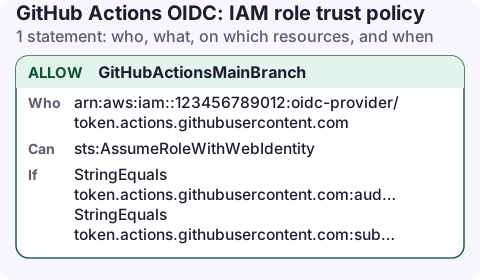
The trust policy
{
  "Version": "2012-10-17",
  "Statement": [
    {
      "Sid": "GitHubActionsMainBranch",
      "Effect": "Allow",
      "Principal": {
        "Federated": "arn:aws:iam::123456789012:oidc-provider/token.actions.githubusercontent.com"
      },
      "Action": "sts:AssumeRoleWithWebIdentity",
      "Condition": {
        "StringEquals": {
          "token.actions.githubusercontent.com:aud": "sts.amazonaws.com",
          "token.actions.githubusercontent.com:sub": "repo:my-org/my-repo:ref:refs/heads/main"
        }
      }
    }
  ]
}
Then attach a permissions policy to the role with only what the workflow deploys, for example ECR push or S3 uploads.
What the conditions check
Principal.Federated: tokens must come from the GitHub OIDC provider registered in your account.:aud: the audience the officialconfigure-aws-credentialsaction requests,sts.amazonaws.com.:sub: who is asking. This is the condition that keeps every other GitHub repository in the world out. Its format depends on what triggered the job:
| Trigger | sub value |
|---|---|
| Push to a branch | repo:my-org/my-repo:ref:refs/heads/main |
| Tag | repo:my-org/my-repo:ref:refs/tags/v1.2.0 |
Job with environment: production | repo:my-org/my-repo:environment:production |
| Pull request | repo:my-org/my-repo:pull_request |
Note that a job using an environment gets the environment form, not the branch form, even when it runs on main. That is the usual reason a working role suddenly fails with "Not authorized to perform sts:AssumeRoleWithWebIdentity".
Set it up
aws iam create-open-id-connect-provider \
  --url https://token.actions.githubusercontent.com \
  --client-id-list sts.amazonaws.com

aws iam create-role --role-name github-deploy \
  --assume-role-policy-document file://github-trust.json
AWS secures this provider using its own trusted certificate authorities, so you no longer need to supply a thumbprint. In the workflow:
permissions:
  id-token: write
  contents: read
steps:
  - uses: aws-actions/configure-aws-credentials@v4
    with:
      role-to-assume: arn:aws:iam::123456789012:role/github-deploy
      aws-region: eu-west-2
Debug a failing assume
The quickest check is the token's actual claims. Print the sub from a test workflow, compare it with the trust policy, and look for the failed AssumeRoleWithWebIdentity event in CloudTrail, which records the subject and the reason.
aws cloudtrail lookup-events \
  --lookup-attributes AttributeKey=EventName,AttributeValue=AssumeRoleWithWebIdentity \
  --max-results 5 --query 'Events[].CloudTrailEvent'
Variations and dangerous mistakes
- Several branches or all branches: switch to
StringLikeand userepo:my-org/my-repo:ref:refs/heads/release-*orrepo:my-org/my-repo:*. Keep the organisation and repository literal. - Dangerous: no
subcondition, orrepo:*. Any public repository can then mint a token and assume your role. Never deploy a trust policy without asubcondition naming your organisation. - Pull requests from forks should not get a deploy role. Give PR workflows a separate read-only role, or none.
- Missing
id-token: writein the workflow permissions: the action fails before reaching AWS, with an error about fetching the OIDC token. - GitHub Enterprise Server or a customised issuer uses a different provider URL and condition key prefix.
Questions
Do I still need a thumbprint for the GitHub OIDC provider?
No. AWS validates GitHub's certificate itself. The ThumbprintList parameter is optional and any value you supply is not used for this provider.
Why does sts:AssumeRoleWithWebIdentity fail only for some jobs?
The sub claim differs by trigger. Jobs using an environment, tags or pull requests send a different sub from branch pushes. Check the trigger against the table above.
Can one role trust several repositories?
Yes. Use StringLike with a list of sub patterns, one per repository. Keep each pattern as specific as you can.
Deploys from GitHub often finish while you are away from your desk. Knowing which role a run assumed, and what it changed, is a CloudTrail lookup you can do from a phone.
About the app → · Download on the App Store