 CloudConsole
S3 bucket policy: deny requests that are not over HTTPS
Add a Deny statement to the bucket policy for s3:* on both the bucket and its objects, for every principal, when aws:SecureTransport is false. Requests over plain HTTP then fail with 403, which satisfies the "S3 buckets should require requests to use SSL" check in Security Hub and AWS Config.
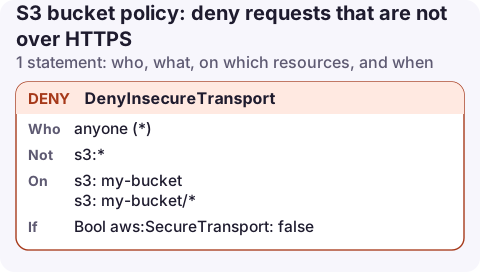
The policy
{
  "Version": "2012-10-17",
  "Statement": [
    {
      "Sid": "DenyInsecureTransport",
      "Effect": "Deny",
      "Principal": "*",
      "Action": "s3:*",
      "Resource": [
        "arn:aws:s3:::my-bucket",
        "arn:aws:s3:::my-bucket/*"
      ],
      "Condition": {
        "Bool": {
          "aws:SecureTransport": "false"
        }
      }
    }
  ]
}
If the bucket already has a policy, add this statement to its Statement list rather than replacing the document.
How it works
- Effect Deny, Principal *: it applies to every caller, including administrators in your own account and AWS services. A Deny can only take access away, so
"*"here is safe; it does not make anything public. - Action s3:* and both resources: bucket-level calls (list, policy reads) and object calls are covered.
aws:SecureTransportistruewhen the request came over TLS. UsingBoolwith"false"means the deny fires only for plain HTTP.
The AWS CLI and SDKs use HTTPS by default, so for most workloads nothing changes. What breaks is anything that talks to the bucket over http://: old scripts, some on-premises appliances, and S3 static website endpoints, which only support HTTP. If the bucket serves a website directly, put CloudFront in front of it before adding this deny.
Apply and test it
aws s3api put-bucket-policy --bucket my-bucket --policy file://deny-http.json

# should still work (HTTPS)
aws s3 ls s3://my-bucket/

# should now fail with 403
aws s3 ls s3://my-bucket/ --endpoint-url http://s3.eu-west-2.amazonaws.com
Check CloudTrail data events or S3 server access logs for a few days before applying to a busy bucket; any request without TLS in the logs is something that will break.
Variations
- Require TLS 1.2 or later. Add a second statement with the same Deny, Principal, Action and Resource and the condition
"NumericLessThan": {"s3:TlsVersion": "1.2"}. AWS endpoints already refuse very old TLS versions, so check whether your compliance framework actually needs this. - Every bucket in an account or organisation. A resource control policy (RCP) in AWS Organizations can enforce the same rule centrally, so new buckets are covered without a bucket policy each.
- Combine with other bucket-level guards such as requiring KMS encryption or VPC endpoint only, each as its own statement.
Find buckets missing the rule
AWS Config's managed rule s3-bucket-ssl-requests-only and the matching Security Hub control report every bucket whose policy lacks this deny. Fixing the findings bucket by bucket with the statement above is safe as long as you merge rather than replace existing policies.
Common mistakes
- Using
"aws:SecureTransport": "true"with an Allow instead of a Deny. It doesn't block anything; other allows still apply over HTTP. - Only listing
arn:aws:s3:::my-bucket/*. Bucket-level calls over HTTP are then still allowed, and some compliance checks fail. - Replacing the existing policy with
put-bucket-policy. It overwrites the whole document, so CloudFront or cross-account grants disappear. Fetch the current policy and merge first.
Questions
Why does my bucket fail "S3 buckets should require requests to use SSL"?
The bucket policy has no statement denying requests where aws:SecureTransport is false. Adding the policy above fixes the finding.
Does this break the S3 console?
No. The console, CLI and SDKs all use HTTPS. Only clients using http:// URLs, including S3 website endpoints, are affected.
A policy that suddenly breaks an old HTTP client tends to show up as an alarm on 4xx errors. Seeing that alarm and the bucket policy side by side on a phone makes the cause obvious.
About the app → · Download on the App Store