 CloudConsole
ABAC: tag-based access control policy example
ABAC compares a tag on the caller (aws:PrincipalTag/project) with a tag on the resource (aws:ResourceTag/project). Allow actions when they match, require the tag on create with aws:RequestTag, and stop people changing the tag. One policy then covers every project; new projects need tags, not new policies.
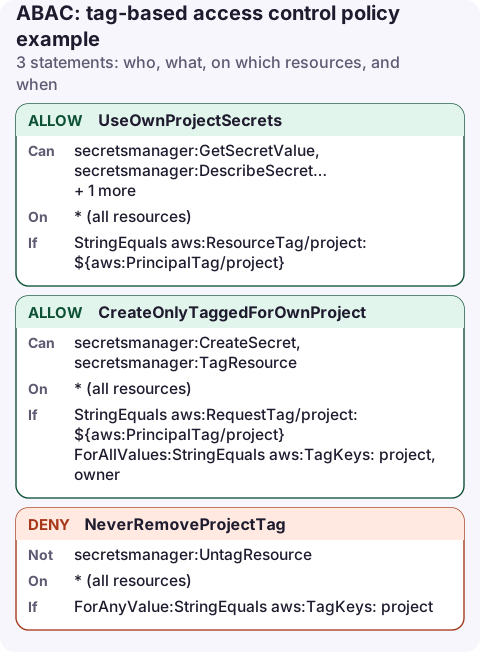
The policy
{
  "Version": "2012-10-17",
  "Statement": [
    {
      "Sid": "UseOwnProjectSecrets",
      "Effect": "Allow",
      "Action": [
        "secretsmanager:GetSecretValue",
        "secretsmanager:DescribeSecret",
        "secretsmanager:PutSecretValue",
        "secretsmanager:UpdateSecret"
      ],
      "Resource": "*",
      "Condition": {
        "StringEquals": {
          "aws:ResourceTag/project": "${aws:PrincipalTag/project}"
        }
      }
    },
    {
      "Sid": "CreateOnlyTaggedForOwnProject",
      "Effect": "Allow",
      "Action": [
        "secretsmanager:CreateSecret",
        "secretsmanager:TagResource"
      ],
      "Resource": "*",
      "Condition": {
        "StringEquals": {
          "aws:RequestTag/project": "${aws:PrincipalTag/project}"
        },
        "ForAllValues:StringEquals": {
          "aws:TagKeys": [
            "project",
            "owner"
          ]
        }
      }
    },
    {
      "Sid": "NeverRemoveProjectTag",
      "Effect": "Deny",
      "Action": "secretsmanager:UntagResource",
      "Resource": "*",
      "Condition": {
        "ForAnyValue:StringEquals": {
          "aws:TagKeys": [
            "project"
          ]
        }
      }
    }
  ]
}
The three tag keys
| Key | Refers to | Used for |
|---|---|---|
aws:PrincipalTag/project | Tag on the calling role, user or session | Who is asking |
aws:ResourceTag/project | Tag already on the resource | Acting on existing resources |
aws:RequestTag/project | Tag being set in this request | Creating or tagging |
aws:TagKeys | All tag keys in the request | Limiting which keys may be set |
UseOwnProjectSecrets lets a role tagged project=payments read and update secrets tagged project=payments. CreateOnlyTaggedForOwnProject means new secrets must carry the caller's project tag and may only use the project and owner keys. NeverRemoveProjectTag stops anyone untagging a secret to get it out of a project's control.
Where principal tags come from
- IAM roles and users: tag them directly.
- IAM Identity Center: turn on attributes for access control and map a user attribute (such as department) to a session tag.
- SAML or OIDC federation: the identity provider passes session tags; the role's trust policy must allow
sts:TagSession.
aws iam tag-role --role-name payments-dev --tags Key=project,Value=payments
aws iam put-role-policy --role-name payments-dev \
  --policy-name abac-secrets --policy-document file://abac.json
Caveats
- Not every action supports tag conditions. Check the "Condition keys" column for each action in the Service Authorization Reference. List actions (like
ListSecrets) generally don't, and need a separate statement on"*". - Whoever can change tags controls access. Restrict
iam:TagRoleandiam:UntagRoleas tightly as you would restrict attaching policies. - Missing tags: a principal without a
projecttag makes the variable unresolvable, so the allow doesn't match. That fails safe.
Test it before rolling out
Create two roles tagged with different projects and one secret per project. Each role should be able to read its own secret and get AccessDenied on the other. Then try creating a secret without a tag, and with the other project's tag; both should fail.
aws iam simulate-principal-policy \
  --policy-source-arn arn:aws:iam::123456789012:role/payments-dev \
  --action-names secretsmanager:GetSecretValue \
  --resource-arns arn:aws:secretsmanager:eu-west-2:123456789012:secret:orders/api-key-AbC123 \
  --context-entries ContextKeyName=aws:ResourceTag/project,ContextKeyValues=orders,ContextKeyType=string
The simulator doesn't read real tags, so pass the resource tag as a context entry; expect implicitDeny.
Common mistakes
- Using
aws:ResourceTagon create: the resource has no tags yet. Useaws:RequestTag. - Using
ForAnyValuewhere you meantForAllValuesonaws:TagKeys, which lets extra keys through. - Tag values with different case (
Paymentsvspayments):StringEqualsis case-sensitive for values.
Questions
What is the difference between ABAC and RBAC in AWS?
RBAC grants permissions per role, so each new project needs new policies. ABAC grants by matching tags on callers and resources, so one policy covers new projects automatically.
Which AWS services support ABAC?
Many, but not every action. The Service Authorization Reference lists aws:ResourceTag and aws:RequestTag support per action; check it for each action you rely on.
Tags that drive permissions also make resources easier to find. Filtering by project tag on a phone is a quick way to see what a team owns when something of theirs alerts.
About the app → · Download on the App Store