 CloudConsole
S3 bucket policy: restrict access to a VPC endpoint
Add a Deny for s3:* on the bucket and its objects when aws:SourceVpce is not your endpoint ID, and exclude an admin role with aws:PrincipalArn so the bucket can still be managed. Requests from the internet, the console and other VPCs are then refused even if IAM allows them.
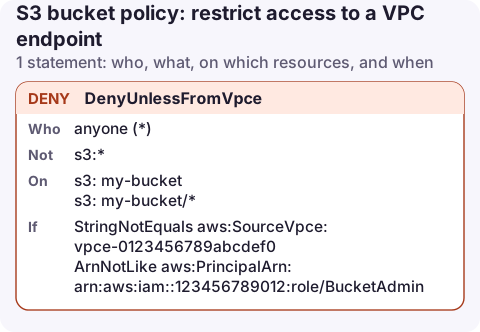
The policy
{
  "Version": "2012-10-17",
  "Statement": [
    {
      "Sid": "DenyUnlessFromVpce",
      "Effect": "Deny",
      "Principal": "*",
      "Action": "s3:*",
      "Resource": [
        "arn:aws:s3:::my-bucket",
        "arn:aws:s3:::my-bucket/*"
      ],
      "Condition": {
        "StringNotEquals": {
          "aws:SourceVpce": "vpce-0123456789abcdef0"
        },
        "ArnNotLike": {
          "aws:PrincipalArn": "arn:aws:iam::123456789012:role/BucketAdmin"
        }
      }
    }
  ]
}
Warning: without the ArnNotLike exception, this policy also blocks you from editing or deleting the bucket policy from the console. Recovering then needs the account root user, which can always delete a bucket policy.
How it works
aws:SourceVpceis the ID of the VPC endpoint the request came through. It exists for both gateway and interface endpoints for S3. For requests that don't use an endpoint, the key is absent, andStringNotEqualson a missing key evaluates to true, so they are denied.- Two conditions in one block are ANDed. The deny applies only when the request is not from the endpoint and the caller is not
BucketAdmin. - Because this is a Deny, it doesn't grant anything. Callers inside the VPC still need an IAM allow such as read-only bucket access.
The other half: an endpoint policy
The bucket policy controls who reaches the bucket. The endpoint policy controls where traffic through the endpoint may go, which stops a compromised instance copying data to an attacker's bucket. A gateway endpoint policy limited to your bucket:
{
  "Version": "2012-10-17",
  "Statement": [
    {
      "Sid": "OnlyMyBucket",
      "Effect": "Allow",
      "Principal": "*",
      "Action": [
        "s3:GetObject",
        "s3:PutObject",
        "s3:ListBucket"
      ],
      "Resource": [
        "arn:aws:s3:::my-bucket",
        "arn:aws:s3:::my-bucket/*"
      ]
    }
  ]
}
aws ec2 modify-vpc-endpoint --vpc-endpoint-id vpce-0123456789abcdef0 \
--policy-document file://endpoint-policy.jsonBe careful: instances that pull packages or container layers from S3-backed repositories (Amazon Linux repos, ECR layers) also go through the gateway endpoint. Add those buckets or they will fail to update.
Variations
- Any endpoint in a VPC: use
aws:SourceVpcwith the VPC ID instead of one endpoint ID. - Allow AWS services to write (for example log delivery): add
"Bool": {"aws:PrincipalIsAWSService": "false"}to the deny's conditions so service principals are not caught. - Organisation-wide: a resource control policy can apply the same perimeter to many buckets.
Find your endpoint ID
aws ec2 describe-vpc-endpoints \
  --filters Name=service-name,Values=com.amazonaws.eu-west-2.s3 \
  --query 'VpcEndpoints[].[VpcEndpointId,VpcId,VpcEndpointType]' --output table
Common mistakes
- Using
aws:SourceIpwith private addresses. Requests through a VPC endpoint carry no public source IP; useaws:SourceVpce,aws:SourceVpcoraws:VpcSourceIp. - Testing from the console. The console runs in your browser, not in the VPC, so it is denied unless you are the excepted role. That is the policy working.
- Endpoint in the wrong region. Gateway endpoints only reach buckets in the same region; cross-region traffic goes over the internet path and is denied.
Questions
How do I restrict an S3 bucket to a VPC?
Deny s3:* in the bucket policy when aws:SourceVpce (one endpoint) or aws:SourceVpc (any endpoint in that VPC) does not match, keeping an exception for an admin role.
I locked myself out of my bucket with a VPC endpoint policy. How do I fix it?
Sign in as the account root user and delete the bucket policy, then re-add it with an aws:PrincipalArn exception for an admin role.
A data-perimeter policy blocks the console by design, so checking a file from your phone will be denied too. That is worth knowing before you are paged about a missing object.
About the app → · Download on the App Store