 CloudConsole
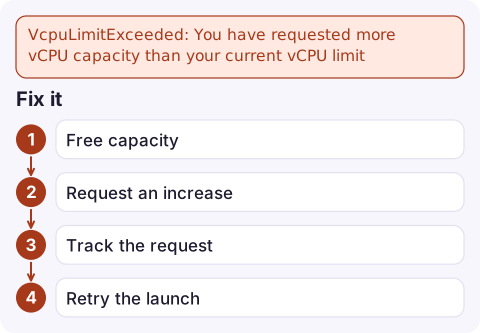
VcpuLimitExceeded: You have requested more vCPU capacity than your current vCPU limit
VcpuLimitExceeded means the instances you are launching would push your account over its per-Region vCPU quota for that instance family group. Check the quota in Service Quotas (On-Demand Standard instances is quota code L-1216C47A), stop or terminate what you do not need, or request an increase.
What the error means
An error occurred (VcpuLimitExceeded) when calling the RunInstances
operation: You have requested more vCPU capacity than your current vCPU
limit of 32 allows for the instance bucket that the specified instance
type belongs to. Please visit http://aws.amazon.com/contact-us/ec2-request
to request an adjustment to this limit.
EC2 On-Demand limits are counted in vCPUs, not instances, and they are grouped into "buckets": one quota covers the standard families (A, C, D, H, I, M, R, T, Z), and GPU, accelerated and high-memory families each have their own. The limit applies per account per Region, and it counts running and pending instances. Stopped instances do not count.
The number in the message is the current quota for the bucket your instance type falls into, so 32 with a request for a c5.24xlarge (96 vCPUs) can never succeed until the quota rises.
Why you are hitting it
- New account or new Region. Default quotas are deliberately low, and they do not carry over between Regions.
- GPU or accelerated instances. Their buckets often start at zero or very low, so even one
g5.xlargecan fail. - Auto Scaling, EKS node groups or AWS Batch scaling out. The scaler retries quietly; you see a group or compute environment stuck below its desired size rather than an obvious error.
- Forgotten instances in the same Region, such as old dev boxes, consuming the quota.
Check quota and usage
Read the current quota for standard On-Demand instances:
aws service-quotas get-service-quota --service-code ec2 \
  --quota-code L-1216C47A --region eu-west-2 \
  --query 'Quota.{name:QuotaName,value:Value}'
For other buckets, list them and pick the right code:
aws service-quotas list-service-quotas --service-code ec2 \
  --query "Quotas[?contains(QuotaName, 'On-Demand')].[QuotaCode,QuotaName,Value]" \
  --output table
Then see what is consuming it:
aws ec2 describe-instances \
  --filters Name=instance-state-name,Values=running,pending \
  --query 'Reservations[].Instances[].[InstanceId,InstanceType,CpuOptions.CoreCount,CpuOptions.ThreadsPerCore]' \
  --output table
vCPUs per instance are cores multiplied by threads per core. The Service Quotas console also graphs utilisation for these quotas, using the AWS/Usage namespace in CloudWatch.
Fix it
- Free capacity by stopping or terminating idle instances in that Region, if that is safe.
- Request an increase for the right bucket. Ask for what you need for peak plus headroom:
aws service-quotas request-service-quota-increase \ --service-code ec2 --quota-code L-1216C47A \ --desired-value 128 --region eu-west-2 - Track the request; small increases are often approved automatically, larger ones go to a support case:
aws service-quotas list-requested-service-quota-change-history \ --service-code ec2 --region eu-west-2 - Retry the launch once the new value shows in
get-service-quota.
Gotchas
- Requesting the increase in the wrong Region. Quotas are regional; check
--region. - Raising the standard bucket when the failing type is a GPU (G/VT or P) or other special family. Match the bucket to the type in the error.
- Spot instances have their own vCPU quotas, separate from On-Demand.
- Do not confuse this with InsufficientInstanceCapacity, which is AWS running short of hardware, not your account hitting a limit.
Questions
Do stopped instances count towards the vCPU limit?
No. The On-Demand vCPU quotas count running and pending instances, so stopping instances frees quota immediately (their EBS volumes still cost money).
How long does a vCPU quota increase take?
Modest increases are frequently approved within minutes to hours. Large jumps, GPU quotas and new accounts can take longer because they are reviewed by AWS Support.
Is the vCPU limit per account or per Region?
Per account, per Region. An increase in eu-west-2 does nothing for us-east-1.

A scale-out blocked by a quota looks like an Auto Scaling group that never reaches its target while load keeps rising. CloudConsole, a phone app for AWS, is built to show those alarms and the resources behind them on your phone so the gap is visible early.
Did it start after a deploy? What changed? on the app’s alarm screen lists the deploys and configuration changes from the hour before the alarm fired.
About the app → · Download on the App Store