 CloudConsole
aws ec2 run-instances
aws ec2 run-instances launches one or more new instances from an AMI. The minimum is --image-id, --instance-type and usually --subnet-id, --security-group-ids and --key-name; add --tag-specifications to name it at launch and --metadata-options HttpTokens=required to enforce IMDSv2.
What the command does
run-instances is the single API behind every EC2 launch, including the console wizard. It returns as soon as EC2 has accepted the request, with each new instance in pending. Everything you do not specify comes from the launch template (if you pass one), the AMI, or account defaults such as the default VPC.
The call is all-or-nothing on count: if EC2 cannot launch at least the minimum number you ask for, it launches none.
Syntax
aws ec2 run-instances \
  --image-id ami-0123456789abcdef0 \
  --instance-type t3.micro \
  [--count 1] \
  [--subnet-id subnet-0123456789abcdef0] \
  [--security-group-ids sg-0123456789abcdef0] \
  [--key-name my-key] \
  [--iam-instance-profile Name=my-instance-profile] \
  [--tag-specifications ...] [--user-data file://init.sh] \
  [--launch-template LaunchTemplateName=web,Version=\$Latest]
--count is a CLI shortcut for the API's --min-count/--max-count: --count 3 means exactly three, --count 2:5 means at least two and up to five.
Worked examples
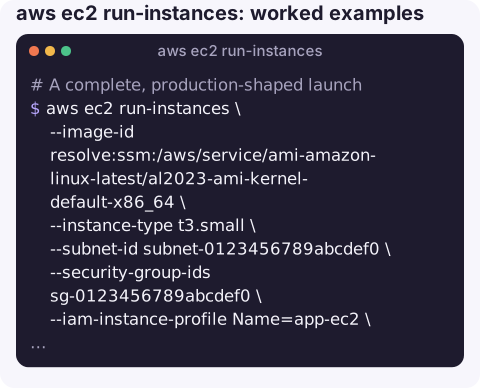
A complete, production-shaped launch with the latest Amazon Linux 2023 AMI resolved from Parameter Store, a Name tag on both the instance and its volume, IMDSv2 required and a 30 GiB gp3 root disk:
aws ec2 run-instances \
  --image-id resolve:ssm:/aws/service/ami-amazon-linux-latest/al2023-ami-kernel-default-x86_64 \
  --instance-type t3.small \
  --subnet-id subnet-0123456789abcdef0 \
  --security-group-ids sg-0123456789abcdef0 \
  --iam-instance-profile Name=app-ec2 \
  --metadata-options HttpTokens=required,HttpEndpoint=enabled \
  --block-device-mappings '[{"DeviceName":"/dev/xvda","Ebs":{"VolumeSize":30,"VolumeType":"gp3"}}]' \
  --tag-specifications 'ResourceType=instance,Tags=[{Key=Name,Value=web-1}]' \
                       'ResourceType=volume,Tags=[{Key=Name,Value=web-1-root}]' \
  --user-data file://init.sh \
  --query "Instances[].InstanceId" --output text
The CLI base64-encodes the user data file for you; passing an already-encoded file double-encodes it and the script silently never runs.
Launch from a launch template, overriding only the type:
aws ec2 run-instances \
  --launch-template LaunchTemplateName=web,Version='$Default' \
  --instance-type m7i.large
Launch a Spot instance:
aws ec2 run-instances --image-id ami-0123456789abcdef0 --instance-type c7i.large \
  --instance-market-options MarketType=spot \
  --subnet-id subnet-0123456789abcdef0
Launch and wait until it is reachable:
ID=$(aws ec2 run-instances --image-id ami-0123456789abcdef0 --instance-type t3.micro \
  --subnet-id subnet-0123456789abcdef0 --query "Instances[0].InstanceId" --output text)
aws ec2 wait instance-status-ok --instance-ids "$ID"
Errors you will meet
| Error | What to check |
|---|---|
InvalidAMIID.NotFound | AMI IDs are per region; the ID came from another region or the AMI is private to another account. |
VPCIdNotSpecified / no default subnet | The region has no default VPC; pass --subnet-id. |
InvalidKeyPair.NotFound | Key pairs are per region too. |
InsufficientInstanceCapacity | Try another AZ (subnet) or instance type. |
VcpuLimitExceeded | Request a higher On-Demand vCPU quota in Service Quotas. |
UnauthorizedOperation | Besides ec2:RunInstances, you need iam:PassRole for an instance profile and ec2:CreateTags for tag-on-create. |
Gotchas
- Security group IDs vs names.
--security-groupstakes names and only works in the default VPC; use--security-group-idseverywhere else. - Public IP. Whether the instance gets one depends on the subnet setting. Override it with
--associate-public-ip-addressor--no-associate-public-ip-address. - Retries can double-launch. Pass a unique
--client-tokenso a retried request does not create a second instance. - Stopping on OS shutdown. Set
--instance-initiated-shutdown-behavior stopexplicitly if your user data might callshutdown;terminatedeletes the instance.
Questions
How do I create an EC2 instance with a name from the CLI?
The Name is just a tag. Add --tag-specifications 'ResourceType=instance,Tags=[{Key=Name,Value=web-1}]' to run-instances so it is named from the moment it launches.
How do I list running instances after launching?
Use aws ec2 describe-instances --filters "Name=instance-state-name,Values=running" with a --query that picks InstanceId and the Name tag.
How do I keep an EC2 instance running after I close SSH?
The instance keeps running regardless of your SSH session. It is processes started in your shell that stop; run them as a systemd service or under tmux, screen or nohup.
Launching capacity is rarely something you want to do from a phone, but seeing that a launch happened is. CloudConsole, a phone app for AWS, is built to show new and existing resources alongside their alarms and costs.
About the app → · Download on the App Store