 CloudConsole
ap-northeast-1: Asia Pacific (Tokyo)
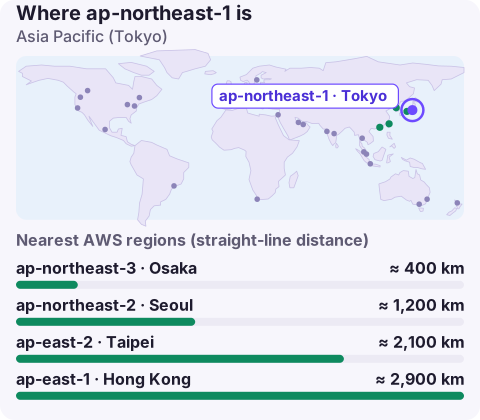
ap-northeast-1 is the code for the Asia Pacific (Tokyo) region in Japan. It is enabled by default, is one of AWS's largest regions in Asia, and is the main choice for Japanese users and for data that must stay in Japan; ap-northeast-3 in Osaka is its in-country partner for disaster recovery.
Why Tokyo
- Japanese users. Japan is a large, latency-sensitive market (games, payments, media), and Tokyo gives the shortest path for most of the population.
- Japanese data. Financial, healthcare and public-sector customers frequently ask for domestic hosting, and APPI (Japan's personal information law) affects how you handle personal data sent abroad.
- Breadth. Tokyo usually gets new services and instance types early among Asia-Pacific regions, so it is also a reasonable hub for wider Asian workloads.
- Transpacific products. Many US companies use Tokyo as their first Asian region alongside us-west-2.
Disaster recovery inside Japan
Osaka (ap-northeast-3) became a full region, and the Tokyo–Osaka pair is now the standard way to keep recovery data in Japan while separating it geographically. Earthquake risk is the reason many Japanese organisations insist on that separation rather than relying on multiple Availability Zones in one metro area.
- Replicate S3 buckets to Osaka and copy backups with AWS Backup or snapshot copies.
- Use database features that support cross-region replicas between the two.
- Pre-provision networking and IAM in Osaka; check that each managed service you depend on exists there.
Availability Zones and capacity
Don't hard-code zone letters from examples. Ask the API what your account can use, and note the zone IDs:
aws ec2 describe-availability-zones --region ap-northeast-1 \
  --query 'AvailabilityZones[].[ZoneName,ZoneId,State]' --output table
Zone names map to physical zones differently per account, and not every instance type is offered in every zone. If an Auto Scaling group or EKS node group fails to launch in one zone, check the offering with describe-instance-type-offerings before blaming capacity.
Targeting ap-northeast-1
aws configure set region ap-northeast-1 --profile jp
export AWS_REGION=ap-northeast-1
Endpoints follow <service>.ap-northeast-1.amazonaws.com, e.g. ecs.ap-northeast-1.amazonaws.com. Remember that maintenance windows for RDS and similar services are set in UTC; Tokyo is UTC+9, so a window that looks like 02:00 in the console is 11:00 in Japan.
Japanese-language console and documentation are available, but API error codes and messages remain in English, so log searches and runbooks should match on the English text.
Other nearby regions
ap-northeast-2 (Seoul) and ap-east-1 (Hong Kong) are close neighbours; ap-southeast-1 (Singapore) is the main South-East Asian hub; us-west-2 is the usual US partner for transpacific services.
When adding Seoul or Singapore alongside Tokyo, keep a clear rule for which data lives where. Multi-region Asian deployments often begin as "just a cache" in a second region and gradually accumulate personal data that was never meant to leave Japan; a periodic inventory with the Resource Groups Tagging API or AWS Config catches that drift.
Questions
Where is ap-northeast-1?
In the Tokyo area of Japan.
What is the DR region for ap-northeast-1?
Osaka (ap-northeast-3) is the usual in-country choice. Check that every service you need is available there.
Is ap-northeast-1 enabled by default?
Yes. Tokyo predates the opt-in model and is available in every account.
If your production runs in Tokyo and part of your team is elsewhere, alarms land in somebody's night. CloudConsole, a phone app for AWS, is built to show alarms, logs and resources on your phone.
About the app → · Download on the App Store