 CloudConsole
ap-south-2: Asia Pacific (Hyderabad)
ap-south-2 is the code for the Asia Pacific (Hyderabad) region, AWS's second region in India. It is opt-in, so it must be enabled per account, and its main role is giving Indian organisations a second in-country region for disaster recovery alongside Mumbai, as well as a primary option for users in southern and central India.
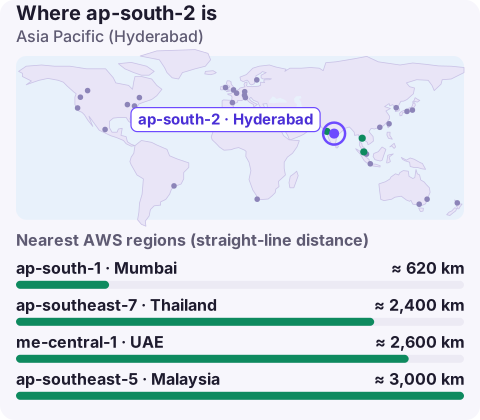
What Hyderabad adds
For Indian banks, payment companies, insurers and public bodies, keeping regulated data in India while still surviving the loss of a whole region used to be awkward: Mumbai was the only Indian region. Hyderabad, several hundred kilometres to the south-east, solves that. It's also a sensible primary for companies headquartered in Hyderabad, Bengaluru or Chennai whose users are concentrated in the south.
Enabling ap-south-2
# current state
aws account get-region-opt-status --region-name ap-south-2

# enable for this account
aws account enable-region --region-name ap-south-2

# see all regions and their opt-in state
aws account list-regions --region-opt-status-contains ENABLED ENABLING DISABLED \
  --query 'Regions[].[RegionName,RegionOptStatus]' --output table
If you run AWS Organizations, enable it for member accounts from the management account with --account-id, and add it to region allow-lists in SCPs. A common miss is the security tooling account: GuardDuty and Security Hub delegated administrators also need the region enabled to aggregate findings from it.
Using it from the CLI and SDKs
Pass --region ap-south-2, export AWS_REGION=ap-south-2, or set it on a profile. Endpoints look like ec2.ap-south-2.amazonaws.com.
If requests fail with "The security token included in the request is invalid" even though the same credentials work in Mumbai, the token was probably issued by the global STS endpoint. Those tokens don't work in opt-in regions unless you change the IAM account setting; using the regional STS endpoint is the cleaner fix.
Designing Mumbai to Hyderabad recovery
- Inventory first. List every service your Mumbai workload uses and check each on the AWS Regional Services List for ap-south-2. A newer region has fewer services, and a missing one changes the plan.
- Keys are regional. Create KMS keys in Hyderabad and re-encrypt snapshot copies with them.
- Quotas start at defaults. Raise them to recovery size in advance.
- Decide RPO and RTO honestly. Asynchronous replication across regions means some data loss is possible; make sure the business has agreed what's acceptable.
- Rehearse. Run the failover at least once with real traffic or a realistic test.
Nearby regions
ap-south-1 (Mumbai) is the other Indian region and the usual partner. Outside India, ap-southeast-1 (Singapore) and the Gulf regions such as me-central-1 are nearest, but only suit data with no Indian localisation requirement.
Hyderabad as a primary
For a company whose engineering and customers are concentrated in southern India, running primary workloads in Hyderabad and recovering into Mumbai can make sense. The trade-off is the narrower catalogue: if your design depends on newer managed services, Mumbai as primary is usually less friction.
Questions
Is ap-south-2 enabled by default?
No. Hyderabad is an opt-in region; enable it in the account settings or with aws account enable-region.
Where is ap-south-2?
In Hyderabad, in southern India.
Can I use ap-south-2 as DR for ap-south-1?
Yes, it's the in-country option. Check that each service you rely on is available in Hyderabad and pre-provision quotas, keys and networking.
A cross-region failover is easier to manage when you can see both regions' alarms side by side. CloudConsole, a phone app for AWS, is built to show that on your phone.
About the app → · Download on the App Store