 CloudConsole
AWS incident response checklist
Decide first whether it is an availability incident (something is down or slow) or a security incident (something or someone is acting without permission), because the first moves differ: for outages you restore service fast, usually by rolling back; for security incidents you contain without destroying evidence. Both start with one person in charge, a written timeline, and a check of what changed recently in CloudTrail.
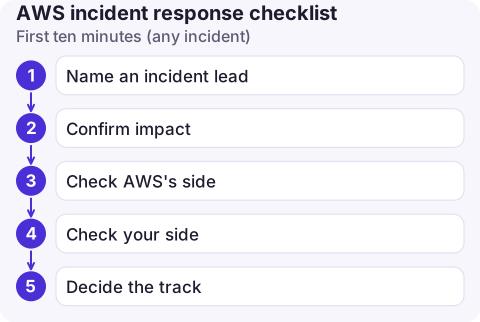
First ten minutes (any incident)
- Name an incident lead and a separate person for communication. One channel, one timeline document with UTC timestamps.
- Confirm impact: which alarms are firing, which customers or Regions, since when. Alarms and dashboards over hunches.
- Check AWS's side: your account health in the AWS Health Dashboard; see checking for an AWS outage.
- Check your side: deploys, config changes, feature flags and infrastructure changes in the last few hours. CloudTrail Event history shows API changes; your pipeline history shows deploys.
- Decide the track: availability or security. If you're unsure, treat it as security until ruled out, which mainly means not deleting anything.
Availability track: restore service
- Roll back the last change before debugging it: Lambda alias rollback, previous ECS task definition revision, CloudFormation or pipeline rollback.
- Add capacity if load is the issue: scale ECS, raise Auto Scaling desired capacity.
- Fail over if a database or AZ is the problem: Aurora failover.
- Shed or queue work rather than letting retries pile up; check DLQs afterwards.
- Freeze other changes until stable, and mute only the alarms you're actively handling.
Security track: contain, preserve, investigate
Leaked access key: deactivate it immediately, accept the breakage, then look at what it did.
aws iam update-access-key --user-name ci-deployer \
  --access-key-id AKIAEXAMPLELEAKED01 --status Inactive

aws cloudtrail lookup-events \
  --lookup-attributes AttributeKey=AccessKeyId,AttributeValue=AKIAEXAMPLELEAKED01 \
  --query 'Events[].[EventTime,EventName,EventSource]' --output text
Compromised role sessions: temporary credentials stay valid until they expire. The IAM console's revoke active sessions action for a role attaches a policy that denies everything to sessions issued before now; the same can be done with an inline policy using the aws:TokenIssueTime condition key.
Suspicious EC2 instance: don't terminate it. Enable termination protection, snapshot its volumes, then isolate it:
aws ec2 modify-instance-attribute --instance-id i-0123456789abcdef0 --disable-api-termination
aws ec2 create-snapshot --volume-id vol-0abc1234def567890 --description "IR-2026-11-16 evidence"
aws ec2 modify-instance-attribute --instance-id i-0123456789abcdef0 --groups sg-0isolation00000000
The isolation security group has no inbound rules and no outbound rules. Existing tracked connections may survive a security group change, so pair it with a restrictive network ACL if you need to cut active sessions. Capture memory before stopping the instance if your forensics process needs it.
Hunt for persistence and clean up
- New IAM users, access keys, roles and trust policy changes (
CreateUser,CreateAccessKey,UpdateAssumeRolePolicy) in CloudTrail; IAM events are recorded in us-east-1. - Resources in Regions you don't use: search all Regions; large GPU instances are a classic sign of crypto-mining.
- New Lambda functions, EventBridge rules, or changed bucket policies that keep access open; see finding public buckets.
- GuardDuty findings, if GuardDuty is enabled, for the same period.
- Rotate every secret the attacker could have read, not only the key that leaked.
Get help, then learn from it
- AWS Support: open a case for security events and for charges caused by unauthorised use. AWS Security Incident Response is a separate paid service for help with investigations, if your organisation subscribes to it.
- Write the post-incident review within a week: timeline, impact, contributing causes, and specific actions with owners. Blameless, but concrete.
- Turn lessons into guardrails: alarms that would have caught it sooner, an organisation-wide CloudTrail trail if you lacked one, budgets for cost anomalies, and runbooks for the steps above.
Questions
What is the first step in AWS incident response?
Put one person in charge, start a timestamped timeline, and confirm the scope from alarms and AWS Health. Then decide whether you are restoring availability or containing a security event.
Should I terminate a compromised EC2 instance?
Not straight away. Snapshot its volumes and isolate it with a restrictive security group so you keep the evidence; terminate only after the investigation no longer needs it.
What is the AWS Security Incident Response service?
A paid AWS service that helps with triage and investigation of security events and gives access to AWS incident responders. It is separate from standard AWS Support plans.

Incidents rarely start when you are at your desk. CloudConsole, a phone app for AWS, is built to put alarms, recent changes, logs and costs on one phone screen, with guardrails so that first actions are safe.
About the app → · Download on the App Store