 CloudConsole
ca-central-1: Canada (Central)
ca-central-1 is the code for the Canada (Central) region, based in the Montreal area of Quebec. It is enabled by default in every account and is the main choice when Canadian customers, contracts or regulators expect data to stay in Canada; ca-west-1 in Calgary is its in-country partner for disaster recovery.
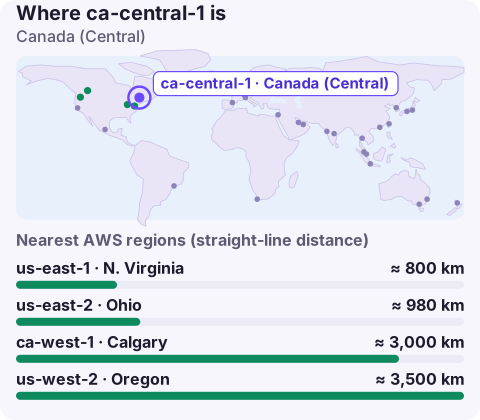
Why teams choose ca-central-1
Latency is rarely the deciding factor: Canadian users are mostly within reach of us-east-1 or us-east-2 at acceptable round-trip times. The real driver is where the data lives.
- Federal and provincial public-sector buyers, and many health and financial organisations, ask suppliers to keep personal information in Canada. Hosting in ca-central-1 makes that a configuration choice rather than a negotiation.
- Canadian enterprise customers often include data-location clauses in procurement questionnaires. Being able to answer "stored and processed in Canada" shortens sales cycles.
- Users in Quebec and Ontario get slightly shorter paths than to Virginia or Ohio.
Keep in mind that choosing the region only controls where your resources run. Logs you ship to a third-party tool, support cases, and global services such as IAM and Route 53 have their own data handling; review those separately if residency is a hard requirement.
Configuring the CLI and SDKs for Canada (Central)
aws configure set region ca-central-1 --profile canada
aws rds describe-db-instances --profile canada \
  --query 'DBInstances[].[DBInstanceIdentifier,AvailabilityZone]' --output table

# environment variable picked up by the CLI and SDKs
export AWS_REGION=ca-central-1
Service endpoints use the region code directly: s3.ca-central-1.amazonaws.com, ec2.ca-central-1.amazonaws.com. If your Terraform or CDK code has the region hard-coded to a US value, change it there; the environment variable won't override an explicit provider setting.
Keeping residency honest: guardrails
Once you have promised Canadian hosting, make it hard to break by accident. A common pattern in AWS Organizations is a service control policy that denies actions outside the approved regions using the aws:RequestedRegion condition key, with an exemption list for global services that don't run in a region. Pair that with an AWS Config or Security Hub check so a stray bucket in us-east-1 is noticed quickly. Test the policy in a sandbox account first: an over-broad deny on global services such as IAM or Support can lock administrators out of routine work.
Nearby and alternative regions
| Region | When it fits |
|---|---|
| ca-west-1 (Calgary) | Second Canadian region: recovery or active-active while staying in the country. Opt-in. |
| us-east-1 / us-east-2 | No residency requirement and you want the widest service range nearby |
| us-west-2 | West-coast Canadian users when residency doesn't matter |
Before relying on a particular managed service, check that it is offered in ca-central-1 (and in ca-west-1 if you plan to fail over there) on the AWS Regional Services List.
Mistakes that put data outside Canada
- Buckets created without a region. An S3 bucket created by a script with no region configured ends up in us-east-1. Set the profile's region and check new buckets with
aws s3api get-bucket-location. - Global anchors. A CloudFront distribution still needs its ACM certificate in us-east-1, and billing alarms live there too. Those hold configuration, not customer records, but be ready to explain them in a residency review.
- Security tooling left on defaults. GuardDuty, AWS Config and Security Hub are enabled per region. Turning them on in us-east-1 does nothing for Montreal.
Questions
Where is ca-central-1?
In the Montreal area of Quebec, Canada. AWS doesn't publish exact facility addresses.
Is ca-central-1 an opt-in region?
No. It predates AWS's opt-in model and is enabled by default. Its newer sibling, ca-west-1 in Calgary, does need enabling.
Does using ca-central-1 guarantee my data stays in Canada?
It keeps the resources you create there in Canada. Data you copy elsewhere, send to other services or replicate cross-region is your responsibility, so add guardrails such as region-restricting SCPs.
Residency guardrails tend to fire as an access-denied error just when someone is trying to fix something urgent. CloudConsole, a phone app for AWS, is built with production guardrails in mind, showing alarms and resources by region on your phone.
About the app → · Download on the App Store