 CloudConsole
mx-central-1: Mexico (Central)
mx-central-1 is the code for the Mexico (Central) region, AWS's first region in Mexico, located in the state of Querétaro. It is an opt-in region that must be enabled per account, and it suits workloads serving Mexican users or needing data kept in Mexico.
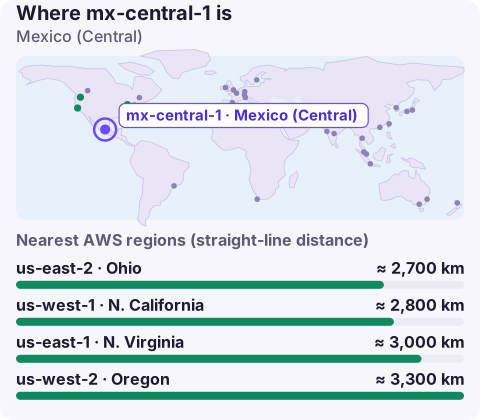
When Mexico (Central) is the right home
Before this region existed, Mexican workloads typically ran in us-east-1, us-east-2 or us-west-2, with traffic crossing the border for every request. mx-central-1 puts compute and storage in the country instead:
- Latency for Mexican users: requests from Mexico City, Guadalajara or Monterrey no longer need to reach the US to be served.
- Local data requirements: banks, insurers, public bodies and their suppliers may need or prefer to keep certain data in Mexico; check what your regulator actually requires rather than assuming.
- Customer expectations: "hosted in Mexico" can be a deciding line in a procurement process.
Opting in to mx-central-1
# is it on for this account?
aws account get-region-opt-status --region-name mx-central-1

# turn it on (from the account itself, or the Organizations
# management account with --account-id)
aws account enable-region --region-name mx-central-1

# confirm it shows as opted-in
aws ec2 describe-regions --all-regions \
  --filters Name=region-name,Values=mx-central-1 \
  --query 'Regions[].[RegionName,OptInStatus]' --output text
Allow some time between enabling and the first deployment, and remember that existing IAM users and roles become usable in the region once enabling finishes; you don't recreate them. If deployments then fail with a token error, the credentials probably came from the global STS endpoint; switch tools to the regional STS endpoint or update the IAM account setting so global tokens work in every region.
Targeting it from tools
Use --region mx-central-1, the AWS_REGION variable or a profile's region setting. Endpoints follow <service>.mx-central-1.amazonaws.com, for example dynamodb.mx-central-1.amazonaws.com. Older SDK versions sometimes don't recognise a region that launched after they were released; if a client refuses the code or can't resolve the endpoint, upgrade the SDK or CLI before investigating anything else.
Pairing and service coverage
For recovery, the US regions are the nearest fully featured options: us-east-2 or us-east-1 for east-coast routes, us-west-2 for the Pacific side. If your reason for Mexico is residency, check whether backups or replicas may leave the country before you set up cross-region copies. For Latin American users further south, sa-east-1 in São Paulo may be closer. As with any new region, the managed services you can use are a subset of the largest regions'; confirm each one on the AWS Regional Services List before committing an architecture.
A short checklist before the first deployment
- Region enabled in every account that will deploy there, including shared-services and logging accounts.
- Region added to any allow-list SCP and to IAM policies that use
aws:RequestedRegion. - GuardDuty, Config and Security Hub switched on here, since they are configured per region.
- Quotas raised to production values; they start at defaults in a newly enabled region.
- CLI, SDK and IaC provider versions recent enough to know the region code.
Questions
Where is the AWS Mexico region?
In central Mexico; AWS's announcement placed it in the state of Querétaro. Its code is mx-central-1.
Do I need to enable mx-central-1?
Yes. It is an opt-in region, so enable it in account settings or with aws account enable-region before creating resources.
Which services are available in mx-central-1?
A subset of what larger regions offer, growing over time. Check the AWS Regional Services List for the current set rather than relying on a snapshot.
If you've just moved users to a new region, the first week is when unexpected alarms appear. CloudConsole, a phone app for AWS, is built to show those alarms and the resources behind them on your phone.
About the app → · Download on the App Store