 CloudConsole
us-west-1: US West (N. California)
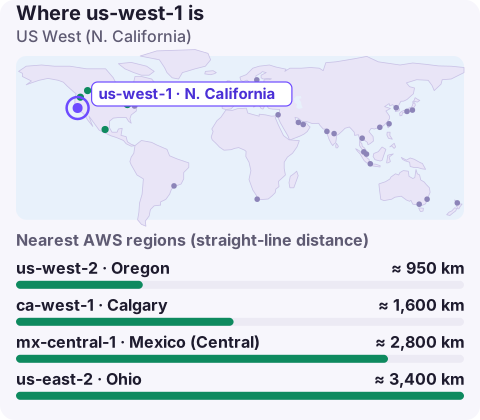
us-west-1 is the code for the US West (N. California) region, located in northern California. It is enabled by default and offers the lowest latency to the San Francisco Bay Area, but for most new West Coast workloads us-west-2 (Oregon) is the better-stocked and usually cheaper choice.
What us-west-1 is good for
The region exists to serve California, and that is still its strongest case. Pick it when:
- Your users or offices are concentrated in the Bay Area or elsewhere in California and the few extra milliseconds to Oregon matter (real-time media, trading, interactive tools).
- You integrate with on-premises systems in California over Direct Connect or VPN and want the shortest path.
- A contract or customer specifically asks for California hosting.
Otherwise, teams on the West Coast typically default to us-west-2.
How it compares with us-west-2
| us-west-1 | us-west-2 | |
|---|---|---|
| Location | Northern California | Oregon |
| Typical EC2 list price | Often higher | Often lower, in line with us-east-1 |
| New services and instance types | Tend to arrive later | Usually among the first regions |
| Capacity headroom | Smaller region | One of the largest |
Price differences vary by service and change over time, so compare the specific resources you plan to run in the AWS Pricing Calculator. Before you design around a particular instance family or managed service, confirm it in the AWS Regional Services List; gaps here catch people who copy a us-west-2 architecture across unchanged.
Targeting us-west-1
aws ec2 describe-availability-zones --region us-west-1 \
  --query 'AvailabilityZones[].[ZoneName,ZoneId,State]' --output table

export AWS_REGION=us-west-1
Run the first command before choosing subnets: it shows which zones your account can actually use in this region, which matters when an Auto Scaling group or EKS cluster expects a minimum number of zones. Service endpoints take the form ec2.us-west-1.amazonaws.com, rds.us-west-1.amazonaws.com and so on. Watch for the near-identical us-west-2 in copied configuration; a one-character slip silently deploys into the wrong region, and nothing errors until something can't find a resource.
Disaster recovery and neighbours
If us-west-1 is your primary, us-west-2 is the natural recovery region: still on the West Coast, larger, and far enough away to be independent. If you need the recovery site on the other side of the country, us-east-2 or us-east-1 work, at the cost of extra latency for West Coast users during a failover. For workloads already in us-west-1 that don't need California specifically, migrating to us-west-2 is often worth considering at the next major redesign, mainly for capacity and service availability.
Moving a workload from us-west-1 to us-west-2
Nothing moves between regions on its own; each piece has its own copy mechanism:
- AMIs and EBS snapshots:
aws ec2 copy-imageandaws ec2 copy-snapshot, run against the destination region. The copied AMI gets a new ID, so update launch templates. - S3: set up replication to a bucket in Oregon, or run a one-off
aws s3 syncfor smaller buckets. Bucket names are global, so the new bucket needs a different name. - RDS: create a cross-region read replica in us-west-2 and promote it at cut-over, which keeps downtime short.
- DNS: lower the TTL on your records a day before, then switch the alias or weighted record.
Re-create security groups, parameters and secrets in the new region too; they are regional and are the usual reason the first boot fails.
Questions
Where is us-west-1 located?
In northern California, in the San Francisco Bay Area. AWS doesn't publish exact facility locations.
Should I use us-west-1 or us-west-2?
Use us-west-1 when California proximity specifically matters. Otherwise us-west-2 usually has more services, more capacity and lower prices.
Why can't I find an instance type in us-west-1?
Not every instance family is offered in every region. Check with describe-instance-type-offerings or the Regional Services List, and consider us-west-2.
A wrong-region deployment usually shows up as a resource you're sure exists but can't find. CloudConsole, a phone app for AWS, is built to let you browse resources across regions from your phone, which makes that kind of slip easier to spot.
About the app → · Download on the App Store