 CloudConsole
How to find all resources in all AWS Regions
Turn on AWS Resource Explorer with an aggregator index; it then searches resources from every enabled Region in one place, in the console or with aws resource-explorer-2 search. Tag Editor in the Resource Groups console can also search all Regions at once. For services neither covers, loop over aws ec2 describe-regions in a script, and use the Bills page to see which Regions are costing money.
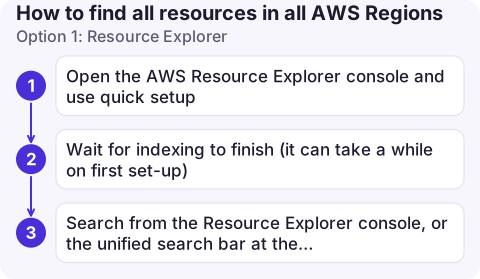
Option 1: Resource Explorer
- Open the AWS Resource Explorer console and use quick setup. It creates an index in each enabled Region and promotes one Region to the aggregator, which collects all the others.
- Wait for indexing to finish (it can take a while on first set-up).
- Search from the Resource Explorer console, or the unified search bar at the top of the AWS console, using filters such as
region:,service:andresourcetype:.
# Run against the aggregator Region (eu-west-2 here)
aws resource-explorer-2 search --region eu-west-2 \
  --query-string "resourcetype:ec2:instance" \
  --query 'Resources[].[Region,Arn]' --output text

aws resource-explorer-2 search --region eu-west-2 \
  --query-string "region:us-east-1" --max-results 100
Resource Explorer has no additional charge. Note the two different flags: --query-string is the search, --query is the CLI's usual output filter.
Option 2: Tag Editor and AWS Config
- Tag Editor (Resource Groups & Tag Editor console): choose All regions and All supported resource types, then search. It lists resources whether or not they're tagged, and you can export the list to CSV.
- AWS Config with an aggregator: if Config recording is on, advanced queries across accounts and Regions answer questions like "all unattached volumes" with SQL-like syntax via
select-aggregate-resource-config. - Resource Groups Tagging API (
get-resources) is per Region and only returns resources that have, or once had, tags, so it misses untagged leftovers.
Option 3: a CLI loop
When you need a specific service, or the tools above don't cover it, loop through Regions:
for r in $(aws ec2 describe-regions --query 'Regions[].RegionName' --output text); do
  n=$(aws ec2 describe-instances --region "$r" \
        --query 'length(Reservations[].Instances[])' --output text)
  v=$(aws ec2 describe-volumes --region "$r" --query 'length(Volumes)' --output text)
  l=$(aws lambda list-functions --region "$r" --query 'length(Functions)' --output text)
  echo "$r instances=$n volumes=$v functions=$l"
done
describe-regions returns Regions enabled for your account; opt-in Regions you haven't enabled can't hold resources anyway. Add --all-regions to see them too.
Start from the bill
If the goal is cost, the fastest index is money: the Bills page in Billing and Cost Management lists charges per service per Region. Any Region with a charge has something in it. Then use one of the methods above in that Region. See stopping AWS charges for clean-up.
Prevent sprawl
- In AWS Organizations, an SCP that denies actions outside your approved Regions (with exceptions for global services) stops resources appearing elsewhere.
- Require an
ownertag through tag policies or IaC, so anything you find has a name attached. - Remember global services (IAM, Route 53, CloudFront) don't belong to a Region; Resource Explorer shows them, but Region loops miss them.
Questions
How do I see all my AWS resources in one place?
Enable Resource Explorer with an aggregator index and search there, or use Tag Editor with all Regions selected.
Does Resource Explorer find every resource type?
No. It supports many common resource types, but not all. Combine it with the bill and service-specific CLI calls for anything missing.
How do I list EC2 instances in all Regions?
Loop over aws ec2 describe-regions and run aws ec2 describe-instances --region for each, or search resourcetype:ec2:instance in Resource Explorer.

Most consoles show one Region at a time, which is how resources get forgotten. CloudConsole, a phone app for AWS, is built to show resources and costs across Regions on one screen.
About the app → · Download on the App Store