 CloudConsole
CloudWatch alarm for ACM DaysToExpiry
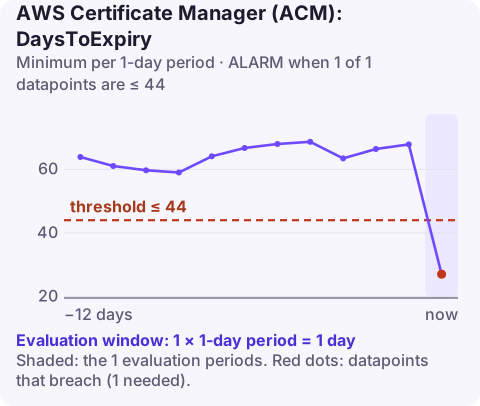
Alarm on the DaysToExpiry metric for each certificate (dimension CertificateArn) using the Minimum statistic over a one-day period, and go into ALARM when it is 44 days or fewer. For ACM-issued certificates that means automatic renewal has not completed in time; for imported certificates it is your reminder to re-import.
What DaysToExpiry reports
ACM publishes DaysToExpiry once a day for each certificate in the Region, both certificates ACM issued and certificates you imported. The value counts down to the certificate's NotAfter date. When a renewed certificate is in place, the count jumps back up.
The two kinds of certificate behave very differently:
| Certificate type | What renews it | What this alarm means |
|---|---|---|
| ACM-issued, DNS validated | ACM, automatically, while the validation CNAME stays in DNS | Managed renewal is stuck |
| ACM-issued, email validated | ACM, but someone must approve the validation emails | Nobody acted on the emails |
| Imported | Nobody: ACM never renews imported certificates | Time to obtain and re-import a new one |
Recommended alarm settings
| Setting | Value |
|---|---|
| Namespace | AWS/CertificateManager |
| Metric | DaysToExpiry |
| Dimensions | CertificateArn |
| Statistic | Minimum |
| Period | 86400 seconds |
| Datapoints to alarm | 1 |
| Evaluation periods | 1 |
| Comparison operator | LessThanOrEqualToThreshold |
| Threshold | 44.0 (days) |
From AWS's CloudWatch recommended alarms page. The one-day period matches how often the metric is published; one breaching datapoint is enough because the value only moves in one direction.
Why 44 days, and when to change it
ACM attempts managed renewal well before that point, so a healthy DNS-validated certificate should never reach 44 days. ACM also emits daily expiry events through EventBridge starting 45 days before expiry by default, and the 44-day alarm lines up with that window. It leaves six weeks to fix DNS, chase an email approver, or buy and import a certificate.
Raise the threshold if your process for imported certificates is slow (procurement, a third-party CA, change windows). Lowering it much below 30 days removes the margin that makes the alarm worth having.
Create it
# Certificates and their expiry dates in this Region
aws acm list-certificates \
  --query "CertificateSummaryList[].[CertificateArn,DomainName,NotAfter]" --output table
aws cloudwatch put-metric-alarm \
--alarm-name cert-www-example-com-expiry \
--namespace AWS/CertificateManager \
--metric-name DaysToExpiry \
--dimensions Name=CertificateArn,Value=arn:aws:acm:eu-west-2:123456789012:certificate/0a1b2c3d-1111-2222-3333-444455556666 \
--statistic Minimum \
--period 86400 \
--evaluation-periods 1 \
--datapoints-to-alarm 1 \
--threshold 44 \
--comparison-operator LessThanOrEqualToThreshold \
--alarm-actions arn:aws:sns:eu-west-2:123456789012:ops-alerts \
--region eu-west-2Create the alarm in the certificate's own Region. Certificates used by CloudFront live in us-east-1, so their alarms do too. You need one alarm per certificate; for many certificates, an EventBridge rule on the ACM expiry event is less work.
When it fires
- Check renewal status:
aws acm describe-certificate --certificate-arn arn:aws:acm:eu-west-2:123456789012:certificate/0a1b2c3d-1111-2222-3333-444455556666 \ --query "Certificate.{Type:Type,NotAfter:NotAfter,Renewal:RenewalSummary,InUseBy:InUseBy}" - DNS validated: confirm the validation CNAME record ACM gave you still exists in the hosted zone and resolves publicly; it is often deleted during DNS clean-ups. A CAA record that does not allow Amazon to issue also blocks renewal. AWS's renewal troubleshooting guide covers the rest.
- Email validated: find who receives the validation mail for the domain, or switch to DNS validation by requesting a new certificate.
- Imported: get the new certificate from your CA and re-import it into the same ARN so attached resources pick it up (re-importing a certificate).
Questions
Does ACM automatically renew imported certificates?
No. Only certificates issued by ACM are renewed automatically. Imported certificates must be replaced and re-imported before they expire.
Why is the ACM DaysToExpiry alarm threshold 44 days?
It gives several weeks to act after managed renewal should already have happened, and lines up with ACM's default expiry events, which start 45 days out.
Where is DaysToExpiry for a CloudFront certificate?
In us-east-1, because certificates used by CloudFront must be in that Region.
An expiry alarm gives you weeks, so there is rarely a need to act from your phone. CloudConsole, a phone app for AWS, is built to show which certificates are close to expiry and their renewal status, so you can hand it to the right person straight away.
Did it start after a deploy? What changed? on the app’s alarm screen lists the deploys and configuration changes from the hour before the alarm fired.
About the app → · Download on the App Store