 CloudConsole
SSL validation failed for https://... certificate verify failed
The CLI could not verify the TLS certificate presented by the endpoint it connected to. On a work network this almost always means a TLS-inspecting proxy (Zscaler, Netskope, a corporate firewall) is re-signing traffic with a company root certificate that the CLI's bundled CA store doesn't trust. Point the CLI at a bundle containing that root with AWS_CA_BUNDLE or ca_bundle in ~/.aws/config instead of turning verification off.
What the error looks like
SSL validation failed for https://sts.eu-west-2.amazonaws.com/
[SSL: CERTIFICATE_VERIFY_FAILED] certificate verify failed:
unable to get local issuer certificate (_ssl.c:1006)
The URL tells you which endpoint failed (STS, S3, or oidc.<region>.amazonaws.com during aws sso login). The text after the colon tells you why: unable to get local issuer certificate or self-signed certificate in certificate chain mean an untrusted root; hostname doesn't match means a name problem; certificate is not yet valid means your clock is wrong.
AWS CLI v2 ships with its own Python and CA bundle, so adding a certificate to the operating system's store often has no effect on it. That surprises people whose browser works fine on the same network.
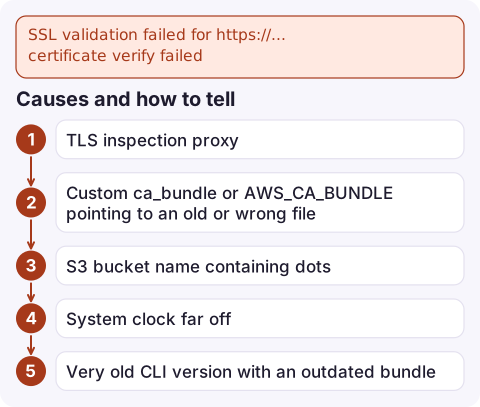
Causes and how to tell
| Cause | Clue |
|---|---|
| TLS inspection proxy | Fails on the office network or VPN, works on home Wi-Fi; issuer is your company, not Amazon |
Custom ca_bundle or AWS_CA_BUNDLE pointing to an old or wrong file | Fails everywhere; aws configure get ca_bundle returns a path |
| S3 bucket name containing dots | Error says hostname doesn't match *.s3.amazonaws.com |
| System clock far off | Certificate "not yet valid" or "expired" |
| Very old CLI version with an outdated bundle | aws --version is years old |
Check who issued the certificate you're actually receiving:
openssl s_client -connect sts.eu-west-2.amazonaws.com:443 \
  -servername sts.eu-west-2.amazonaws.com </dev/null 2>/dev/null \
  | openssl x509 -noout -issuer -subject
An issuer that names your employer or security vendor confirms TLS inspection.
Fix it for a TLS-inspecting proxy
- Get the proxy's root certificate in PEM format from your IT team or export it from your browser's certificate viewer.
- Build a bundle that contains both the public roots and the corporate root, so endpoints that bypass the proxy still verify:
(On macOS, export the system roots from Keychain Access, or ask IT for a combined bundle.)cat /etc/ssl/certs/ca-certificates.crt corp-root.pem > ~/.aws/ca-bundle.pem - Tell the CLI and SDKs to use it, either per shell or permanently:
export AWS_CA_BUNDLE=~/.aws/ca-bundle.pem aws configure set ca_bundle ~/.aws/ca-bundle.pem - Retry
aws sts get-caller-identity, thenaws sso loginif that was the failing step.
Other fixes
- Dotted bucket names: virtual-hosted style URLs like
my.bucket.s3.amazonaws.comcan't match the wildcard certificate. Use path-style addressing for that bucket (addressing_style = pathunder ans3section in the profile), or rename the bucket without dots. - Clock: sync with NTP, then retry. A badly wrong clock also breaks request signing.
- Outdated CLI: upgrade to a current AWS CLI v2 release.
What not to do
--no-verify-ssl makes the error go away by accepting any certificate, including one from an attacker on the network, and it prints a warning on every call. It's acceptable for a one-off test that confirms the diagnosis, never as a permanent setting or in scripts. Likewise, don't disable inspection on your own; the proxy is usually a compliance requirement, and adding its root to the CLI's trust store is the supported route.
Questions
How do I fix SSL validation failed in aws sso login?
The SSO login talks to the oidc and portal endpoints, which your proxy is intercepting. Set AWS_CA_BUNDLE or ca_bundle to a PEM bundle that includes your corporate root certificate, then run aws sso login again.
Why does my browser work but the AWS CLI fails with certificate verify failed?
Your browser trusts the operating system's certificate store, where IT installed the proxy's root. AWS CLI v2 uses its own bundled CA store, so it needs AWS_CA_BUNDLE pointing at the corporate root.
Is --no-verify-ssl safe to use?
No. It disables certificate checks entirely. Use it only to confirm the diagnosis, then configure a proper CA bundle.

Certificate errors on a corporate network can lock you out of the CLI at the moment you need it. CloudConsole, a phone app for AWS, is built to show alarms, logs and resources on your phone over a different network path while you sort out the proxy.
Did it start after a deploy? What changed? on the app’s alarm screen lists the deploys and configuration changes from the hour before the alarm fired.
About the app → · Download on the App Store