 CloudConsole
How to check SSL certificate expiry in ACM
In the AWS Certificate Manager console, the certificate list shows each certificate's expiry date (Not after); open a certificate to see its renewal status. From the CLI, aws acm describe-certificate --certificate-arn ARN --query Certificate.NotAfter returns the date. ACM renews DNS-validated certificates it issued automatically while they are in use; imported certificates never renew themselves.
List expiry dates
# All certificates in this Region with expiry and renewal eligibility
aws acm list-certificates \
  --query 'CertificateSummaryList[].[DomainName,Status,Type,NotAfter,InUse,RenewalEligibility]' \
  --output table

# One certificate in detail, including renewal status
aws acm describe-certificate \
  --certificate-arn arn:aws:acm:us-east-1:123456789012:certificate/0a1b2c3d-1111-2222-3333-444455556666 \
  --query 'Certificate.{notAfter:NotAfter,type:Type,renewal:RenewalSummary.RenewalStatus,inUseBy:InUseBy}'
Certificates are Regional. Those used by CloudFront live in us-east-1; those used by load balancers and API Gateway Regional endpoints live in the resource's own Region. Check each Region you use.
Rows with Type IMPORTED are the ones to put in a calendar, because nothing renews them for you. A certificate showing InUse false near its expiry date can usually be left to lapse or deleted, once you have checked that nothing outside AWS relies on it.
Will it renew itself?
| Certificate | Renewal | What you must do |
|---|---|---|
| Issued by ACM, DNS validation, in use | Automatic | Keep the validation CNAME record in DNS |
| Issued by ACM, email validation | Needs approval | Someone must act on the renewal email before expiry |
| Issued by ACM, not associated with any resource | Not guaranteed | Attach it, or let it lapse deliberately |
| Imported | Never | Get a new certificate from your CA and re-import it to the same ARN |
A renewal status of PENDING_VALIDATION or FAILED close to expiry is the thing to chase; see pending validation for the usual DNS causes.
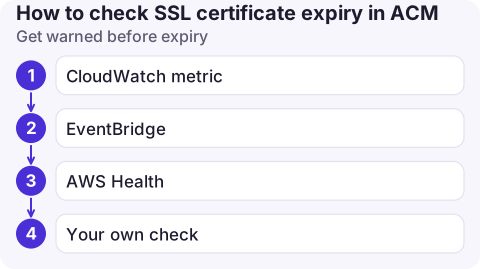
Get warned before expiry
- CloudWatch metric: ACM publishes
DaysToExpiryper certificate in theAWS/CertificateManagernamespace. The recommended alarm is on ACM DaysToExpiry. - EventBridge: ACM sends daily "approaching expiration" events for certificates nearing expiry. Change how early they start with
aws acm put-account-configuration --expiry-events DaysBeforeExpiry=30 --idempotency-token expiry1. - AWS Health also sends notifications about certificates that can't be renewed automatically.
- Your own check: a scheduled job that loops over your Regions with
list-certificatesand flags anyNotAfterwithin 30 days also catches imported certificates.
Check what clients actually see
echo | openssl s_client -connect www.example.com:443 -servername www.example.com 2>/dev/null \
  | openssl x509 -noout -dates -issuer
If this shows a different expiry from ACM, the endpoint isn't using the certificate you think: a load balancer listener with an old certificate, a CloudFront distribution in front, or a certificate on a custom domain in API Gateway. InUseBy from describe-certificate lists the resources ACM knows about.
Not the same problem
Errors such as CERTIFICATE_VERIFY_FAILED or "unable to get local issuer certificate" from aws sso login or other CLI commands are about your machine trusting AWS's certificates, usually because a corporate proxy intercepts TLS. They have nothing to do with ACM; see SSL validation failed.
Questions
Do ACM certificates renew automatically?
ACM-issued certificates with DNS validation renew automatically as long as they are in use and the validation CNAME is still in DNS. Email-validated certificates need approval, and imported ones never renew automatically.
How do I find which resources use an ACM certificate?
Run aws acm describe-certificate and read the InUseBy list, which shows load balancers, CloudFront distributions and other integrated resources.
Why does my API Gateway custom domain show a certificate error?
Often the certificate doesn't cover the exact domain name, is in the wrong Region (edge-optimised endpoints need us-east-1), or has expired or not finished validation.

An expiring certificate is a slow-moving problem that becomes urgent all at once. CloudConsole, a phone app for AWS, is built to surface expiry alarms on your phone well before that point.
About the app → · Download on the App Store