 CloudConsole
CloudWatch alarm for API Gateway Count (REST API stage)
Use the Count metric with the SampleCount statistic for an ApiName and Stage, and alarm when it stays below your normal minimum for 10 of 10 one-minute periods. AWS leaves the threshold to you; set it from the quietest healthy minutes in your own history, and treat missing data as breaching or a total outage will never alarm.
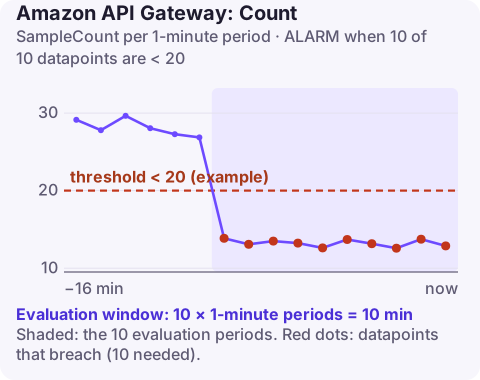
What a low-traffic alarm catches
Error and latency alarms only fire when requests arrive. If clients cannot reach the API at all, because DNS for a custom domain broke, a WAF rule now blocks everyone, a resource policy denies the caller's VPC, or the mobile app shipped with the wrong base URL, those alarms stay green. A drop in Count is often the only signal.
Count records one sample per request to the stage. SampleCount (and Sum) over a minute is the number of requests that minute. AWS suggests this alarm only for APIs with steady, predictable traffic; a back-office API used twice a day will alarm all night.
Recommended alarm settings
| Setting | Value |
|---|---|
| Namespace | AWS/ApiGateway |
| Metric | Count |
| Dimensions | ApiName, Stage |
| Statistic | SampleCount |
| Period | 60 seconds |
| Datapoints to alarm | 10 |
| Evaluation periods | 10 |
| Comparison operator | LessThanThreshold |
| Threshold | Depends on your situation: set from your baseline (method below) |
Per the CloudWatch recommended alarms list. Ten consecutive low minutes is long enough to ignore a brief lull and short enough to catch an outage before most users give up.
How to choose the threshold
You want a number that normal quiet periods stay above and a real outage falls below. A practical method:
- Pull one-minute request counts for a typical day (1,440 points fits in a single call):
aws cloudwatch get-metric-statistics \ --namespace AWS/ApiGateway --metric-name Count \ --dimensions Name=ApiName,Value=orders-api Name=Stage,Value=prod \ --statistics SampleCount --period 60 \ --start-time 2026-11-09T00:00:00Z --end-time 2026-11-10T00:00:00Z \ --query "sort_by(Datapoints,&SampleCount)[:10].[Timestamp,SampleCount]" \ --output table - Repeat for a weekend day and your quietest weekday.
- Take the lowest healthy minute you found and set the threshold to about half of it. If the quietest minute is 40 requests, a threshold of 20 ignores normal dips and fires when traffic collapses.
- If overnight traffic is near zero but daytime is heavy, one static threshold cannot do both; use CloudWatch anomaly detection on
Countinstead, or only enable actions during business hours.
Create it (and get missing data right)
# Threshold 20 is an example: half the quietest healthy minute
aws cloudwatch put-metric-alarm \
  --alarm-name orders-api-prod-low-traffic \
  --namespace AWS/ApiGateway \
  --metric-name Count \
  --dimensions Name=ApiName,Value=orders-api Name=Stage,Value=prod \
  --statistic SampleCount \
  --period 60 \
  --evaluation-periods 10 \
  --datapoints-to-alarm 10 \
  --threshold 20 \
  --comparison-operator LessThanThreshold \
  --treat-missing-data breaching \
  --alarm-actions arn:aws:sns:eu-west-2:123456789012:ops-alerts \
  --region eu-west-2
When a stage gets no requests, API Gateway publishes no datapoint rather than a zero. With the default missing-data behaviour the alarm keeps its previous state or drifts into INSUFFICIENT_DATA, which is exactly the outage you built it for. --treat-missing-data breaching fixes that.
When it fires
- Hit the API yourself from outside AWS with
curl -iagainst the public URL and the custom domain. A connection failure points to DNS, certificates or the domain mapping; a fast 403 points to WAF or a resource policy. - Check the callers. Did a client release change the endpoint, or did an upstream batch job stop running?
- Look at recent changes to the stage, base path mappings and the web ACL attached to it.
- Check usage plans and keys: a deleted or disabled API key makes callers fail before their requests count as usage they expect.
- If traffic genuinely moved (a new API version, a migration), update or delete the alarm rather than muting it.
Questions
Why use SampleCount instead of Sum for API Gateway Count?
Each request contributes a sample with value 1, so SampleCount and Sum give the same number. AWS's recommendation specifies SampleCount; either works.
Why does my low-traffic alarm not fire when the API is down?
With no requests there are no datapoints. Set treat missing data to breaching so absence of data counts as low traffic.
Should every API have a Count alarm?
No. Only APIs with steady traffic benefit; for spiky or rarely used APIs a synthetic canary is a better outage detector.
A silent API is easy to miss because nothing is erroring. CloudConsole, a phone app for AWS, is built to show alarms like this one with the traffic graph behind them, so a drop to zero is obvious from a phone.
Did it start after a deploy? What changed? on the app’s alarm screen lists the deploys and configuration changes from the hour before the alarm fired.
About the app → · Download on the App Store