 CloudConsole
DynamoDB WriteThrottleEvents alarm for a global secondary index
Alarm on WriteThrottleEvents with the TableName and GlobalSecondaryIndexName dimensions, using Sum, when it is above your threshold for 5 of 5 one-minute periods. Index write throttling matters more than index read throttling: when an index cannot absorb its writes, DynamoDB throttles the writes to the base table.
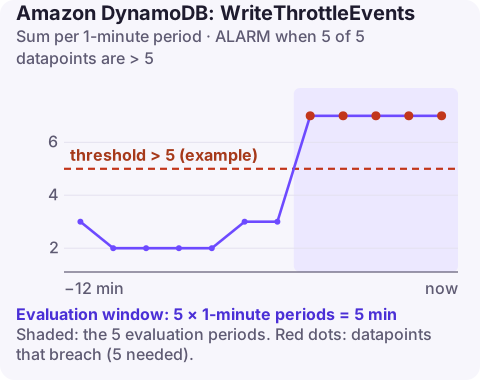
Why index write throttling hurts the whole table
Every write to a table that changes an indexed attribute must also be applied to the index. On provisioned tables, the index has its own write capacity. If it runs out, DynamoDB slows the table's writes rather than letting the index fall behind. Callers writing to the table receive throttling errors, even though the table itself has plenty of capacity. The throttles are recorded against the index, so a team looking only at the table's WriteThrottleEvents is confused.
Things that make an index need more write capacity than expected:
- projecting
ALLattributes, so each index write is as large as the item; - an update that changes the index key, which counts as a delete and an insert in the index;
- auto scaling configured on the table but not on its indexes, or with a lower maximum on the index;
- a low-cardinality index key concentrating writes on one partition.
Recommended alarm settings
| Setting | Value |
|---|---|
| Namespace | AWS/DynamoDB |
| Metric | WriteThrottleEvents |
| Dimensions | TableName, GlobalSecondaryIndexName |
| Statistic | Sum |
| Period | 60 seconds |
| Datapoints to alarm | 5 |
| Evaluation periods | 5 |
| Comparison operator | GreaterThanThreshold |
| Threshold | Depends on your situation: per-index, from its history |
From the CloudWatch recommended alarms page.
Choosing the threshold
Because these throttles reach the application as failed table writes, err on the low side. Chart the index's throttles beside its ConsumedWriteCapacityUnits and its provisioned write capacity for two weeks. If the index never throttled outside incidents, a threshold of 1 to 5 per minute (five minutes in a row) is reasonable. If it throttles daily during a predictable job, the better fix is capacity or pacing; tune the threshold only once that is done. Missing data: notBreaching.
Create it
aws cloudwatch put-metric-alarm \
  --alarm-name orders-by-customer-write-throttles \
  --namespace AWS/DynamoDB \
  --metric-name WriteThrottleEvents \
  --dimensions Name=TableName,Value=orders Name=GlobalSecondaryIndexName,Value=customer-index \
  --statistic Sum \
  --period 60 \
  --evaluation-periods 5 \
  --datapoints-to-alarm 5 \
  --threshold 5 \
  --comparison-operator GreaterThanThreshold \
  --treat-missing-data notBreaching \
  --alarm-actions arn:aws:sns:eu-west-2:123456789012:ops-alerts \
  --region eu-west-2
When it fires
- Compare the index's capacity with its consumption. If consumed writes are at the provisioned line, raise the index's write capacity, or its auto scaling maximum, directly:
aws dynamodb update-table --table-name orders \ --global-secondary-index-updates \ '[{"Update":{"IndexName":"customer-index","ProvisionedThroughput":{"ReadCapacityUnits":100,"WriteCapacityUnits":400}}}]' - Check auto scaling coverage. Scalable targets for indexes are registered separately from the table's.
- Shrink index writes. Project only the attributes queries need (
KEYS_ONLYorINCLUDE); this needs a new index, since projections cannot be changed in place. - Drop indexes nobody queries. They cost write capacity on every change.
- See AWS's throttling troubleshooting guide for hot-key strategies.
Questions
Can a GSI throttle writes to the base table?
Yes. If an index lacks write capacity, DynamoDB throttles writes to the table so the index does not fall behind.
Where do I see GSI write throttles?
In WriteThrottleEvents with both the TableName and GlobalSecondaryIndexName dimensions, not in the table-only metric.
Does an on-demand table have this problem?
Less often, since indexes scale with the table, but a hot partition on an index key can still throttle writes.
Index back-pressure is one of the most confusing DynamoDB incidents to diagnose under pressure. CloudConsole, a phone app for AWS, is built to show index and table throttling together on a phone so the cause is obvious.
Did it start after a deploy? What changed? on the app’s alarm screen lists the deploys and configuration changes from the hour before the alarm fired.
About the app → · Download on the App Store