 CloudConsole
CloudWatch alarm for EBS VolumeStalledIOCheck
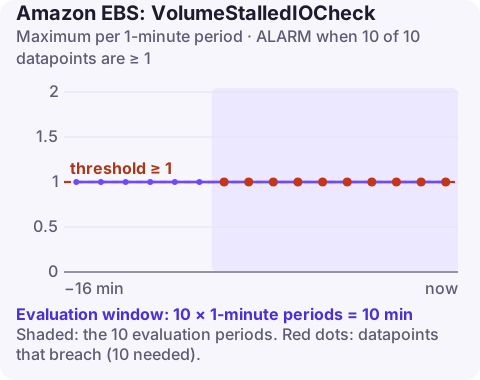
VolumeStalledIOCheck reports 1 when an EBS volume attached to an instance cannot complete I/O, and 0 when it passes. AWS recommends alarming when the Maximum is 1 or more for 10 of 10 one-minute periods, per VolumeId and InstanceId. EBS often recovers on its own within minutes; ten minutes of failure means it is time to act.
What the check detects
A stalled volume is one the instance can still see but cannot read from or write to. The check looks for faults you cannot fix from inside the operating system: problems in the storage hardware or software behind the volume, a fault on the physical host affecting its path to EBS, or broken connectivity between the instance and the volume.
From the application's side, a stalled volume looks like processes hanging in I/O wait, a database that stops committing, or an SSH session that freezes when you run ls on the mount point. CPU often drops because everything is blocked. The check runs for volumes attached to Nitro-based instances.
Recommended alarm settings
| Setting | Value |
|---|---|
| Namespace | AWS/EBS |
| Metric | VolumeStalledIOCheck |
| Dimensions | VolumeId, InstanceId |
| Statistic | Maximum |
| Period | 60 seconds |
| Datapoints to alarm | 10 |
| Evaluation periods | 10 |
| Comparison operator | GreaterThanOrEqualToThreshold |
| Threshold | 1.0 |
From the CloudWatch recommended alarms list. The metric is binary, so a threshold of 1 means "failed". Ten failing minutes in a row allows for EBS's own automatic recovery first.
Create it
aws cloudwatch put-metric-alarm \
  --alarm-name db-data-volume-stalled-io \
  --namespace AWS/EBS \
  --metric-name VolumeStalledIOCheck \
  --dimensions Name=VolumeId,Value=vol-0123456789abcdef0 Name=InstanceId,Value=i-0123456789abcdef0 \
  --statistic Maximum \
  --period 60 \
  --evaluation-periods 10 \
  --datapoints-to-alarm 10 \
  --threshold 1 \
  --comparison-operator GreaterThanOrEqualToThreshold \
  --alarm-actions arn:aws:sns:eu-west-2:123456789012:ops-alerts \
  --region eu-west-2
Because the alarm is per volume and instance, re-create it if you move the volume to another instance. For fleets, generate these alarms from tags with a script or infrastructure as code rather than by hand. Leave missing data at the default: a detached volume stops reporting, which should not page anyone.
Tuning
There is little to tune on the threshold. The judgement call is the window. For a database volume where a few minutes of stall is already an outage, consider a shorter window (for example five of five) and accept that you will sometimes be paged for a stall EBS would have fixed itself. For stateless instances behind a load balancer, keep ten minutes, or rely on health checks to replace the instance and skip this alarm entirely.
When it fires
- Confirm the volume status from outside the instance:
aws ec2 describe-volume-status --volume-ids vol-0123456789abcdef0 \ --query "VolumeStatuses[].[VolumeId,VolumeStatus.Status,VolumeStatus.Details]" - Check AWS Health for EBS events in the Availability Zone.
- Fail over first if the instance runs something with a replica (a database standby, a cluster member). Restoring service matters more than fixing this volume.
- Stop and start the instance (not reboot) if the fault is on the host side; a start places it on new hardware. Data on instance store volumes is lost when you stop, and an instance with no Elastic IP gets a new public IP. See how to stop an EC2 instance.
- Replace the volume from its most recent snapshot if it stays impaired.
Questions
What does VolumeStalledIOCheck = 1 mean?
The volume failed the stalled I/O check in that minute: it is attached but I/O is not completing.
Does a stalled EBS volume fix itself?
Often, yes. EBS usually detects and recovers impaired volumes within a few minutes, which is why the alarm waits ten minutes.
Is VolumeStalledIOCheck the same as an EC2 status check?
It is related. EC2 also offers an attached-EBS status check for the instance, while this metric reports per volume.
A stalled volume often looks like a hung server, and the first question is whether to wait or fail over. CloudConsole, a phone app for AWS, is built to show this alarm with the volume's status and any AWS Health events on a phone.
Did it start after a deploy? What changed? on the app’s alarm screen lists the deploys and configuration changes from the hour before the alarm fired.
About the app → · Download on the App Store