 CloudConsole
CloudWatch alarm: EC2 StatusCheckFailed
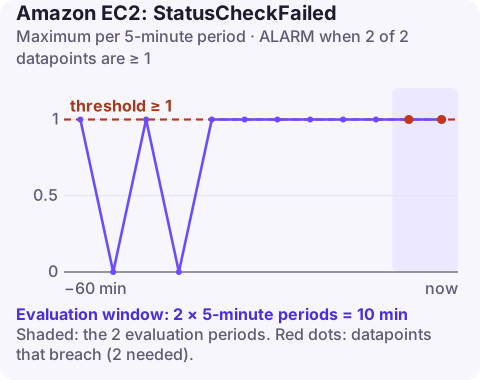
Alarm on AWS/EC2 StatusCheckFailed per InstanceId using the Maximum over 300 seconds, firing when it is greater than or equal to 1 for 2 of 2 periods. The metric is 1 whenever the system or the instance status check fails, so this alarm tells you an instance has been unhealthy in two consecutive five-minute windows.
What the metric measures
EC2 runs automated health checks against every running instance and publishes the results to CloudWatch every minute at no extra cost. StatusCheckFailed is the combined result: it reads 0 when the checks pass and 1 when at least one fails. Two separate metrics tell you which side broke:
| Metric | What failed | Who fixes it |
|---|---|---|
StatusCheckFailed_System | The physical host, its power or network, or the hypervisor | AWS, or you by moving the instance to new hardware |
StatusCheckFailed_Instance | The guest: kernel panic, exhausted memory, broken network configuration, full or corrupt root file system | You |
Because the combined metric covers both, it is the right single alarm per instance. Only running instances report, so a stopped instance shows no data rather than a failure.
Recommended alarm settings
| Setting | Recommended value |
|---|---|
| Namespace | AWS/EC2 |
| Metric | StatusCheckFailed |
| Dimensions | InstanceId |
| Statistic | Maximum |
| Threshold | 1 |
| Period | 300 seconds |
| Datapoints to alarm | 2 |
| Evaluation periods | 2 |
| Comparison operator | GreaterThanOrEqualToThreshold |
Why these settings
- Maximum with a threshold of 1 means one failed minute inside a five-minute period marks that period as failing. The metric only takes the values 0 and 1, so there is nothing to tune in the threshold itself.
- 2 of 2 five-minute periods requires a failure to show up in two consecutive windows, so you hear about a broken instance within roughly ten minutes, while a check that fails once during a brief host blip and then recovers does not page anyone.
- Want it faster? Drop the period to 60 seconds and use 3 of 3. You trade some false alarms during reboots for a quicker signal.
Patching reboots can make the instance check fail for a minute or two while the OS restarts. Usually that touches only one window, but a reboot that straddles a five-minute boundary can mark two windows and fire the alarm, so mute the alarm during planned maintenance.
Create the alarm
aws cloudwatch put-metric-alarm \
  --alarm-name ec2-web-1-status-check-failed \
  --alarm-description "web-1 failed a status check in 2 consecutive 5-minute periods" \
  --namespace AWS/EC2 \
  --metric-name StatusCheckFailed \
  --dimensions Name=InstanceId,Value=i-0123456789abcdef0 \
  --statistic Maximum \
  --period 300 \
  --evaluation-periods 2 \
  --datapoints-to-alarm 2 \
  --threshold 1 \
  --comparison-operator GreaterThanOrEqualToThreshold \
  --alarm-actions arn:aws:sns:eu-west-2:123456789012:oncall-alerts
For self-healing, create a second alarm on StatusCheckFailed_System with the recover action arn:aws:automate:eu-west-2:ec2:recover, which moves the instance to healthy hardware on supported instance types. Keep the reboot action (arn:aws:automate:eu-west-2:ec2:reboot) for instance check failures; recovery does not help when the OS itself is broken.
When it fires
- Find out which check failed.
aws ec2 describe-instance-status \ --instance-ids i-0123456789abcdef0 \ --query 'InstanceStatuses[].{System:SystemStatus.Status,Instance:InstanceStatus.Status,Events:Events}' - System check failing: look for a scheduled event on the instance. For an EBS-backed instance, a stop and start (not a reboot) places it on a different host; see system status check failed. Instance-store data is lost when you stop.
- Instance check failing: pull the console output with get-console-output and look for a kernel panic, an out-of-memory killer, a failed mount in
/etc/fstabor a network interface that never came up. Details in instance status check failed. - Instance is behind an Auto Scaling group? The group's health check may already be replacing it. Confirm before you start debugging a machine that is about to disappear.
The common next mistake is rebooting an instance with a failing system check and waiting: a reboot usually stays on the same faulty host.
Questions
How do I create a CloudWatch alarm for EC2 instance status?
Create an alarm on StatusCheckFailed in the AWS/EC2 namespace with the InstanceId dimension, Maximum statistic and a threshold of 1. The EC2 console can also create one for you from the instance's status checks view.
What is the difference between StatusCheckFailed_System and StatusCheckFailed_Instance?
The system metric covers AWS infrastructure under the instance, while the instance metric covers the operating system and its configuration. StatusCheckFailed is 1 if either fails.
Should I also alarm on CPUUtilization for EC2?
Yes, they catch different problems. A status check alarm tells you the instance is broken; a CPU alarm tells you it is working but overloaded.
Status check failures arrive at any hour, and the first decision (wait, reboot or stop and start) is quick to make if you can see which check failed. CloudConsole, a phone app for AWS, is built to show the alarm and the instance's status on your phone.
Did it start after a deploy? What changed? on the app’s alarm screen lists the deploys and configuration changes from the hour before the alarm fired.
About the app → · Download on the App Store