 CloudConsole
CloudWatch alarm: Amazon EFS BurstCreditBalance
Alarm on AWS/EFS BurstCreditBalance for the FileSystemId, Average over 60 seconds, when it is less than or equal to 0 for 15 of 15 minutes. That means a file system in Bursting throughput mode has run out of credits and is now held to its baseline throughput, which for a small file system can be very low.
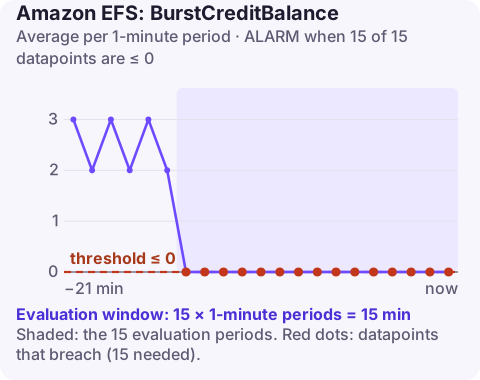
How EFS burst credits work
In Bursting throughput mode, an EFS file system earns credits continuously at a rate tied to how much data it stores, and spends them whenever clients push throughput above that baseline. BurstCreditBalance is the bank balance, reported in bytes.
The catch is that baseline scales with stored size. A file system holding a few gigabytes has a tiny baseline, so it relies almost entirely on burst. When the balance hits zero, throughput drops to the baseline (EFS still meters at least 1 MiB/s), and anything reading or writing heavily slows to a crawl. Teams often discover this weeks after launch, when the initial credit allowance finally runs out.
The metric matters only in Bursting mode. File systems on Elastic or Provisioned throughput do not depend on credits.
Recommended alarm settings
| Setting | Recommended value |
|---|---|
| Namespace | AWS/EFS |
| Metric | BurstCreditBalance |
| Dimensions | FileSystemId |
| Statistic | Average |
| Threshold | 0.0 |
| Period | 60 seconds |
| Datapoints to alarm | 15 |
| Evaluation periods | 15 |
| Comparison operator | LessThanOrEqualToThreshold |
Why 0, and when to warn earlier
The published threshold marks the point of impact: once the balance has been at zero for 15 minutes, you are definitely throttled. That is a clear, low-noise signal, but it leaves no lead time.
For an early warning, estimate time-to-empty. Chart BurstCreditBalance over two weeks: if it falls steadily during working hours and only partly recovers overnight, the trend line tells you when it will reach zero. Add a second alarm at a balance that leaves you a day or two of runway, for example the lowest value you have seen on a normal day, halved. Compare PermittedThroughput with actual throughput (MeteredIOBytes per second) to see how much above baseline you run.
Create the alarm
aws cloudwatch put-metric-alarm \
  --alarm-name efs-uploads-burst-credits-empty \
  --alarm-description "EFS fs-0123456789abcdef0 burst credits exhausted for 15 minutes" \
  --namespace AWS/EFS \
  --metric-name BurstCreditBalance \
  --dimensions Name=FileSystemId,Value=fs-0123456789abcdef0 \
  --statistic Average \
  --period 60 \
  --evaluation-periods 15 \
  --datapoints-to-alarm 15 \
  --threshold 0 \
  --comparison-operator LessThanOrEqualToThreshold \
  --alarm-actions arn:aws:sns:eu-west-2:123456789012:oncall-alerts
When it fires
- Confirm the mode:
aws efs describe-file-systems --file-system-id fs-0123456789abcdef0 --query "FileSystems[0].ThroughputMode". - Find what is consuming throughput: backups, bulk copies, log shipping or analytics jobs reading the whole tree are the usual culprits. Reschedule or rate-limit them if you can.
- Switch throughput mode if the workload genuinely needs more than baseline. Elastic throughput scales with demand and bills per use; Provisioned suits a steady, predictable rate:
Check the EFS documentation for restrictions on how often you can change throughput mode, and review the cost model before changing.aws efs update-file-system \ --file-system-id fs-0123456789abcdef0 \ --throughput-mode elastic - Avoid the anti-pattern of padding the file system with dummy data to raise baseline; Elastic throughput usually solves the same problem more cleanly.
Questions
What happens when EFS burst credits run out?
Throughput is limited to the file system's baseline rate, with a metered minimum of 1 MiB/s. Applications keep working but reads and writes become much slower.
Does BurstCreditBalance apply to Elastic throughput?
No. Burst credits only govern file systems in Bursting throughput mode, so this alarm is not needed for Elastic or Provisioned file systems.
Why did my credits run out weeks after creating the file system?
New file systems start with a credit allowance. A small file system that uses more than its baseline gradually drains that allowance and only notices when it reaches zero.
Credit exhaustion makes everything that touches the file system slow at once, which can look like an outage from your phone. CloudConsole, a phone app for AWS, is built to show the alarm alongside the metric trend so the cause is obvious at a glance.
Did it start after a deploy? What changed? on the app’s alarm screen lists the deploys and configuration changes from the hour before the alarm fired.
About the app → · Download on the App Store