 CloudConsole
CloudWatch alarm: EventBridge Scheduler InvocationDroppedCount
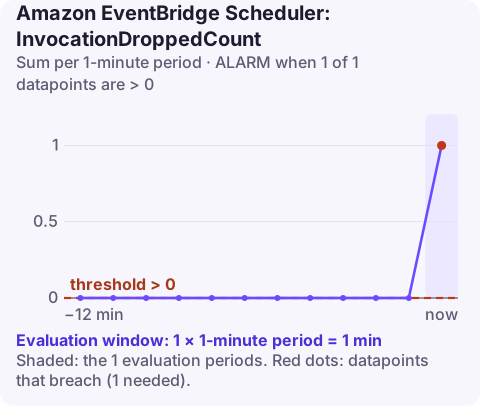
Alarm on AWS/Scheduler InvocationDroppedCount at account level, Sum per 60 seconds, above 0 for a single datapoint. Every count is a scheduled invocation that EventBridge Scheduler gave up on without delivering it anywhere, so the alarm deliberately fires on the first one.
What a dropped invocation is
When Scheduler cannot invoke a target, it retries according to the schedule's retry policy. If the error is not retryable, or retries and the maximum event age run out, the invocation ends in one of two places: the schedule's dead-letter queue if one is configured, or nowhere. "Nowhere" is what this metric counts.
That is why AWS notes you can skip this alarm if every schedule has a correctly configured DLQ: failures then show up as messages in the queue instead. In practice, schedules created by hand, by older templates or by other teams often lack a DLQ, so this alarm is a good account-wide safety net.
Common reasons for drops: the target was deleted or renamed, the schedule's execution role lost permission to call it, the payload is invalid for the target API, or the target was throttled or erroring for longer than the retry window.
Recommended alarm settings
| Setting | Recommended value |
|---|---|
| Namespace | AWS/Scheduler |
| Metric | InvocationDroppedCount |
| Dimensions | None (account level) |
| Statistic | Sum |
| Threshold | 0.0 |
| Period | 60 seconds |
| Datapoints to alarm | 1 |
| Evaluation periods | 1 |
| Comparison operator | GreaterThanThreshold |
One of one is intentional: a drop is permanent data loss, and there is nothing to wait out.
Tuning
- Do not raise the threshold to quieten it. If drops are frequent and accepted, the honest fix is a DLQ on those schedules, then this alarm only covers the ones without.
- Set missing data to
notBreaching; the metric is only published when something is dropped. - Route this alarm to a ticket queue as well as a pager if dropped runs are usually recoverable by replay.
Also check whether the alarm is the right tool at all. If most schedules already have DLQs, an alarm on each DLQ's visible message count gives you the payload and the error for every failure, which this account-wide counter never will. Keep this alarm as the backstop for schedules created outside your usual templates.
Create the alarm
aws cloudwatch put-metric-alarm \
  --alarm-name scheduler-invocations-dropped \
  --alarm-description "EventBridge Scheduler dropped at least one invocation" \
  --namespace AWS/Scheduler \
  --metric-name InvocationDroppedCount \
  --statistic Sum \
  --period 60 \
  --evaluation-periods 1 \
  --datapoints-to-alarm 1 \
  --threshold 0 \
  --comparison-operator GreaterThanThreshold \
  --treat-missing-data notBreaching \
  --alarm-actions arn:aws:sns:eu-west-2:123456789012:oncall-alerts
When it fires
- Work out which schedules ran at that time. List schedules (
aws scheduler list-schedules --state ENABLED) and match their expressions to the alarm time; look at the target's own errors. - Check the execution role and target. Run
aws scheduler get-schedule --name nightly-export --group-name defaultand confirm the target ARN exists and the role can call it. CloudTrail shows access-denied calls from the role. - Re-run the missed work manually if it matters (invoke the function or send the message the schedule would have sent).
- Add a DLQ to the schedule so future failures are captured with their payload and error details.
Questions
Is a CloudWatch alarm the same as an EventBridge rule?
No. An alarm watches a metric and changes state; EventBridge routes events. They work together: every alarm state change is also published as an event to the default event bus, which you can route to other targets.
Do I need this alarm if my schedules have a DLQ?
Not for those schedules: failed invocations land in the DLQ instead. Keep the alarm if any schedule in the account lacks one, and alarm on the DLQ depth instead.
Can I recover a dropped scheduled invocation?
Scheduler does not keep it. You have to work out what the run should have done and trigger it yourself, which is the main argument for configuring DLQs.
A dropped schedule is silent by nature: nothing errors in your app because nothing ran. CloudConsole, a phone app for AWS, is built to put alarms like this in front of you on your phone so missed runs do not wait until morning.
Did it start after a deploy? What changed? on the app’s alarm screen lists the deploys and configuration changes from the hour before the alarm fired.
About the app → · Download on the App Store