 CloudConsole
How to redrive messages from an SQS dead-letter queue
Open the dead-letter queue in the SQS console and choose Start DLQ redrive, or run aws sqs start-message-move-task --source-arn with the DLQ's ARN. By default the messages go back to the queues they originally came from. Fix whatever made them fail first, or they will land straight back in the DLQ.
Before you redrive
Messages reach a DLQ because a consumer received them more times than the source queue's maxReceiveCount without deleting them. Redriving only helps if that reason has gone away. Check three things first:
- Why they failed. Look at a few messages (
receive-messageon the DLQ) and match them to consumer errors in your logs. Bad payloads will never succeed and belong in a different queue or a bin. - The fix is deployed. If the consumer is a Lambda function, confirm the new version is live behind the event source mapping.
- The consumer can take the burst. Thousands of messages arriving at once can throttle a downstream database. Use a custom redrive velocity (below) to spread them out.
Console steps
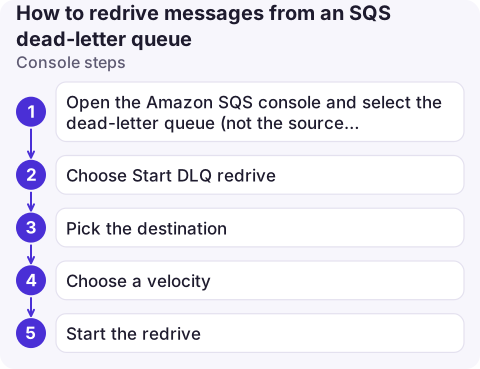
- Open the Amazon SQS console and select the dead-letter queue (not the source queue).
- Choose Start DLQ redrive.
- Pick the destination: back to the source queue or queues, or a custom destination queue you choose.
- Choose a velocity: let SQS pick the rate, or set a maximum number of messages per second.
- Start the redrive. The page shows progress, and you can cancel a task that is still running.
CLI steps
# 1. Start the move (no destination = each message returns to its original source queue)
aws sqs start-message-move-task \
  --source-arn arn:aws:sqs:eu-west-2:123456789012:orders-dlq \
  --max-number-of-messages-per-second 50

# 2. Watch progress
aws sqs list-message-move-tasks \
  --source-arn arn:aws:sqs:eu-west-2:123456789012:orders-dlq \
  --query 'Results[].{status:Status,moved:ApproximateNumberOfMessagesMoved,toMove:ApproximateNumberOfMessagesToMove}'

# 3. Stop it early if the consumer starts failing again
aws sqs cancel-message-move-task --task-handle "<TaskHandle from step 1>"
Add --destination-arn to send everything to one specific queue instead, for example a quarantine queue you inspect by hand. Only one move task can run per source queue at a time.
What to check afterwards
- The DLQ's
ApproximateNumberOfMessagesattribute falls to zero (see checking queue depth). - The source queue's depth rises and then drains as the consumer works through the backlog.
- The DLQ does not start filling again. A DLQ alarm on visible messages, such as ApproximateNumberOfMessagesVisible, tells you quickly if the fix didn't hold.
Common mistakes
- Redriving before fixing. The messages cycle through
maxReceiveCountreceives again and return to the DLQ, having used up more of their retention time. - Short DLQ retention. For standard queues, a message's age is counted from when it was first sent, not when it reached the DLQ. If the DLQ keeps messages for fewer days than the source, they can expire before anyone looks.
- Expecting it to work for every DLQ. The move task redrives DLQs that sit behind SQS source queues. A queue used as the dead-letter target for Lambda asynchronous invocations or SNS subscriptions has no SQS source to return to; process those messages with your own consumer or a custom destination.
- Missing permissions. The caller needs to read and delete from the DLQ and send to the destination; a key policy that blocks encrypt/decrypt on a KMS-encrypted destination also stops the move.
Questions
How do I redrive messages from a DLQ back to the original queue?
Start a DLQ redrive in the console with the source-queue option, or call aws sqs start-message-move-task with only --source-arn set to the DLQ ARN. Each message goes back to the queue it came from.
Can I redrive only some messages?
Not with the built-in move task, which moves everything. To be selective, receive messages from the DLQ yourself, send the ones you want to the source queue, and delete them from the DLQ.
Does redrive change the message body?
No. The body and message attributes are kept; only the queue changes.

A filling DLQ is easy to miss until a customer asks where their order went. CloudConsole, a phone app for AWS, is built to surface queue alarms and depths on your phone so you notice before that happens.
About the app → · Download on the App Store