 CloudConsole
CloudWatch alarm: SQS ApproximateNumberOfMessagesVisible
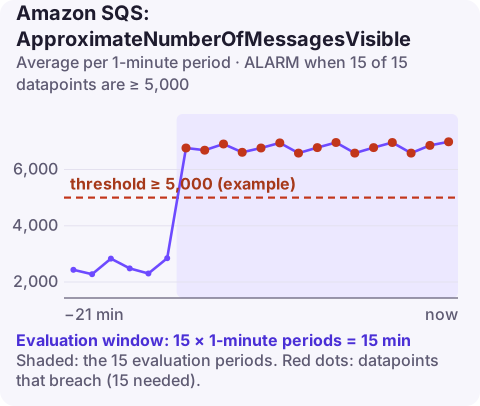
Alarm on AWS/SQS ApproximateNumberOfMessagesVisible per QueueName with the Average over 60 seconds, firing when it is at or above your threshold for 15 consecutive minutes. Base the threshold on the backlog your consumers normally clear; on a dead-letter queue, use a threshold of 0 instead, because any message there needs attention.
What the metric measures
ApproximateNumberOfMessagesVisible is the number of messages waiting to be received: the queue backlog. It does not include messages in flight or delayed messages. As the name says, the figure is approximate, which is fine for alarming.
A growing backlog means producers are adding work faster than consumers remove it. Typical reasons: a traffic surge, consumers scaled down or crashed, a slower downstream dependency making each message take longer, or a Lambda event source mapping that is disabled or throttled.
SQS publishes metrics for a queue while it is active, and stops if it has had no activity for several hours. That is rarely a problem for busy queues, but it affects alarms on idle ones.
Delayed messages, and messages hidden after being received, are reported by other metrics (ApproximateNumberOfMessagesDelayed and ApproximateNumberOfMessagesNotVisible). Adding all three gives the full number of messages the queue is holding.
Recommended alarm settings
| Setting | Recommended value |
|---|---|
| Namespace | AWS/SQS |
| Metric | ApproximateNumberOfMessagesVisible |
| Dimensions | QueueName |
| Statistic | Average |
| Threshold | Depends on your situation (based on historical backlog) |
| Period | 60 seconds |
| Datapoints to alarm | 15 |
| Evaluation periods | 15 |
| Comparison operator | GreaterThanOrEqualToThreshold |
Choosing the threshold
- Work queues: chart the Average and Maximum for two weeks. Pick a value comfortably above the normal peak backlog, or calculate it from tolerance: if consumers process 50 messages a second and a 10-minute delay is acceptable, a backlog of 30,000 is your limit, so alarm somewhat below it.
- Dead-letter queues: threshold 0, and consider 1 of 1 datapoints so the first failed message notifies you. This is the right way to alarm on a DLQ.
- Bursty queues that fill and drain quickly: rely on age of oldest message instead, which ignores size and measures delay.
Whatever value you pick, review it when consumers change: a faster worker or a larger fleet means the same backlog clears sooner, so the threshold can come down and catch problems earlier.
Create the alarm
aws cloudwatch put-metric-alarm \
  --alarm-name sqs-orders-backlog-high \
  --alarm-description "orders backlog above 5000 messages for 15 minutes" \
  --namespace AWS/SQS \
  --metric-name ApproximateNumberOfMessagesVisible \
  --dimensions Name=QueueName,Value=orders \
  --statistic Average \
  --period 60 \
  --evaluation-periods 15 \
  --datapoints-to-alarm 15 \
  --threshold 5000 \
  --comparison-operator GreaterThanOrEqualToThreshold \
  --alarm-actions arn:aws:sns:eu-west-2:123456789012:oncall-alerts
For a DLQ, the same command with --threshold 0, --comparison-operator GreaterThanThreshold and the DLQ name works well.
When it fires
- Confirm consumers are running and receiving:
NumberOfMessagesReceivedshould be well above zero. - Compare inflow and outflow:
NumberOfMessagesSentversusNumberOfMessagesDeletedtells you whether producers surged or consumers slowed. - Scale consumers (see scale an ECS service), or raise Lambda concurrency and batch size.
- For a DLQ: read a few messages to find the failure, fix the consumer, then redrive them.
Questions
How do I set a CloudWatch alarm on an SQS dead-letter queue?
Alarm on ApproximateNumberOfMessagesVisible for the DLQ with GreaterThanThreshold 0, so any message landing there notifies you. Do not use NumberOfMessagesSent on a DLQ, because messages moved there by a redrive policy are not counted in it.
How do I check SQS queue size from the CLI?
Run aws sqs get-queue-attributes with --attribute-names ApproximateNumberOfMessages ApproximateNumberOfMessagesNotVisible for the queue URL.
Why does my SQS alarm go to INSUFFICIENT_DATA?
SQS stops publishing metrics for queues that have been inactive for several hours. Treat missing data as notBreaching for queues that are legitimately idle.
A backlog that grows overnight is easier to deal with if you know about it early. CloudConsole, a phone app for AWS, is built to show queue alarms and depth on your phone, with production guardrails in mind.
Did it start after a deploy? What changed? on the app’s alarm screen lists the deploys and configuration changes from the hour before the alarm fired.
About the app → · Download on the App Store