 CloudConsole
CloudWatch alarm: EventBridge Scheduler TargetErrorThrottledCount
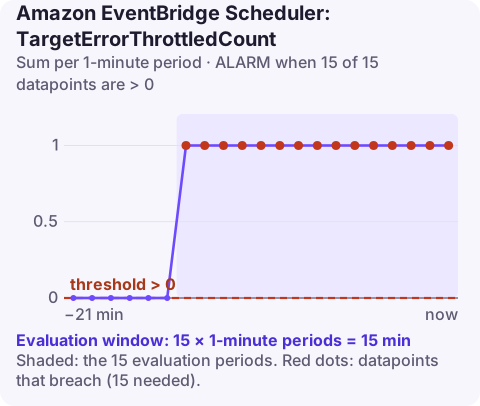
Alarm on AWS/Scheduler TargetErrorThrottledCount at account level with the Sum over 60 seconds, firing when it is above 0 for 15 consecutive minutes. A sustained non-zero count means the services your schedules invoke, such as Lambda, SQS or Step Functions, are rejecting calls for throttling, so scheduled work is running late.
What the metric counts
Every time EventBridge Scheduler calls a schedule's target and the target API answers with a throttling error, this metric goes up by one. The throttling is on the target's side: a Lambda function at its concurrency limit, an API with a low request rate quota, or another service applying its own limits. It is different from InvocationThrottleCount, which is Scheduler limiting itself.
Throttled invocations are retried according to the schedule's retry policy, so a few throttles usually mean delay rather than loss. Fifteen minutes of continuous throttling, though, means retries are not catching up, and if retries or the maximum event age run out the invocation is dropped or sent to the dead-letter queue.
The classic cause is many schedules sharing the same cron minute. A thousand per-customer schedules all set to cron(0 9 * * ? *) hit the same Lambda function at exactly 09:00.
Recommended alarm settings
| Setting | Recommended value |
|---|---|
| Namespace | AWS/Scheduler |
| Metric | TargetErrorThrottledCount |
| Dimensions | None (account level) |
| Statistic | Sum |
| Threshold | 0.0 |
| Period | 60 seconds |
| Datapoints to alarm | 15 |
| Evaluation periods | 15 |
| Comparison operator | GreaterThanThreshold |
With no dimensions, the alarm covers every schedule in the account and Region.
Tuning
- Brief throttling can be normal for bursty fan-out schedules. If you see short spikes every hour that clear on retry, keep the 15-of-15 window; it is designed to skip exactly that.
- Zero tolerance for time-critical schedules: reduce datapoints to alarm (for example 3 of 3) so you hear about it within minutes.
- Per group. If you organise schedules into schedule groups, check
list-metricsfor group-level dimensions and alarm on the important group separately, so a noisy batch group does not mask a critical one.
Create the alarm
aws cloudwatch put-metric-alarm \
  --alarm-name scheduler-target-throttled \
  --alarm-description "EventBridge Scheduler targets throttling for 15 minutes" \
  --namespace AWS/Scheduler \
  --metric-name TargetErrorThrottledCount \
  --statistic Sum \
  --period 60 \
  --evaluation-periods 15 \
  --datapoints-to-alarm 15 \
  --threshold 0 \
  --comparison-operator GreaterThanThreshold \
  --treat-missing-data notBreaching \
  --alarm-actions arn:aws:sns:eu-west-2:123456789012:oncall-alerts
Missing data is treated as not breaching because the metric only appears when throttling happens.
When it fires
- Identify the target. Look for the matching throttle metric on the target side: Lambda Throttles, or the throttling metrics of the service you invoke.
- Spread the load. Give schedules a flexible time window so Scheduler distributes invocations across it instead of firing them all at once, for example
--flexible-time-window Mode=FLEXIBLE,MaximumWindowInMinutes=15onaws scheduler update-schedule(that call replaces the whole schedule definition, so pass all its current settings). - Raise the target's capacity: reserved concurrency or a quota increase for Lambda, or put an SQS queue between Scheduler and the slow consumer.
- Check for loss: if InvocationDroppedCount also moved, some runs never happened and may need replaying.
Questions
Is a CloudWatch alarm the same as an EventBridge rule?
No. An alarm watches a metric and changes state; EventBridge routes events. They work together: every alarm state change is also published as an event to the default event bus, which you can route to other targets.
Can a CloudWatch alarm trigger an EventBridge rule?
Yes. Create a rule on the default bus that matches the "CloudWatch Alarm State Change" event for your alarm, and point it at any supported target.
Will throttled scheduled invocations be lost?
Not immediately. Scheduler retries them under the schedule's retry policy; they are lost only if retries or the maximum event age are exhausted and no dead-letter queue is configured.
Scheduled jobs that run late are easy to miss until a customer asks why their report did not arrive. CloudConsole, a phone app for AWS, is built to surface alarms like this one on your phone with the metric history alongside.
Did it start after a deploy? What changed? on the app’s alarm screen lists the deploys and configuration changes from the hour before the alarm fired.
About the app → · Download on the App Store