 CloudConsole
CloudWatch alarm: EventBridge Scheduler InvocationsFailedToBeSentToDeadLetterCount
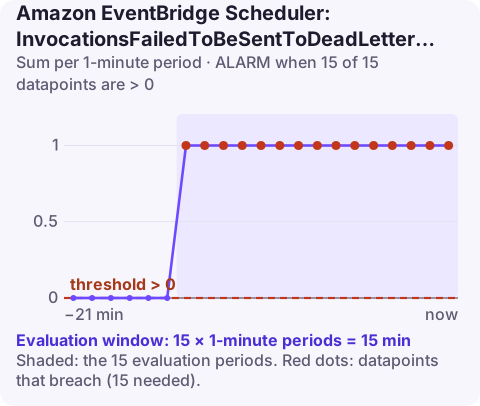
Alarm on AWS/Scheduler InvocationsFailedToBeSentToDeadLetterCount at account level, Sum per minute, above 0 for 15 of 15 minutes. It catches the case where a schedule's invocation failed and Scheduler then could not even put it on the configured dead-letter queue, which nearly always means the DLQ setup is broken.
What the metric means
A dead-letter queue is your safety net for schedules: invocations that exhaust their retries are sent there with error details instead of being lost. This metric counts attempts to write to that SQS queue that failed. If it stays above zero, the safety net has a hole.
Typical causes:
| Cause | What to check |
|---|---|
| Execution role cannot send to the queue | The role needs sqs:SendMessage on the DLQ ARN |
| Queue deleted or ARN mistyped | aws sqs get-queue-url for the name in the schedule |
| Queue encrypted with a customer managed KMS key | The role also needs permission to use that key |
| Message too large for SQS | Large payloads plus error metadata can exceed the queue's maximum message size |
Scheduler also publishes variants of this metric with an error-type suffix after an underscore. Run aws cloudwatch list-metrics --namespace AWS/Scheduler to see which ones exist in your account; they tell you the reason directly.
Recommended alarm settings
| Setting | Recommended value |
|---|---|
| Namespace | AWS/Scheduler |
| Metric | InvocationsFailedToBeSentToDeadLetterCount |
| Dimensions | None (account level) |
| Statistic | Sum |
| Threshold | 0.0 |
| Period | 60 seconds |
| Datapoints to alarm | 15 |
| Evaluation periods | 15 |
| Comparison operator | GreaterThanThreshold |
Why 15 minutes when any failure is bad? Writes to the DLQ are retried, and transient, retryable errors are counted too. Waiting for 15 straight minutes filters those out and leaves the persistent misconfigurations.
Create the alarm
aws cloudwatch put-metric-alarm \
  --alarm-name scheduler-dlq-delivery-failing \
  --alarm-description "EventBridge Scheduler cannot write failed invocations to the DLQ" \
  --namespace AWS/Scheduler \
  --metric-name InvocationsFailedToBeSentToDeadLetterCount \
  --statistic Sum \
  --period 60 \
  --evaluation-periods 15 \
  --datapoints-to-alarm 15 \
  --threshold 0 \
  --comparison-operator GreaterThanThreshold \
  --treat-missing-data notBreaching \
  --alarm-actions arn:aws:sns:eu-west-2:123456789012:oncall-alerts
If you only care about one queue, alarm on the error-specific variants or on the DLQ's own metrics as well; this account-level metric does not say which schedule failed.
Common mistakes
- Testing the DLQ only with a working target. The DLQ path is exercised only when an invocation fails, so a broken DLQ can sit unnoticed for months. Point a test schedule at a non-existent target once to prove it end to end.
- Granting the queue policy but not the role. Scheduler writes to the DLQ using the schedule's execution role, so the identity-based policy on that role matters.
- Sharing one DLQ across accounts or Regions without the matching permissions.
When it fires
- Read the suffix metrics to learn the error category.
- Test the role. Use the IAM policy simulator, or check CloudTrail for
SendMessagecalls from the scheduler role being denied. - Confirm the queue exists in the expected account and Region, and that its queue policy and KMS key policy do not block the role.
- Remember the original failure. Something made the invocation fail in the first place; once the DLQ works, its messages will tell you what. Those invocations are effectively dropped until you fix the DLQ, so re-run anything important.
Questions
Is a CloudWatch alarm the same as an EventBridge rule?
No. An alarm watches a metric and changes state; EventBridge routes events. They work together: every alarm state change is also published as an event to the default event bus, which you can route to other targets.
How do I alarm on an SQS dead-letter queue?
Alarm on ApproximateNumberOfMessagesVisible for the DLQ with a threshold of 0, so any message arriving there notifies you.
What permissions does EventBridge Scheduler need for a DLQ?
The schedule's execution role needs sqs:SendMessage on the queue, and permission to use the KMS key if the queue is encrypted with a customer managed key.
A broken dead-letter queue only matters on the day something else fails, which is why it deserves its own alarm. CloudConsole, a phone app for AWS, is built to show you alarms and queue details from your phone with production guardrails in mind.
Did it start after a deploy? What changed? on the app’s alarm screen lists the deploys and configuration changes from the hour before the alarm fired.
About the app → · Download on the App Store