 CloudConsole
CloudWatch alarm: NAT Gateway PacketsDropCount
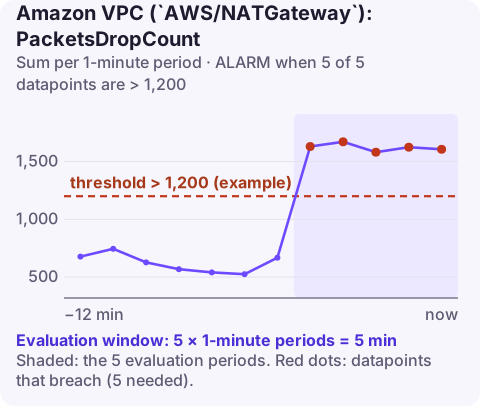
Alarm on AWS/NATGateway PacketsDropCount per NatGatewayId with the Sum over 60 seconds, firing above your threshold for 5 of 5 minutes. A good threshold is about 0.01% of the packets the gateway normally handles per minute, calculated from your own traffic history.
What the metric counts
PacketsDropCount is the number of packets the NAT gateway discarded. A handful is normal background noise; a sustained rise means something is wrong on the path through the gateway. Possible reasons include an issue with the NAT gateway service itself in that Availability Zone, the gateway being overwhelmed, or traffic it cannot translate.
Drops are different from port allocation errors. ErrorPortAllocation counts new connections refused for lack of ports; this metric counts packets lost, which can affect connections already open, so symptoms are retransmissions, slow transfers and intermittent timeouts.
Recommended alarm settings
| Setting | Recommended value |
|---|---|
| Namespace | AWS/NATGateway |
| Metric | PacketsDropCount |
| Dimensions | NatGatewayId |
| Statistic | Sum |
| Threshold | Depends on your situation (about 0.01% of normal packet volume) |
| Period | 60 seconds |
| Datapoints to alarm | 5 |
| Evaluation periods | 5 |
| Comparison operator | GreaterThanThreshold |
Computing the threshold
The gateway publishes packet counters for both directions: PacketsInFromSource, PacketsOutToDestination, PacketsInFromDestination and PacketsOutToSource. Sum the inbound ones per minute over a representative week and take a typical busy-hour value.
- Busy-hour total: about 12,000,000 packets per minute.
- 0.01% of that: 1,200 packets per minute.
If traffic swings a lot between day and night, a fixed number will be too lax at night. A metric math alarm on 100 * drops / (PacketsInFromSource + PacketsInFromDestination) with a threshold of 0.01 adapts to load.
Recalculate after big changes in traffic, such as a migration onto this VPC or moving a busy workload behind VPC endpoints; a threshold computed for last quarter's volume can be far too high or too low today. Five consecutive one-minute breaches is a fairly short window for a network signal, so if you see occasional bursts of drops that clear on their own without user impact, extend the evaluation to ten or fifteen minutes rather than raising the threshold.
Create the alarm
aws cloudwatch put-metric-alarm \
  --alarm-name natgw-packets-dropped \
  --alarm-description "NAT gateway dropping more than ~0.01% of packets" \
  --namespace AWS/NATGateway \
  --metric-name PacketsDropCount \
  --dimensions Name=NatGatewayId,Value=nat-0123456789abcdef0 \
  --statistic Sum \
  --period 60 \
  --evaluation-periods 5 \
  --datapoints-to-alarm 5 \
  --threshold 1200 \
  --comparison-operator GreaterThanThreshold \
  --treat-missing-data notBreaching \
  --alarm-actions arn:aws:sns:eu-west-2:123456789012:oncall-alerts
When it fires
- Check AWS Health for the Region and Availability Zone; the AWS Health Dashboard and your account's Health events will show a NAT gateway issue if there is one.
- Compare gateways. If only one AZ's gateway drops packets, and you have one per AZ, the problem is local to that gateway or zone.
- Look at load: a sudden jump in
BytesOutToDestinationorActiveConnectionCountat the same time points to a traffic surge. - Reduce dependency on the NAT: VPC endpoints for AWS services take that traffic off the gateway, which also cuts data processing charges.
Questions
Is some NAT gateway packet loss normal?
A small number of drops can occur in normal operation, which is why the threshold is a fraction of traffic rather than zero.
Will a NAT gateway problem in one AZ affect other AZs?
Only if subnets in other AZs route through that gateway. One NAT gateway per AZ, with each AZ's subnets using their local gateway, limits the impact.
Network drops are hard to reason about from a phone, so the first job is seeing whether one gateway or all of them are affected. CloudConsole, a phone app for AWS, is built to show alarms per resource so that comparison is quick.
Did it start after a deploy? What changed? on the app’s alarm screen lists the deploys and configuration changes from the hour before the alarm fired.
About the app → · Download on the App Store