 CloudConsole
CloudWatch alarm: Route 53 HealthCheckStatus
Alarm on AWS/Route53 HealthCheckStatus for the HealthCheckId with the Average over 60 seconds, firing when it is below 1 for 3 of 3 minutes. Route 53 reports 1 while the endpoint is healthy and 0 when it is not, so any value under 1 means it was judged unhealthy for at least part of the minute. Create the alarm in us-east-1, where Route 53 metrics live.
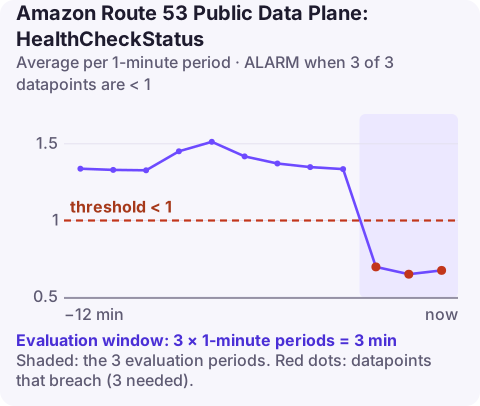
What the metric reports
A Route 53 health check is probed by checkers in several Regions. Route 53 combines their results into one status, and HealthCheckStatus exposes it as 1 (healthy) or 0 (unhealthy). With the Average statistic over a minute, a value of 0.5 means the check was unhealthy for roughly half that minute.
The status drives DNS failover: records associated with an unhealthy check stop being returned (if a healthy alternative exists). An alarm on the same metric tells you that failover has started, or that your only endpoint is down.
Recommended alarm settings
| Setting | Recommended value |
|---|---|
| Namespace | AWS/Route53 |
| Metric | HealthCheckStatus |
| Dimensions | HealthCheckId |
| Statistic | Average |
| Threshold | 1.0 |
| Period | 60 seconds |
| Datapoints to alarm | 3 |
| Evaluation periods | 3 |
| Comparison operator | LessThanThreshold |
Three consecutive minutes avoids paging for a single probe failure while still alerting quickly.
Create the alarm in us-east-1
Route 53 is a global service and publishes its CloudWatch metrics only in US East (N. Virginia). An alarm created in any other Region will never receive data. The SNS topic for the alarm action must also be in us-east-1.
aws cloudwatch put-metric-alarm \
  --alarm-name r53-api-healthcheck-unhealthy \
  --alarm-description "api.example.com health check unhealthy for 3 minutes" \
  --namespace AWS/Route53 \
  --metric-name HealthCheckStatus \
  --dimensions Name=HealthCheckId,Value=abcdef01-2345-6789-abcd-ef0123456789 \
  --statistic Average \
  --period 60 \
  --evaluation-periods 3 \
  --datapoints-to-alarm 3 \
  --threshold 1 \
  --comparison-operator LessThanThreshold \
  --alarm-actions arn:aws:sns:us-east-1:123456789012:oncall-alerts \
  --region us-east-1
Decide what missing data should mean. If the health check is deleted or disabled the metric stops; breaching makes that visible, missing leaves the alarm in INSUFFICIENT_DATA.
Why a health check goes unhealthy
| Cause | How to spot it |
|---|---|
| Endpoint really down or returning errors | Your own monitoring agrees; last failure reason shows an HTTP status |
| Firewall blocking Route 53 health checkers | Endpoint works for users but checks time out; allow the Route 53 health check IP ranges |
| Slow responses | Checkers time out while users see slow pages |
| String matching fails | Response body changed and no longer contains the configured string |
| TLS issues on HTTPS checks | Expired certificate or SNI mismatch in the failure reason |
When it fires
- Ask Route 53 why:
These show the per-checker status and the last failure message, the same information as the Health checkers tab in the console.aws route53 get-health-check-last-failure-reason \ --health-check-id abcdef01-2345-6789-abcd-ef0123456789 aws route53 get-health-check-status \ --health-check-id abcdef01-2345-6789-abcd-ef0123456789 - Test the endpoint yourself from outside your network with the same protocol, port and path.
- Check failover: confirm DNS now returns the secondary record with list-resource-record-sets and a
digquery. - Fix and watch the metric return to 1; Route 53 needs several successful probes before it marks the endpoint healthy again.
Questions
How do I create a CloudWatch alarm for a Route 53 health check?
Create the alarm in us-east-1 on AWS/Route53 HealthCheckStatus with the HealthCheckId dimension, LessThanThreshold 1. The console can also create one when you create the health check.
Why is my Route 53 health check alarm stuck in INSUFFICIENT_DATA?
Usually because the alarm was created outside us-east-1, or the HealthCheckId is wrong. Route 53 metrics exist only in US East (N. Virginia).
Can I alarm on a calculated health check?
Yes. Calculated health checks also report HealthCheckStatus, so the same alarm works for them.
An unhealthy health check often means an outage is under way, and the first question is whether failover worked. CloudConsole, a phone app for AWS, is built to show the alarm on your phone so you can check quickly where you are.
Did it start after a deploy? What changed? on the app’s alarm screen lists the deploys and configuration changes from the hour before the alarm fired.
About the app → · Download on the App Store