 CloudConsole
CloudWatch alarm: Amazon S3 OperationsFailedReplication
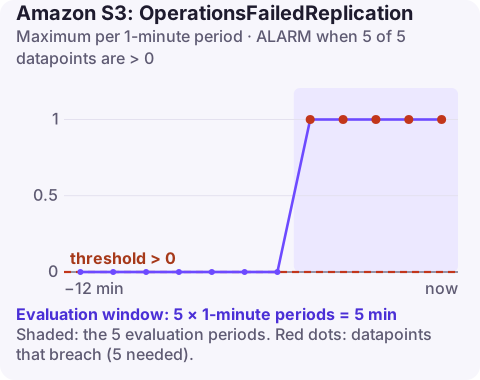
Alarm on AWS/S3 OperationsFailedReplication for the SourceBucket, DestinationBucket and RuleId, using the Maximum over 60 seconds, firing when it is above 0 for 5 of 5 minutes. Any non-zero value means objects that should have been copied by a replication rule were not, so your destination is silently falling out of sync.
What the metric tracks
When S3 Replication metrics are enabled on a replication rule, S3 publishes per-rule metrics including OperationsFailedReplication: the number of objects that failed to replicate. It covers new objects replicated by Cross-Region Replication (CRR) and Same-Region Replication (SRR), and existing objects replicated with S3 Batch Replication.
The metric reports 0 for minutes with successful replication and publishes nothing for minutes with no replication activity. Any value above 0 is a real failure.
Replication metrics are enabled per rule (they are included automatically with S3 Replication Time Control). Without them, this metric does not exist and failures go unnoticed.
Replication metrics also include replication latency and bytes pending replication; those are useful for spotting slowness, while this one is specifically about failures.
Recommended alarm settings
| Setting | Recommended value |
|---|---|
| Namespace | AWS/S3 |
| Metric | OperationsFailedReplication |
| Dimensions | SourceBucket, DestinationBucket, RuleId |
| Statistic | Maximum |
| Threshold | 0.0 |
| Period | 60 seconds |
| Datapoints to alarm | 5 |
| Evaluation periods | 5 |
| Comparison operator | GreaterThanThreshold |
Why these settings
Maximum with a threshold of 0 catches even a single failure in a minute. Requiring 5 consecutive minutes tells you failures are ongoing rather than a one-off. If you replicate for compliance or disaster recovery and every object matters, reduce it to 1 of 1. Treat missing data as not breaching, because quiet periods publish nothing.
The alarm is per replication rule, so a bucket with several rules (for example one per prefix or destination) needs one alarm per rule you care about.
Create the alarm
aws cloudwatch put-metric-alarm \
  --alarm-name s3-replication-failures-prod-to-dr \
  --alarm-description "Objects failing to replicate from my-bucket to my-bucket-dr" \
  --namespace AWS/S3 \
  --metric-name OperationsFailedReplication \
  --dimensions Name=SourceBucket,Value=my-bucket Name=DestinationBucket,Value=my-bucket-dr Name=RuleId,Value=replicate-all \
  --statistic Maximum \
  --period 60 \
  --evaluation-periods 5 \
  --datapoints-to-alarm 5 \
  --threshold 0 \
  --comparison-operator GreaterThanThreshold \
  --treat-missing-data notBreaching \
  --alarm-actions arn:aws:sns:eu-west-2:123456789012:oncall-alerts
When it fires
- Get the failure reason. S3 Event Notifications can report replication failure events with a reason; configure them on the source bucket if you need per-object detail.
- Check the replication role: it needs permission to read and replicate from the source and to write replicas in the destination, and the destination bucket policy must allow it for cross-account setups.
- Check encryption: objects encrypted with SSE-KMS need the rule configured to replicate them and the role allowed to decrypt with the source key and encrypt with the destination key. See KMS access denied.
- Check the destination: versioning must stay enabled, and Object Lock or ownership settings can block writes.
- Re-replicate: after fixing the cause, use S3 Batch Replication to replicate objects that failed.
Questions
How do I create a CloudWatch alarm for an S3 bucket?
Enable request metrics on the bucket with a metrics configuration (a filter), then alarm on metrics such as 4xxErrors or 5xxErrors using the BucketName and FilterId dimensions. Daily storage metrics like BucketSizeBytes need no setup but are only updated once a day.
How do I enable S3 replication metrics?
Turn on replication metrics in the replication rule's settings (or enable S3 Replication Time Control, which includes them). Metrics are then published per rule in CloudWatch.
Are failed replications retried automatically?
Not reliably for permission or configuration errors. Fix the cause, then use S3 Batch Replication to replicate the objects that failed.
Replication failures do not break anything today; they break your recovery plan later. CloudConsole, a phone app for AWS, is built to make sure alarms like this reach you on your phone instead of waiting in a console.
Did it start after a deploy? What changed? on the app’s alarm screen lists the deploys and configuration changes from the hour before the alarm fired.
About the app → · Download on the App Store