 CloudConsole
CloudWatch alarm: SNS NumberOfNotificationsFailed
Alarm on AWS/SNS NumberOfNotificationsFailed per TopicName using the Sum over 60 seconds, firing when it is above your threshold for 5 of 5 minutes. For topics whose subscribers are only SQS, Lambda or Firehose, use 0, because those deliveries should not fail in a healthy setup; for HTTP, email or SMS subscribers, set it from history and your tolerance.
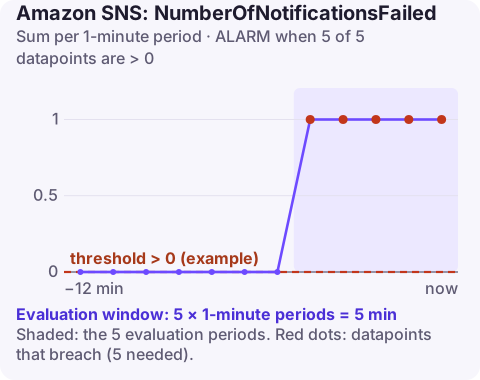
What counts as a failed notification
NumberOfNotificationsFailed counts deliveries SNS could not complete. SNS retries according to the delivery policy for each protocol, so a failure here reflects an endpoint that kept rejecting or could not be reached.
| Subscriber | Usual cause of failures |
|---|---|
| SQS queue | Queue policy does not allow the topic to send; queue encrypted with the AWS managed aws/sqs key, which SNS cannot use |
| Lambda | Function resource policy missing permission for SNS; function deleted or renamed |
| HTTP/S | Endpoint returning 5xx or timing out, TLS problems, endpoint moved |
| SMS / email | Invalid numbers, carrier rejection, spend limit reached, mailbox issues |
Failures are counted per subscription delivery, so one published message can add several failures if more than one subscriber is broken.
Recommended alarm settings
| Setting | Recommended value |
|---|---|
| Namespace | AWS/SNS |
| Metric | NumberOfNotificationsFailed |
| Dimensions | TopicName |
| Statistic | Sum |
| Threshold | Depends on your situation (0 for SQS, Lambda and Firehose subscribers) |
| Period | 60 seconds |
| Datapoints to alarm | 5 |
| Evaluation periods | 5 |
| Comparison operator | GreaterThanThreshold |
Choosing the threshold
For AWS-to-AWS subscriptions, any failure is a misconfiguration, so use 0. For HTTP endpoints you do not control, there will be some background failure; chart the Sum over two weeks, consider your SLA to the people relying on those notifications, and set the threshold above normal noise. If a topic mixes both kinds, the noisy HTTP subscriber will mask the SQS ones; delivery status logging lets you separate them.
A related trap is a Lambda subscriber in another account: the function's resource policy must allow the topic, and when someone tightens it, deliveries fail without any error in the function's own metrics, because it was never invoked.
Create the alarm
aws cloudwatch put-metric-alarm \
  --alarm-name sns-order-events-delivery-failures \
  --alarm-description "SNS deliveries from order-events failing for 5 minutes" \
  --namespace AWS/SNS \
  --metric-name NumberOfNotificationsFailed \
  --dimensions Name=TopicName,Value=order-events \
  --statistic Sum \
  --period 60 \
  --evaluation-periods 5 \
  --datapoints-to-alarm 5 \
  --threshold 0 \
  --comparison-operator GreaterThanThreshold \
  --treat-missing-data notBreaching \
  --alarm-actions arn:aws:sns:eu-west-2:123456789012:oncall-alerts
When it fires
- Turn on delivery status logging for the topic's protocols if it is off; logs in CloudWatch Logs show each failed delivery, the endpoint and the status code.
- SQS: check the queue policy for an allow on
sqs:SendMessagefrom the topic ARN, and the queue's KMS key; use a customer managed key whose policy lets SNS use it. - Lambda: run
aws lambda get-policy --function-name order-handlerand look for the SNS permission. - HTTP: check the endpoint's health and logs.
- Protect messages by adding a redrive policy (DLQ) to subscriptions, so undeliverable messages are kept.
Questions
How do I send a CloudWatch alarm to an SNS topic?
Add the topic ARN as an alarm action (--alarm-actions on put-metric-alarm, or Notification in the console). The topic's access policy must allow CloudWatch to publish, which the default policy does for alarms in the same account.
Does SNS retry failed deliveries?
Yes. Each protocol has a delivery retry policy; HTTP/S retry behaviour can be customised. After retries are exhausted, the message is dropped unless the subscription has a dead-letter queue.
Notification failures often mean someone downstream is missing information they rely on. CloudConsole, a phone app for AWS, is built to show this alarm on your phone so you can check which topic is affected.
Did it start after a deploy? What changed? on the app’s alarm screen lists the deploys and configuration changes from the hour before the alarm fired.
About the app → · Download on the App Store