 CloudConsole
CloudWatch alarm: SNS NumberOfNotificationsDelivered (too low)
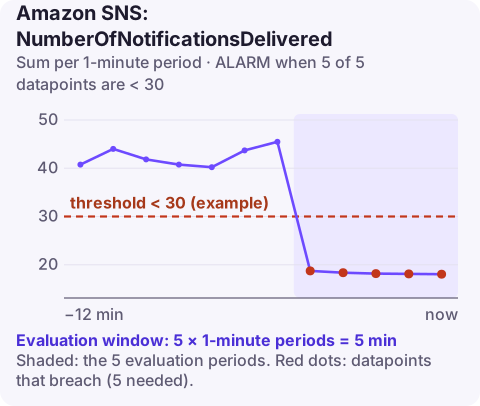
Alarm on AWS/SNS NumberOfNotificationsDelivered per TopicName with the Sum over 60 seconds, firing when it falls below your expected minimum for 5 consecutive minutes. Deliveries should roughly equal messages published times matching subscriptions; a drop while publishing is steady points at subscriptions or endpoints, not at the publisher.
What the metric measures
NumberOfNotificationsDelivered counts successful deliveries from the topic to its subscriptions. One published message with four subscriptions can produce four deliveries, minus any filtered out by subscription filter policies.
So the expected value is a product: publishes, multiplied by the number of subscriptions each message should reach. That makes this metric good at spotting things NumberOfMessagesPublished cannot:
- A subscription deleted or unsubscribed by mistake (an email recipient clicking "unsubscribe" is a classic).
- A new filter policy that is stricter than intended.
- Endpoints failing, so deliveries move into NumberOfNotificationsFailed.
- Deliveries being delayed by retries during an SNS or endpoint event.
Recommended alarm settings
| Setting | Recommended value |
|---|---|
| Namespace | AWS/SNS |
| Metric | NumberOfNotificationsDelivered |
| Dimensions | TopicName |
| Statistic | Sum |
| Threshold | Depends on your situation (expected minimum per minute) |
| Period | 60 seconds |
| Datapoints to alarm | 5 |
| Evaluation periods | 5 |
| Comparison operator | LessThanThreshold |
Choosing the threshold
Chart deliveries and publishes together for two weeks. If the ratio is steady (say 3 deliveries per publish) and quiet periods see 30 publishes a minute, normal minimum deliveries are about 90; a threshold of 30 leaves room for variation while still catching a lost subscription. For daily cycles, an anomaly detection alarm below the band works better than a fixed value. Set missing data to breaching, so a topic that delivers nothing is treated as a problem.
A ratio alarm with metric math, deliveries divided by publishes, catches subscription loss even when overall traffic swings a lot.
Common mistakes
- Leaving missing data as the default. A topic that delivers nothing may publish no datapoints, so the alarm never leaves INSUFFICIENT_DATA.
- Forgetting filter policies. A topic where most subscriptions filter heavily has deliveries far below publishes times subscribers; base the threshold on observed deliveries.
- One alarm for a mixed topic. If one subscriber dominates the volume, losing a small subscriber will not move the total; alarm on that subscriber's side as well.
Create the alarm
aws cloudwatch put-metric-alarm \
  --alarm-name sns-order-events-delivered-drop \
  --alarm-description "Fewer than 30 deliveries a minute from order-events for 5 minutes" \
  --namespace AWS/SNS \
  --metric-name NumberOfNotificationsDelivered \
  --dimensions Name=TopicName,Value=order-events \
  --statistic Sum \
  --period 60 \
  --evaluation-periods 5 \
  --datapoints-to-alarm 5 \
  --threshold 30 \
  --comparison-operator LessThanThreshold \
  --treat-missing-data breaching \
  --alarm-actions arn:aws:sns:eu-west-2:123456789012:oncall-alerts
When it fires
- Compare with publishes. If publishes also fell, start with the publisher.
- List subscriptions with
aws sns list-subscriptions-by-topic --topic-arn arn:aws:sns:eu-west-2:123456789012:order-eventsand check for missing orPendingConfirmationentries. - Check failures on the same topic; if failures rose, follow that runbook.
- Review filter policies changed recently, and compare with
NumberOfNotificationsFilteredOut.
Email subscriptions deserve special attention: an unsubscribe link in each email means any recipient can remove themselves, and the topic owner is not told. If email delivery matters, check subscriptions periodically, or deliver through a system you control.
Questions
What does a CloudWatch alarm SNS message look like?
The message body is JSON with fields such as AlarmName, AlarmDescription, NewStateValue, NewStateReason, OldStateValue, StateChangeTime, Region and a Trigger object describing the metric, statistic and threshold.
Why does SNS show fewer deliveries than publishes times subscribers?
Filter policies drop messages that do not match, and failed deliveries are counted separately. Both reduce NumberOfNotificationsDelivered.
A lost subscription can go unnoticed for days because everything upstream looks healthy. CloudConsole, a phone app for AWS, is built to show delivery alarms like this on your phone alongside the topic's other metrics.
Did it start after a deploy? What changed? on the app’s alarm screen lists the deploys and configuration changes from the hour before the alarm fired.
About the app → · Download on the App Store