 CloudConsole
CloudWatch alarm: SNS NumberOfMessagesPublished (too low)
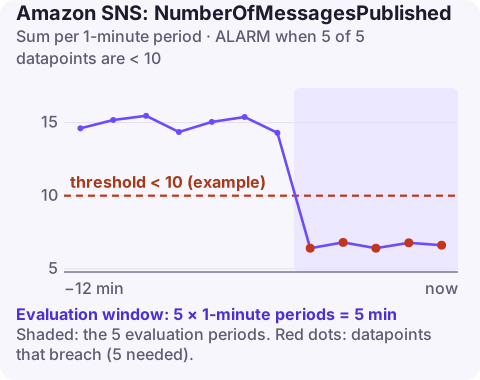
Alarm on AWS/SNS NumberOfMessagesPublished per TopicName with the Sum over 60 seconds, firing when it is below your expected minimum for 5 of 5 minutes. It catches publishers that have quietly stopped sending, which no error-rate alarm will notice because nothing is failing; it is only worth creating for topics with dependable traffic.
What the metric tells you
NumberOfMessagesPublished counts messages successfully published to the topic. Watching for a drop turns it into a heartbeat for whatever feeds the topic: an order service, a scheduled job, a monitoring pipeline. If the publisher crashes, loses permissions, or a deploy removes the publish call, this is often the only metric that changes.
When nothing is published in a minute, SNS may publish no datapoint at all rather than a zero. For an alarm that looks for low traffic, that matters: set missing data to breaching, otherwise a completely silent publisher leaves the alarm in INSUFFICIENT_DATA instead of ALARM.
This alarm pairs well with business context. If a topic carries order events, a drop in publishes during trading hours is a strong signal; a drop at 3am may be normal. That context should shape both the threshold and who gets paged.
Recommended alarm settings
| Setting | Recommended value |
|---|---|
| Namespace | AWS/SNS |
| Metric | NumberOfMessagesPublished |
| Dimensions | TopicName |
| Statistic | Sum |
| Threshold | Depends on your situation (your expected minimum per minute) |
| Period | 60 seconds |
| Datapoints to alarm | 5 |
| Evaluation periods | 5 |
| Comparison operator | LessThanThreshold |
Choosing the minimum
- Chart the Sum per minute for two to four weeks. Note the lowest values during the quietest real periods (overnight, weekends).
- Set the threshold below that floor, with a margin; if quiet periods never drop below 40 per minute, a threshold of 10 is safe.
- Strongly cyclical traffic? A single fixed number is either too sensitive at night or too blind by day. A CloudWatch anomaly detection alarm on the same metric, alarming only below the band, adapts to the daily pattern.
- Bursty or low-volume topics (a few messages an hour) are poor candidates; use a longer period such as an hour, or monitor the publisher directly.
Create the alarm
aws cloudwatch put-metric-alarm \
  --alarm-name sns-order-events-publish-drop \
  --alarm-description "Fewer than 10 messages a minute published to order-events for 5 minutes" \
  --namespace AWS/SNS \
  --metric-name NumberOfMessagesPublished \
  --dimensions Name=TopicName,Value=order-events \
  --statistic Sum \
  --period 60 \
  --evaluation-periods 5 \
  --datapoints-to-alarm 5 \
  --threshold 10 \
  --comparison-operator LessThanThreshold \
  --treat-missing-data breaching \
  --alarm-actions arn:aws:sns:eu-west-2:123456789012:oncall-alerts
When it fires
- Check the publisher: is the service running, and do its logs show publish errors such as authorisation failures?
- Look for a deploy or config change in the publisher around the start time.
- Check upstream: is the publisher itself receiving less work (fewer orders, a stopped scheduled job)? A business drop and a technical fault look the same here.
- Check the topic policy and KMS key if the topic is encrypted; publishers need permission to use the key.
Questions
How do I send a CloudWatch alarm to an SNS topic?
Add the topic ARN as an alarm action (--alarm-actions on put-metric-alarm, or Notification in the console). The topic's access policy must allow CloudWatch to publish, which the default policy does for alarms in the same account.
Why is my SNS publish alarm in INSUFFICIENT_DATA?
With no publishes there may be no datapoints. Set treat-missing-data to breaching for low-traffic alarms so silence counts as a problem.
A publisher that stops sending is easy to miss because nothing turns red. CloudConsole, a phone app for AWS, is built to put that kind of quiet alarm on your phone where you will actually see it.
Did it start after a deploy? What changed? on the app’s alarm screen lists the deploys and configuration changes from the hour before the alarm fired.
About the app → · Download on the App Store