 CloudConsole
CloudWatch alarm: SNS NumberOfNotificationsRedrivenToDlq
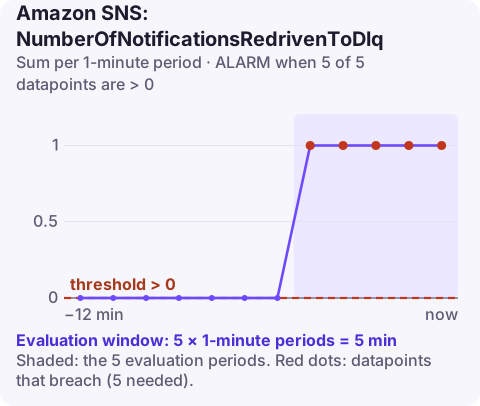
Alarm on AWS/SNS NumberOfNotificationsRedrivenToDlq per TopicName with the Sum over 60 seconds, firing when it is above 0 for 5 of 5 minutes. Each count is a message SNS gave up delivering to a subscriber and moved to that subscription's dead-letter queue; it is kept, but the subscriber never processed it.
What the metric means
An SNS subscription can have a redrive policy pointing at an SQS queue. When SNS cannot deliver a message to the subscriber after its retries (for example the subscribed queue denies access, the Lambda function is gone, or an HTTP endpoint keeps failing), it sends the message to that dead-letter queue and counts it here.
That is the good outcome compared with dropping the message, but it still means a subscriber is broken. AWS recommends this alarm wherever SNS feeds SQS, Lambda or Firehose, because in those setups messages should practically never end up in a DLQ.
Note that this is a topic-level count across all subscriptions with redrive policies, so it tells you that some subscriber is failing, not which one.
Recommended alarm settings
| Setting | Recommended value |
|---|---|
| Namespace | AWS/SNS |
| Metric | NumberOfNotificationsRedrivenToDlq |
| Dimensions | TopicName |
| Statistic | Sum |
| Threshold | 0.0 |
| Period | 60 seconds |
| Datapoints to alarm | 5 |
| Evaluation periods | 5 |
| Comparison operator | GreaterThanThreshold |
Five consecutive minutes with redrives means a sustained delivery failure. A single message redriven once will not trip it. To hear about every message, also alarm on the DLQ's own ApproximateNumberOfMessagesVisible with a threshold of 0; that also keeps reminding you until the queue is emptied.
Tuning
The threshold should stay at zero: in a healthy system with AWS-managed subscribers, nothing should be redriven. What you can tune is the window. Five consecutive minutes is designed to page you for an ongoing failure rather than a blip; if every message matters (payments, audit events), reduce datapoints to alarm to 1 so the first redrive notifies you.
HTTP subscribers are the exception. Third-party endpoints have outages, and some redrives are expected; route those alarms to a lower-urgency channel and rely on the DLQ to keep messages until the endpoint recovers.
Create the alarm
aws cloudwatch put-metric-alarm \
  --alarm-name sns-order-events-redriven-to-dlq \
  --alarm-description "order-events messages moving to a subscription DLQ for 5 minutes" \
  --namespace AWS/SNS \
  --metric-name NumberOfNotificationsRedrivenToDlq \
  --dimensions Name=TopicName,Value=order-events \
  --statistic Sum \
  --period 60 \
  --evaluation-periods 5 \
  --datapoints-to-alarm 5 \
  --threshold 0 \
  --comparison-operator GreaterThanThreshold \
  --treat-missing-data notBreaching \
  --alarm-actions arn:aws:sns:eu-west-2:123456789012:oncall-alerts
When it fires
- Find the subscription. Each subscription has its own DLQ; check which DLQ is filling with queue depth.
- Read a message. Messages in an SNS DLQ carry attributes describing the failure, such as the error code and message, which tell you why delivery failed.
- Fix the subscriber: permissions on the queue or function, the function's own errors, or the HTTP endpoint.
- Replay the messages once fixed, by consuming the DLQ and re-publishing them. If the DLQ subscribes back to processing, a redrive may suit.
Questions
How do I send a CloudWatch alarm to an SNS topic?
Add the topic ARN as an alarm action (--alarm-actions on put-metric-alarm, or Notification in the console). The topic's access policy must allow CloudWatch to publish, which the default policy does for alarms in the same account.
Where does SNS put messages it cannot deliver?
In the subscription's dead-letter queue, an SQS queue set in the subscription's RedrivePolicy. Without one, undeliverable messages are discarded after retries.
Messages landing in a DLQ are safe but stuck, and someone needs to notice. CloudConsole, a phone app for AWS, is built to show this alarm and the related queue depth on your phone.
Did it start after a deploy? What changed? on the app’s alarm screen lists the deploys and configuration changes from the hour before the alarm fired.
About the app → · Download on the App Store