 CloudConsole
CloudWatch alarm: SNS NumberOfNotificationsFailedToRedriveToDlq
Alarm on AWS/SNS NumberOfNotificationsFailedToRedriveToDlq per TopicName, Sum over 60 seconds, above 0 for 5 of 5 minutes. It catches the worst case for a subscription: delivery failed, and SNS also could not put the message on the configured dead-letter queue, so the message is lost.
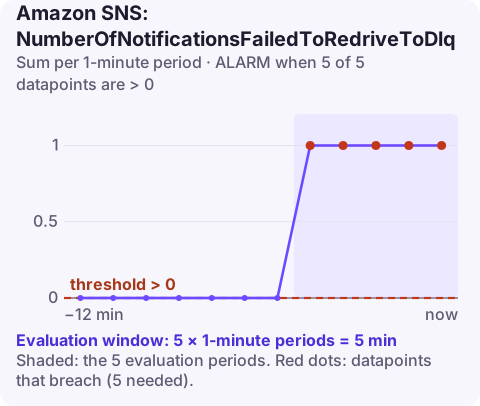
What it means
When a subscription has a redrive policy, undeliverable messages go to the DLQ. If that step fails too, this metric counts it. That is nearly always a configuration problem with the DLQ, which means every message that fails delivery from then on is being discarded.
| Cause | How to check |
|---|---|
| DLQ queue policy does not allow SNS to send | Queue policy must allow sqs:SendMessage for the topic ARN as source |
| DLQ deleted or ARN wrong in RedrivePolicy | Compare the subscription's RedrivePolicy with existing queues |
| KMS encryption on the DLQ | Key policy must allow SNS to use the key; the AWS managed SQS key cannot be used |
| FIFO mismatch | A FIFO topic's subscriptions need a FIFO dead-letter queue |
| Different account or Region | Cross-account DLQs need an explicit queue policy |
Recommended alarm settings
| Setting | Recommended value |
|---|---|
| Namespace | AWS/SNS |
| Metric | NumberOfNotificationsFailedToRedriveToDlq |
| Dimensions | TopicName |
| Statistic | Sum |
| Threshold | 0.0 |
| Period | 60 seconds |
| Datapoints to alarm | 5 |
| Evaluation periods | 5 |
| Comparison operator | GreaterThanThreshold |
Five one-minute datapoints filter transient errors; anything sustained is a broken setup. If the topic is low volume, use 1 of 1 so a single lost message is noticed.
Why this alarm is worth having
Dead-letter queues are usually configured once and then forgotten. Queue policies get tightened by security reviews, encryption is added to meet a compliance requirement, or a queue is recreated by infrastructure code with a different name. Any of these silently breaks the DLQ, and you only find out when a delivery failure happens and the message has nowhere to go.
That is what makes this metric valuable: it turns a hidden configuration problem into a visible one the first time it matters. Pair it with a periodic test, such as a subscription you deliberately break in a non-production account, to prove the DLQ path works before you need it.
Create the alarm
aws cloudwatch put-metric-alarm \
  --alarm-name sns-order-events-dlq-unreachable \
  --alarm-description "SNS cannot write undeliverable order-events messages to the DLQ" \
  --namespace AWS/SNS \
  --metric-name NumberOfNotificationsFailedToRedriveToDlq \
  --dimensions Name=TopicName,Value=order-events \
  --statistic Sum \
  --period 60 \
  --evaluation-periods 5 \
  --datapoints-to-alarm 5 \
  --threshold 0 \
  --comparison-operator GreaterThanThreshold \
  --treat-missing-data notBreaching \
  --alarm-actions arn:aws:sns:eu-west-2:123456789012:oncall-alerts
When it fires
- Read the redrive policy for each subscription:
aws sns get-subscription-attributes \ --subscription-arn arn:aws:sns:eu-west-2:123456789012:order-events:0123abcd-4567-89ef-0123-456789abcdef \ --query "Attributes.RedrivePolicy" - Check the DLQ exists with get-queue-attributes and read its
PolicyandKmsMasterKeyId. - Fix permissions on the queue and key, then watch the metric return to zero.
- Fix the original delivery failure as well; it is the reason messages needed the DLQ, and those messages are already gone.
Questions
What does a CloudWatch alarm SNS message look like?
The message body is JSON with fields such as AlarmName, AlarmDescription, NewStateValue, NewStateReason, OldStateValue, StateChangeTime, Region and a Trigger object describing the metric, statistic and threshold.
Why can SNS not send to my dead-letter queue?
Most often the queue policy does not allow the topic to send, or the queue is encrypted with a KMS key SNS is not permitted to use.
This alarm means messages are being lost right now, so it is worth seeing quickly wherever you are. CloudConsole, a phone app for AWS, is built to bring alarms like this to your phone with their details.
Did it start after a deploy? What changed? on the app’s alarm screen lists the deploys and configuration changes from the hour before the alarm fired.
About the app → · Download on the App Store