 CloudConsole
CloudWatch alarm: SQS ApproximateNumberOfMessagesNotVisible
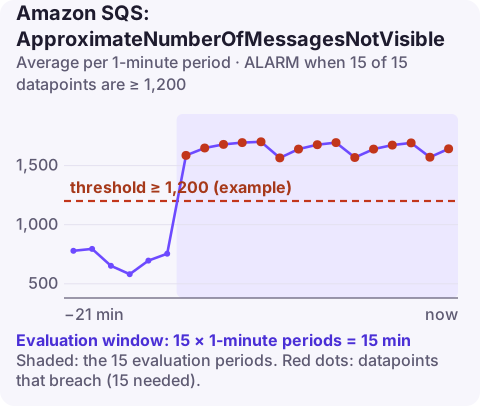
Alarm on AWS/SQS ApproximateNumberOfMessagesNotVisible per QueueName with the Average over 60 seconds, firing when it is at or above your threshold for 15 of 15 minutes. Set the threshold about 50% above the highest normal number of in-flight messages; a sudden jump usually means consumers are receiving messages but not deleting them.
What in-flight means
When a consumer receives a message, SQS hides it for the visibility timeout. Until the consumer deletes it, or the timeout expires and it reappears, it is "in flight" and counted by ApproximateNumberOfMessagesNotVisible.
In a healthy system this number tracks how many messages your consumers are actively working on. It rises abnormally when:
- Consumers fail to call
DeleteMessageafter processing (a bug, or an exception after the work is done), so messages cycle in and out of visibility. - Processing takes almost as long as the visibility timeout, so messages are frequently in flight twice.
- Consumers receive large batches and hold them while working through slowly.
There are also hard limits: about 120,000 in-flight messages for a standard queue, and 20,000 for a FIFO queue. FIFO queues have an extra effect: SQS looks through only the first 20,000 messages to find available message groups, so a large backlog in one group can stop other groups being delivered, without any error.
Recommended alarm settings
| Setting | Recommended value |
|---|---|
| Namespace | AWS/SQS |
| Metric | ApproximateNumberOfMessagesNotVisible |
| Dimensions | QueueName |
| Statistic | Average |
| Threshold | Depends on your situation (about 50% above normal maximum) |
| Period | 60 seconds |
| Datapoints to alarm | 15 |
| Evaluation periods | 15 |
| Comparison operator | GreaterThanOrEqualToThreshold |
Choosing the threshold
Chart the metric for two weeks and find the highest in-flight count during normal peaks, for example 800. Add 50%: 1,200. For FIFO queues, also keep the threshold well below 20,000 so you are warned before hitting the limit. If consumer concurrency is fixed (say 50 workers each receiving batches of 10), the theoretical maximum in flight is 500, and anything well above it means messages are not being deleted.
Lambda consumers deserve a note: the event source mapping receives batches on the function's behalf, so in-flight counts scale with concurrency multiplied by batch size, and a jump often follows a change to either setting.
Create the alarm
aws cloudwatch put-metric-alarm \
  --alarm-name sqs-orders-in-flight-high \
  --alarm-description "More than 1200 orders messages in flight for 15 minutes" \
  --namespace AWS/SQS \
  --metric-name ApproximateNumberOfMessagesNotVisible \
  --dimensions Name=QueueName,Value=orders \
  --statistic Average \
  --period 60 \
  --evaluation-periods 15 \
  --datapoints-to-alarm 15 \
  --threshold 1200 \
  --comparison-operator GreaterThanOrEqualToThreshold \
  --alarm-actions arn:aws:sns:eu-west-2:123456789012:oncall-alerts
When it fires
- Check receives versus deletes: graph
NumberOfMessagesReceivedandNumberOfMessagesDeleted. Receives far above deletes means messages are being processed repeatedly or not deleted. - Compare processing time with the visibility timeout (get-queue-attributes
VisibilityTimeout). Raise the timeout, or extend it per message withChangeMessageVisibilityfor long jobs. - Look for delete errors in consumer logs, such as an expired receipt handle.
- FIFO: check whether one message group has a large backlog blocking the others, and spread work across more group IDs.
Questions
How do I alarm on SQS queue size?
Visible messages (ApproximateNumberOfMessagesVisible) are the backlog waiting to be processed; not-visible messages are in progress. Most teams alarm on visible messages and on age of oldest message first.
How do I set a CloudWatch alarm on an SQS dead-letter queue?
Alarm on ApproximateNumberOfMessagesVisible for the DLQ with GreaterThanThreshold 0, so any message landing there notifies you. Do not use NumberOfMessagesSent on a DLQ, because messages moved there by a redrive policy are not counted in it.
A climbing in-flight count often means a consumer bug rather than a capacity problem, which is useful to know before scaling anything. CloudConsole, a phone app for AWS, is built to show queue alarms and metrics on your phone.
Did it start after a deploy? What changed? on the app’s alarm screen lists the deploys and configuration changes from the hour before the alarm fired.
About the app → · Download on the App Store