 CloudConsole
How to check SQS queue size
Run aws sqs get-queue-attributes --queue-url URL --attribute-names ApproximateNumberOfMessages ApproximateNumberOfMessagesNotVisible to see messages waiting and messages in flight. The SQS console shows the same figures in the queue list. For trends and alarms, use the CloudWatch metrics ApproximateNumberOfMessagesVisible and ApproximateAgeOfOldestMessage. All counts are approximate.
The three numbers
| Attribute (CloudWatch metric) | Meaning |
|---|---|
ApproximateNumberOfMessages (ApproximateNumberOfMessagesVisible) | Waiting to be received: the backlog |
ApproximateNumberOfMessagesNotVisible | Received by a consumer but not yet deleted: in flight |
ApproximateNumberOfMessagesDelayed | Sent with a delay that hasn't elapsed |
Queue depth on its own can mislead: a busy queue can hold thousands of messages and be fine. ApproximateAgeOfOldestMessage tells you whether consumers are keeping up.
Check it now
aws sqs get-queue-attributes \
  --queue-url https://sqs.eu-west-2.amazonaws.com/123456789012/orders \
  --attribute-names ApproximateNumberOfMessages ApproximateNumberOfMessagesNotVisible ApproximateNumberOfMessagesDelayed

# Every queue in the Region with its backlog
for q in $(aws sqs list-queues --query 'QueueUrls[]' --output text); do
  n=$(aws sqs get-queue-attributes --queue-url "$q" \
      --attribute-names ApproximateNumberOfMessages \
      --query 'Attributes.ApproximateNumberOfMessages' --output text)
  echo "$n $q"
done | sort -rn | head
In the SQS console, the queue list shows messages available and messages in flight per queue; the queue's Monitoring tab graphs the CloudWatch metrics.
Dead-letter queues
A DLQ is an ordinary queue that receives messages a consumer failed to process maxReceiveCount times, as set in the source queue's redrive policy. Any visible message in a DLQ means something failed, so its healthy depth is zero.
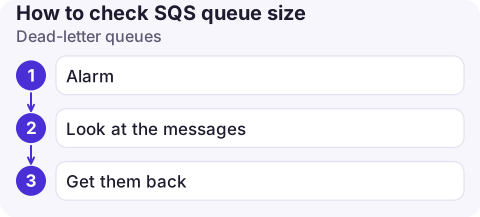
- Alarm:
ApproximateNumberOfMessagesVisibleon the DLQ, greater than 0, as in the recommended visible-messages alarm. - Look at the messages:
aws sqs receive-message --queue-url DLQ_URL --max-number-of-messages 10 --visibility-timeout 60 --attribute-names All. Received messages come back after the visibility timeout as long as you don't delete them.ApproximateReceiveCountin the attributes shows how often each was tried. - Get them back: once the cause is fixed, redrive the DLQ.
Alarm on backlog
aws cloudwatch put-metric-alarm \
  --alarm-name orders-queue-oldest-message \
  --namespace AWS/SQS --metric-name ApproximateAgeOfOldestMessage \
  --dimensions Name=QueueName,Value=orders \
  --statistic Maximum --period 60 \
  --evaluation-periods 5 --datapoints-to-alarm 5 \
  --threshold 600 --comparison-operator GreaterThanThreshold \
  --alarm-actions arn:aws:sns:eu-west-2:123456789012:ops-alerts
This fires when the oldest message has waited more than ten minutes for five minutes running. Choose the threshold from how long your work can safely wait; see ApproximateAgeOfOldestMessage for the published guidance.
Why the numbers look odd
- Approximate by design: SQS is distributed, so counts can lag or differ briefly between calls, especially on busy queues.
- CloudWatch lag: SQS metrics arrive at one-minute granularity and can trail the real state by a few minutes.
- Quiet queues: metrics may stop being published for a queue that has had no activity for some hours, so an alarm on an idle queue may show insufficient data. Treat missing data as not breaching for those.
- In-flight rising while visible stays flat: consumers are receiving but not deleting, usually because processing fails or runs longer than the visibility timeout.
- FIFO queues: a backlog can mean one message group is held up by a failing message while other groups keep moving.
Questions
How do I check how many messages are in an SQS queue?
Call aws sqs get-queue-attributes with ApproximateNumberOfMessages (waiting) and ApproximateNumberOfMessagesNotVisible (in flight), or look at the queue list in the SQS console.
How do I see what is in a dead-letter queue?
Receive messages from the DLQ with aws sqs receive-message and a visibility timeout. If you don't delete them they become visible again afterwards.
Which CloudWatch metric shows SQS queue size?
ApproximateNumberOfMessagesVisible in the AWS/SQS namespace, with the QueueName dimension.

A growing backlog is easiest to fix early. CloudConsole, a phone app for AWS, is built to show queue depth and oldest-message age on your phone alongside the alarms.
About the app → · Download on the App Store