 CloudConsole
CloudWatch alarm: Site-to-Site VPN TunnelState (per VPN connection)
Alarm on AWS/VPN TunnelState with the VpnId dimension, Minimum over 300 seconds, firing when it is below 1 for 3 of 3 periods. At the connection level the value is 1 only when every tunnel is up, so anything less means at least one of the two tunnels has been down for about 15 minutes and you have lost redundancy.
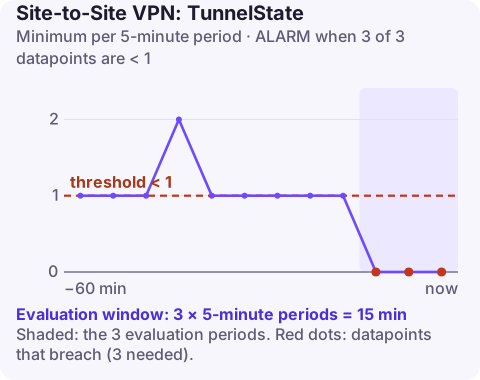
How TunnelState works at the VPN level
Each Site-to-Site VPN connection has two tunnels, terminating on different AWS endpoints. CloudWatch reports TunnelState as 1 for a tunnel that is up and 0 for one that is down; for BGP connections a tunnel counts as up only when BGP is established, not merely when IPsec is. With only VpnId, the value covers the connection as a whole, so 0.5 means one of two tunnels is down.
That is the point of this alarm: traffic may still be flowing over the surviving tunnel, so nobody notices, until AWS performs maintenance on the remaining endpoint or your device fails over badly. Losing redundancy is the warning.
Recommended alarm settings
| Setting | Recommended value |
|---|---|
| Namespace | AWS/VPN |
| Metric | TunnelState |
| Dimensions | VpnId |
| Statistic | Minimum |
| Threshold | 1.0 |
| Period | 300 seconds |
| Datapoints to alarm | 3 |
| Evaluation periods | 3 |
| Comparison operator | LessThanThreshold |
The Minimum statistic catches any dip in the period. Three five-minute periods means a tunnel must be down for about fifteen minutes, which rides out brief rekeys and endpoint replacements.
Single-tunnel setups
If your customer gateway only configures one tunnel, the second is always down and this alarm will sit in ALARM permanently. Either configure both tunnels (recommended), or use the per-tunnel version of this alarm on the tunnel you actually use. Do not raise the threshold to 0.5 to silence it: you would then miss the only tunnel going down.
Create the alarm
aws cloudwatch put-metric-alarm \
  --alarm-name vpn-office-tunnel-down \
  --alarm-description "At least one tunnel on vpn-0123456789abcdef0 down for 15 minutes" \
  --namespace AWS/VPN \
  --metric-name TunnelState \
  --dimensions Name=VpnId,Value=vpn-0123456789abcdef0 \
  --statistic Minimum \
  --period 300 \
  --evaluation-periods 3 \
  --datapoints-to-alarm 3 \
  --threshold 1 \
  --comparison-operator LessThanThreshold \
  --treat-missing-data breaching \
  --alarm-actions arn:aws:sns:eu-west-2:123456789012:oncall-alerts
breaching for missing data is a judgement call: it surfaces a VPN that has stopped reporting, but also alarms if the connection is deleted.
When it fires
- See which tunnel is down:
aws ec2 describe-vpn-connections \ --vpn-connection-ids vpn-0123456789abcdef0 \ --query "VpnConnections[0].VgwTelemetry[].[OutsideIpAddress,Status,StatusMessage,LastStatusChange]" \ --output table - Check the customer gateway device for IKE and IPsec errors on that peer address: mismatched phase 1 or 2 settings, an expired pre-shared key change, or dead peer detection timeouts.
- For BGP VPNs, check whether IPsec is up but BGP is not (wrong ASN, neighbour IPs, or the device not advertising routes).
- Check AWS Health for scheduled tunnel endpoint maintenance, which takes one tunnel down at a time.
- Enable tunnel logging to CloudWatch Logs if you need the IKE negotiation detail.
Questions
Why is my VPN TunnelState alarm always in ALARM?
Most likely only one tunnel is configured on your device. The VPN-level metric stays below 1 while the second tunnel is down.
Does TunnelState 0.5 mean traffic is down?
Not necessarily. Traffic can still flow over the remaining tunnel, but you have no redundancy.
A single VPN tunnel dropping is easy to ignore until the second one goes, so a quick look from wherever you are is useful. CloudConsole, a phone app for AWS, is built to show alarms like this one on your phone.
Did it start after a deploy? What changed? on the app’s alarm screen lists the deploys and configuration changes from the hour before the alarm fired.
About the app → · Download on the App Store