 CloudConsole
CloudWatch alarm: Site-to-Site VPN TunnelState (per tunnel)
Alarm on AWS/VPN TunnelState with the TunnelIpAddress dimension, Minimum over 300 seconds, below 1 for 3 of 3 periods. This version tracks one tunnel, identified by its AWS outside IP address, so you know exactly which tunnel went down and can alarm only on tunnels you actually use.
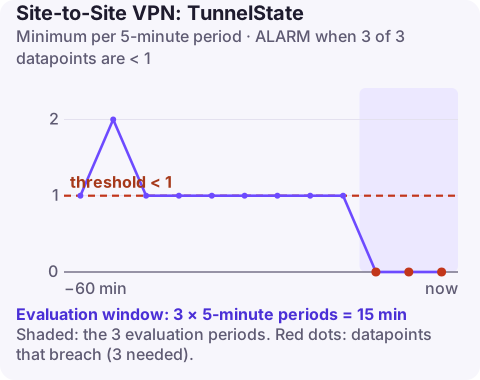
How this differs from the VpnId alarm
The metric is the same: 1 when a tunnel is up (for BGP, when the BGP session is established), 0 when it is down. The difference is scope.
| VpnId alarm | TunnelIpAddress alarm (this page) | |
|---|---|---|
| Watches | Both tunnels of one connection | One tunnel |
| Tells you which tunnel failed | No | Yes |
| Single-tunnel setups | Always in ALARM | Works, if you only alarm on the configured tunnel |
| Alarms per connection | One | Two |
Use the VpnId alarm as the default for redundant connections. Use per-tunnel alarms when you run a single tunnel, when you route preferentially over one tunnel and need to know if the primary fails, or when different teams own the two paths.
An alarm on an unconfigured tunnel's IP will always be in ALARM, so only create alarms for tunnels your device actually brings up.
Recommended alarm settings
| Setting | Recommended value |
|---|---|
| Namespace | AWS/VPN |
| Metric | TunnelState |
| Dimensions | TunnelIpAddress |
| Statistic | Minimum |
| Threshold | 1.0 |
| Period | 300 seconds |
| Datapoints to alarm | 3 |
| Evaluation periods | 3 |
| Comparison operator | LessThanThreshold |
Find the tunnel IP addresses
The dimension value is the AWS side outside IP address of the tunnel, not your customer gateway's address:
aws ec2 describe-vpn-connections \
  --vpn-connection-ids vpn-0123456789abcdef0 \
  --query "VpnConnections[0].VgwTelemetry[].OutsideIpAddress"
Those addresses stay the same for the life of the VPN connection, but a replaced connection gets new ones, so update the alarms if you recreate the VPN.
Name the alarms after the tunnel role (primary or secondary) as well as the address, so whoever is paged knows straight away whether traffic is affected.
Create the alarm
aws cloudwatch put-metric-alarm \
  --alarm-name vpn-office-tunnel1-down \
  --alarm-description "Primary VPN tunnel 203.0.113.10 down for 15 minutes" \
  --namespace AWS/VPN \
  --metric-name TunnelState \
  --dimensions Name=TunnelIpAddress,Value=203.0.113.10 \
  --statistic Minimum \
  --period 300 \
  --evaluation-periods 3 \
  --datapoints-to-alarm 3 \
  --threshold 1 \
  --comparison-operator LessThanThreshold \
  --treat-missing-data breaching \
  --alarm-actions arn:aws:sns:eu-west-2:123456789012:oncall-alerts
Create a second alarm with the other address if both tunnels are configured.
When it fires
- Check the tunnel's status message in
VgwTelemetry(same command as above, addingStatusandStatusMessage). - Is the other tunnel up? If so, confirm traffic has moved to it; with static routing your device must handle that, with BGP routes should withdraw automatically.
- Check the device for that peer: IKE version and proposals, pre-shared key, dead peer detection, and whether the interface or ISP link behind it is up.
- Look for maintenance: AWS replaces tunnel endpoints one at a time and notifies through AWS Health.
If tunnels flap (repeatedly going down and up), look at dead peer detection settings and rekey timers on the customer gateway first; mismatched lifetimes between the two sides are a frequent cause of periodic drops.
Questions
Which IP do I use for the TunnelIpAddress dimension?
The AWS outside IP address of the tunnel, listed as OutsideIpAddress in the VPN connection's telemetry, not your customer gateway IP.
Should I use both the VpnId and per-tunnel alarms?
For most redundant connections the VpnId alarm is enough. Add per-tunnel alarms if you need to know which tunnel failed or run only one tunnel.
Knowing which tunnel dropped tells you whether to call your network team or wait for AWS maintenance to finish. CloudConsole, a phone app for AWS, is built to show that alarm detail on your phone.
Did it start after a deploy? What changed? on the app’s alarm screen lists the deploys and configuration changes from the hour before the alarm fired.
About the app → · Download on the App Store