 CloudConsole
Amazon Redshift pricing explained
Provisioned Redshift bills each RA3 node per hour ($1.086 for an ra3.xlplus in us-east-1 at the time of writing) plus Redshift Managed Storage at $0.024 per GB-month. Redshift Serverless bills compute at $0.375 per RPU-hour, measured per second while queries run, plus the same storage price. Spectrum queries on S3 cost $5.00 per TB scanned.
Pricing dimensions
| Dimension | Unit | us-east-1 price |
|---|---|---|
| ra3.large | node-hour | $0.543 |
| ra3.xlplus | node-hour | $1.086 |
| ra3.4xlarge | node-hour | $3.26 |
| Redshift Managed Storage | GB-month | $0.024 |
| Serverless compute | RPU-hour | $0.375 |
| Spectrum | TB scanned | $5.00 |
From the AWS Price List API at the time of writing. Serverless has a one-minute minimum each time compute starts, and the base capacity you set (in RPUs) is what each active period bills at, scaling up under load.
Worked examples
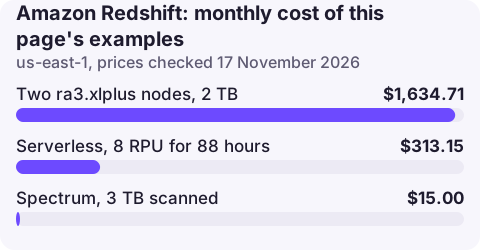
1. A two-node provisioned cluster. Two ra3.xlplus nodes with 2 TB of data:
- Compute: 2 × 730 × $1.086 = $1,585.56
- Storage: 2,048 × $0.024 = $49.15
- Total: $1,634.71 a month
2. Serverless for business-hours analytics. 8 RPU base capacity, busy about 4 hours a day on 22 days (88 hours): 8 × 88 × $0.375 = $264.00, plus $49.15 for the same 2 TB, $313.15.
3. Spectrum on a data lake. Queries scanning 3 TB of S3 data a month: 3 × $5.00 = $15.00. Parquet and partitioning cut the bytes scanned.
Provisioned or Serverless?
A provisioned cluster bills every hour it runs; Serverless bills only while queries run, so it suits intermittent workloads. A cluster busy most hours is cheaper provisioned, especially with reserved nodes. You can pause a provisioned cluster and pay only for storage while paused, and set usage limits on Serverless to cap RPU-hours per day, week or month.
Charges people miss
- Concurrency scaling beyond the free credits each cluster accrues (up to one hour a day) is billed per second at on-demand rates.
- Serverless dashboards and BI tools that query every few minutes keep compute awake all day.
- Snapshots kept beyond the automated retention, billed as backup storage.
- Cross-Region snapshot copies and data sharing across Regions, billed for transfer.
- DC2 legacy nodes ($0.25 per hour for dc2.large) bundled with local storage, which makes growth expensive.
Reserved nodes and Serverless reservations
Provisioned clusters can use one- or three-year reserved nodes, which discount the node-hour price in exchange for a commitment, much like EC2 reservations. Serverless has its own capacity reservations measured in RPUs. Both make sense only for the baseline you are sure to use; burst capacity is better left on demand. Storage is never covered by reservations, so a warehouse with a lot of cold data benefits more from unloading it to S3 and querying it with Spectrum.
Seeing Redshift cost
In Cost Explorer under Redshift, group by Usage type for Node:ra3.xlplus, RMS:ra3.xlplus, USE1-Redshift:ServerlessUsage and USE1-DataScanned (Spectrum). The Serverless console shows RPU-hours per day; SYS_SERVERLESS_USAGE in the database gives the same per query window.
Questions
How much does Redshift cost per month?
A two-node ra3.xlplus cluster with 2 TB is about $1,634.71 a month in us-east-1 at the time of writing; small Serverless workloads can cost a few hundred dollars.
Is Redshift Serverless cheaper?
For intermittent workloads, usually yes, because you pay $0.375 per RPU-hour only while queries run. For clusters busy most of the day, provisioned nodes are cheaper.
Is Redshift free?
No, though new customers can get a Serverless trial credit; check the Redshift free trial page for current terms.
A runaway query can hold Serverless capacity for hours. CloudConsole is being built to show alarms and costs on a phone so it gets noticed.
About the app → · Download on the App Store