 CloudConsole
aws codepipeline start-pipeline-execution
aws codepipeline start-pipeline-execution --name my-pipeline starts a new run using the latest revision from each source action, exactly like the console's Release change button. It returns a pipelineExecutionId you can follow with get-pipeline-execution; V2 pipelines also accept --variables and --source-revisions.
What the command does
It kicks off a fresh execution of the whole pipeline. Without extra options, every source action fetches its latest revision (head of the configured branch, latest image tag, newest S3 object version). Whether the new run replaces, queues behind or runs alongside an in-progress one depends on the pipeline's execution mode: superseded, queued or parallel.
Syntax
aws codepipeline start-pipeline-execution --name <pipeline> \
  [--variables name=<var>,value=<value> ...] \
  [--source-revisions actionName=<SourceAction>,revisionType=COMMIT_ID,revisionValue=<sha>]
Worked examples
Rerun with the latest commit (for example after fixing an environment problem):
exec_id=$(aws codepipeline start-pipeline-execution --name orders-api \
  --query pipelineExecutionId --output text)
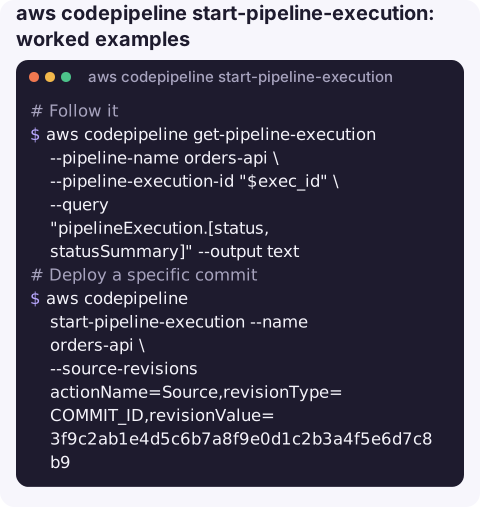
Follow it until it finishes:
aws codepipeline get-pipeline-execution --pipeline-name orders-api \
  --pipeline-execution-id "$exec_id" \
  --query "pipelineExecution.[status,statusSummary]" --output text
Deploy a specific commit, such as rolling back to a known-good version (V2 pipelines):
aws codepipeline start-pipeline-execution --name orders-api \
  --source-revisions actionName=Source,revisionType=COMMIT_ID,revisionValue=3f9c2ab1e4d5c6b7a8f9e0d1c2b3a4f5e6d7c8b9
Pass pipeline-level variables defined in the pipeline (V2):
aws codepipeline start-pipeline-execution --name orders-api \
  --variables name=DEPLOY_ENV,value=staging name=RUN_MIGRATIONS,value=false
Recent runs and their trigger:
aws codepipeline list-pipeline-executions --pipeline-name orders-api --max-items 5 \
  --query "pipelineExecutionSummaries[].[pipelineExecutionId,status,startTime,trigger.triggerType]" --output table
When to start a run by hand
Most executions are started by a source change. Manual starts are for the cases in between: an external dependency was fixed and nothing in the repository changed, a scheduled release needs to go out, or you need to redeploy an older commit after a bad release. In the last case, make sure later commits are not picked up by the next automatic run before the fix lands; a disabled stage transition is the usual way to hold production while you sort it out.
Rerun everything or just a stage?
| You want to… | Use |
|---|---|
| Run the full pipeline on the newest code | start-pipeline-execution |
| Retry only the failed actions of a stage in the same execution | aws codepipeline retry-stage-execution --retry-mode FAILED_ACTIONS; see retrying a failed stage |
| Stop a run that is going wrong | aws codepipeline stop-pipeline-execution, optionally with --abandon |
Gotchas
- Superseded mode can cancel your run. In the default mode, a newer execution reaching a stage replaces an older one waiting there. Starting a run while a release is half-way through can supersede it.
- Revision types depend on the source.
COMMIT_IDfor CodeCommit and connection-based Git sources,IMAGE_DIGESTfor ECR,S3_OBJECT_VERSION_IDorS3_OBJECT_KEYfor S3. - Variables and source revisions need a V2 pipeline. V1 pipelines reject them; check
pipelineTypewithaws codepipeline get-pipeline. - Disabled transitions still stop it. If someone disabled the transition into a stage, the run waits there; re-enable with
enable-stage-transition. - Idempotency.
--client-request-tokenprevents duplicate runs if a script retries the call.
Questions
How do I re-run a CodePipeline from the CLI?
aws codepipeline start-pipeline-execution --name <pipeline>. It uses the latest source revision; add --source-revisions to pin an exact commit.
How do I deploy an older commit with CodePipeline?
On a V2 pipeline, start an execution with --source-revisions actionName=Source,revisionType=COMMIT_ID,revisionValue=<sha>. On V1, revert the commit in the repository instead.
How do I check whether my execution succeeded?
Poll aws codepipeline get-pipeline-execution with the returned pipelineExecutionId until status is Succeeded, Failed, Stopped or Superseded.
Kicking off a redeploy is often the fix someone wants to make from wherever they are. CloudConsole is built with guardrails for production pipelines and to show their state on a phone.
About the app → · Download on the App Store