 CloudConsole
How to approve a CodePipeline manual approval
In the CodePipeline console, open the pipeline, choose Review on the waiting approval action, add a comment and choose Approve or Reject. From the CLI, get the approval token with aws codepipeline get-pipeline-state, then call aws codepipeline put-approval-result with status=Approved. An approval that nobody answers fails the stage after seven days.
Console steps
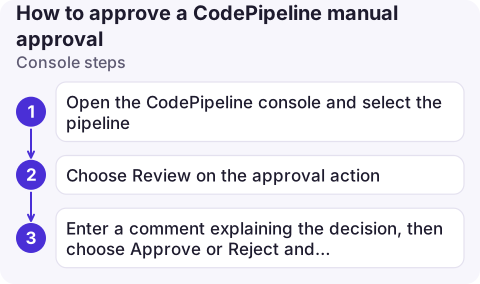
- Open the CodePipeline console and select the pipeline. The approval stage shows the action as waiting.
- Choose Review on the approval action. If the pipeline author added a URL to review (for example a staging site or a change set), open it first.
- Enter a comment explaining the decision, then choose Approve or Reject and submit.
Approving lets the execution continue to the next stage. Rejecting fails the stage; the execution stops there, and you can later retry the stage to get a fresh approval request.
CLI steps
# 1. Get the token for the waiting approval (stage "Approval", action "ManualApproval")
TOKEN=$(aws codepipeline get-pipeline-state --name my-pipeline \
  --query "stageStates[?stageName=='Approval'].actionStates[?actionName=='ManualApproval'][].latestExecution.token" \
  --output text)

# 2. Approve (or use status=Rejected)
aws codepipeline put-approval-result \
  --pipeline-name my-pipeline \
  --stage-name Approval \
  --action-name ManualApproval \
  --result summary="Staging checks passed, approved by alex",status=Approved \
  --token "$TOKEN"
The response includes approvedAt. Stage and action names are case-sensitive and must match the pipeline definition; aws codepipeline get-pipeline --name my-pipeline shows them.
Permissions
The approver needs codepipeline:PutApprovalResult on the action, plus read access to see the pipeline. The resource ARN goes down to the action, so you can let one group approve production only:
{
  "Version": "2012-10-17",
  "Statement": [
    { "Effect": "Allow", "Action": ["codepipeline:GetPipeline", "codepipeline:GetPipelineState", "codepipeline:ListPipelines"], "Resource": "*" },
    { "Effect": "Allow", "Action": "codepipeline:PutApprovalResult",
      "Resource": "arn:aws:codepipeline:eu-west-2:123456789012:my-pipeline/Approval/ManualApproval" }
  ]
}
Before you approve
- Check what you're approving. The execution's source revision (commit ID) is visible in the pipeline view and in
aws codepipeline list-pipeline-executions --pipeline-name my-pipeline. Make sure it's the change you reviewed, not a newer one that arrived meanwhile. - Check earlier stages passed as expected: tests, security scans and the staging deploy.
- Leave a real comment. The summary is recorded with the approval and in CloudTrail, which is your audit trail for who let the change through.
Every decision is recorded in CloudTrail as a PutApprovalResult event, which answers "who let this release through?" later. If your team discusses approvals in chat, connect the approval action's SNS topic to a chat channel; people still approve in the console or CLI, so the IAM policy above remains the control.
Errors you may hit
| Error | Meaning |
|---|---|
InvalidApprovalTokenException | The token is stale: the approval already got a response, expired, or a newer execution superseded it. Fetch the token again. |
ApprovalAlreadyCompletedException | Someone else approved or rejected it first |
ActionNotFoundException / StageNotFoundException | Name mismatch, often case |
AccessDeniedException | Your policy doesn't cover that action ARN |
To be told when an approval is waiting, configure an SNS topic on the approval action; reviewers get an email (or chat message) with a link.
Questions
How long does a CodePipeline manual approval wait?
Seven days. If nobody approves or rejects it within that time, the action fails and the stage fails with it.
Can I approve a CodePipeline from the command line?
Yes. Get the token from aws codepipeline get-pipeline-state and pass it to aws codepipeline put-approval-result with status=Approved and a summary.
What happens when I reject an approval?
The approval action and its stage fail and the execution stops. Retrying the stage creates a new approval request.

Approvals tend to arrive when the approver is away from their desk. CloudConsole, a phone app for AWS, is built to show pipeline state on your phone, with production guardrails around anything that changes it.
About the app → · Download on the App Store