 CloudConsole
aws ec2 authorize-security-group-ingress
aws ec2 authorize-security-group-ingress --group-id sg-0123456789abcdef0 --protocol tcp --port 443 --cidr 203.0.113.0/24 adds an inbound rule to a security group. Use --source-group to allow another group instead of a CIDR, and --ip-permissions when you need several rules, IPv6 or a rule description.
What the command does
Security groups deny all inbound traffic until a rule allows it. This command appends one or more allow rules; it cannot create deny rules (that is what network ACLs are for). Groups are stateful, so you only need inbound rules for the connection to be accepted; return traffic is automatically allowed.
The change applies within seconds to every network interface using the group: instances, load balancers, RDS, Lambda in a VPC and so on.
Syntax
The short form (one rule, IPv4 or one source group):
aws ec2 authorize-security-group-ingress \
  --group-id sg-0123456789abcdef0 \
  --protocol tcp|udp|icmp|all \
  --port 443 | --port 8000-8080 \
  --cidr 203.0.113.0/24 | --source-group sg-0fedcba9876543210
The full form, which supports descriptions, IPv6, prefix lists and several rules per call:
aws ec2 authorize-security-group-ingress --group-id sg-0123456789abcdef0 \
  --ip-permissions 'IpProtocol=tcp,FromPort=443,ToPort=443,IpRanges=[{CidrIp=0.0.0.0/0,Description="Public HTTPS"}],Ipv6Ranges=[{CidrIpv6=::/0}]'
Worked examples
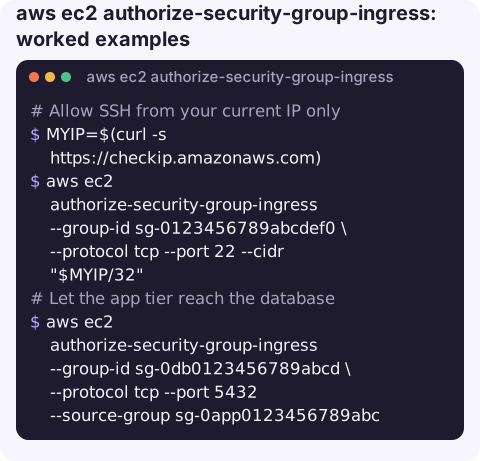
Allow SSH from your current IP only:
MYIP=$(curl -s https://checkip.amazonaws.com)
aws ec2 authorize-security-group-ingress --group-id sg-0123456789abcdef0 \
  --protocol tcp --port 22 --cidr "$MYIP/32"
Let the app tier reach the database by referencing its security group rather than IPs, so the rule keeps working as instances come and go:
aws ec2 authorize-security-group-ingress --group-id sg-0db0123456789abcd \
  --protocol tcp --port 5432 --source-group sg-0app0123456789abc
Allow a port range with a description, so the next person knows why it exists:
aws ec2 authorize-security-group-ingress --group-id sg-0123456789abcdef0 \
  --ip-permissions 'IpProtocol=tcp,FromPort=8000,ToPort=8080,IpRanges=[{CidrIp=10.0.0.0/16,Description="Internal admin UIs"}]'
Allow ping (for ICMP, FromPort is the ICMP type, 8 for echo request, and a ToPort of -1 means any code):
aws ec2 authorize-security-group-ingress --group-id sg-0123456789abcdef0 \
  --ip-permissions 'IpProtocol=icmp,FromPort=8,ToPort=-1,IpRanges=[{CidrIp=10.0.0.0/16}]'
The response returns "Return": true and a SecurityGroupRules list containing the new sgr- rule IDs, which you can store for a later revoke.
Errors
| Error | Meaning |
|---|---|
InvalidPermission.Duplicate | An identical rule already exists. Safe to ignore in idempotent scripts. |
RulesPerSecurityGroupLimitExceeded | The group is at its rule quota. Consolidate CIDRs into a managed prefix list, or request a higher quota. |
InvalidGroup.NotFound | Wrong region, or a group ID from another VPC/account. |
InvalidParameterValue on CIDR | The CIDR is not aligned, for example 10.0.1.5/24 instead of 10.0.1.0/24. |
Gotchas
- Prefer least privilege. Avoid
0.0.0.0/0on SSH, RDP and database ports; use Session Manager for shell access instead of opening 22 at all. --protocol allignores ports and opens every port. Easy to do by accident when copying examples.- Still no traffic? Check the network ACL, the route table and the host firewall; a security group rule is necessary but not sufficient.
- Outbound rules are separate. If you removed the default allow-all egress rule, add the matching rule with
authorize-security-group-egress.
Questions
How do I add a description to a security group rule from the CLI?
Use --ip-permissions with a Description inside the IpRanges entry. The short --cidr form has no description field.
How do I allow traffic from another security group?
Use --source-group sg-... with --protocol and --port. Members of the source group can then connect, whatever their IP addresses.
Do I need an outbound rule for responses?
No. Security groups are stateful, so responses to allowed inbound connections are permitted regardless of outbound rules.
Opening a port is a quick change with a long tail of risk. CloudConsole, a phone app for AWS, is built with production guardrails so changes like this are visible and deliberate.
About the app → · Download on the App Store