 CloudConsole
aws ec2 describe-security-groups
aws ec2 describe-security-groups lists security groups in a region with all their inbound (IpPermissions) and outbound (IpPermissionsEgress) rules. Use --filters such as Name=vpc-id or Name=ip-permission.cidr,Values=0.0.0.0/0 to narrow it, and --query to flatten the deeply nested rules.
What the command does
Each security group in the output carries its ID, name, VPC, description, tags and two rule lists. Every rule has a protocol, a port range and one or more sources: IPv4 CIDRs in IpRanges, IPv6 in Ipv6Ranges, other groups in UserIdGroupPairs, and prefix lists in PrefixListIds. A protocol of -1 means all traffic, in which case there are no port fields.
Syntax
aws ec2 describe-security-groups \
  [--group-ids sg-0123456789abcdef0 ...] \
  [--filters "Name=vpc-id,Values=vpc-0123456789abcdef0"] \
  [--query ...] [--output table]
Prefer --group-ids or a group-name filter over --group-names: the latter only resolves names in the default VPC.
Worked examples
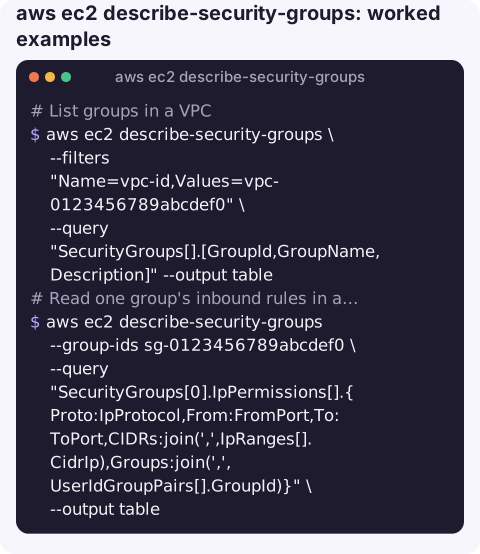
List groups in a VPC:
aws ec2 describe-security-groups \
  --filters "Name=vpc-id,Values=vpc-0123456789abcdef0" \
  --query "SecurityGroups[].[GroupId,GroupName,Description]" --output table
Read one group's inbound rules in a flat form:
aws ec2 describe-security-groups --group-ids sg-0123456789abcdef0 \
  --query "SecurityGroups[0].IpPermissions[].{Proto:IpProtocol,From:FromPort,To:ToPort,CIDRs:join(',',IpRanges[].CidrIp),Groups:join(',',UserIdGroupPairs[].GroupId)}" \
  --output table
Groups with any rule open to the whole internet:
aws ec2 describe-security-groups \
  --filters "Name=ip-permission.cidr,Values=0.0.0.0/0" \
  --query "SecurityGroups[].[GroupId,GroupName]" --output text
Groups with SSH open to the world, checked inside a single rule so port and CIDR must match together:
aws ec2 describe-security-groups \
  --query 'SecurityGroups[?IpPermissions[?FromPort==`22` && IpRanges[?CidrIp==`0.0.0.0/0`]]].[GroupId,GroupName]' \
  --output text
What is using this group? Security groups attach to network interfaces, so ask for those:
aws ec2 describe-network-interfaces \
  --filters "Name=group-id,Values=sg-0123456789abcdef0" \
  --query "NetworkInterfaces[].[NetworkInterfaceId,InterfaceType,Description,Attachment.InstanceId]" \
  --output table
Useful filters
| Filter | Matches |
|---|---|
vpc-id | Groups in a VPC. |
group-name | By name, in any VPC; wildcards allowed. |
ip-permission.cidr | Any inbound rule with that IPv4 CIDR. |
ip-permission.from-port / to-port | Any inbound rule with that port. |
ip-permission.group-id | Groups that allow traffic from another group. |
egress.ip-permission.cidr | Outbound rules with that CIDR. |
tag:<key> | By tag value. |
Gotchas
- Rule filters are matched independently.
ip-permission.from-port=22plusip-permission.cidr=0.0.0.0/0also matches a group with port 22 open to a private range and port 443 open to the world. Use the JMESPath form above when the pair must be on one rule. - Port ranges. A rule of 0–65535 opens port 22 too, but
FromPort==`22`will not catch it. For audits, also look forIpProtocol=='-1'and wide ranges. - IPv6. Open-to-world IPv6 rules use
::/0inIpv6Ranges; a CIDR filter on0.0.0.0/0misses them. - Rule IDs. This command does not show
sgr-rule IDs. Useaws ec2 describe-security-group-ruleswhen you need them for revoke or modify calls.
Questions
How do I list all security groups with the CLI?
aws ec2 describe-security-groups --query "SecurityGroups[].[GroupId,GroupName,VpcId]" --output table lists every group in the current region. Repeat with --region for others.
How do I find security groups that allow 0.0.0.0/0?
Use --filters "Name=ip-permission.cidr,Values=0.0.0.0/0" for inbound rules, and check Ipv6Ranges for ::/0 separately.
How do I describe network interfaces for a security group?
Run aws ec2 describe-network-interfaces --filters "Name=group-id,Values=sg-0123456789abcdef0". Any interface listed is using the group, including Lambda, RDS and load balancer ENIs.
An open port found during an incident is easier to judge with the right context in front of you. CloudConsole, a phone app for AWS, is built to show resources and their alarms on a phone, with guardrails for production.
About the app → · Download on the App Store