 CloudConsole
Could not connect to RDS: connection timed out
A timeout means packets to the database's port were silently dropped, so it is a network problem, not credentials. The usual cause is the DB security group not allowing your client's security group or IP on 3306/5432; after that, check whether the instance is publicly accessible and in public subnets (if you are connecting from outside the VPC) and that the instance is actually running.
Timeout vs other failures
Different messages, different problems:
| Message | Meaning |
|---|---|
| Connection timed out / Can't connect to MySQL server (110) / timeout expired | No reply at all: security group, NACL, routing, wrong host |
| Connection refused | Host reachable but nothing listening on that port: wrong port, instance stopped or rebooting |
| Access denied / password authentication failed | Network is fine; credentials problem |
| This RDS Proxy requires TLS connections | Reached RDS Proxy fine, but it is set to require TLS; enable SSL in the client |
Test the TCP path directly from the client machine first:
nc -vz -w 5 orders-db.abcdefghijkl.eu-west-2.rds.amazonaws.com 5432Causes, most common first
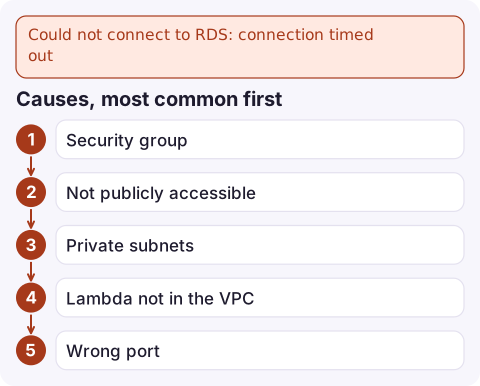
- Security group on the DB instance does not allow the client. From inside AWS, allow the client's security group as the source; from outside, allow your public IP as a /32.
- Not publicly accessible: the endpoint resolves to a private IP, so it is unreachable from your laptop. That is usually correct for production; use a bastion, Session Manager port forwarding or a VPN.
- Private subnets: even with Publicly accessible set to Yes, the DB subnet group must use subnets with a route to an internet gateway for outside access.
- Lambda not in the VPC, or in subnets whose route tables or NACLs cannot reach the database subnets.
- Wrong port: the instance was created on a non-default port.
- Instance not available: stopped, rebooting, or failing over.
Check the configuration
aws rds describe-db-instances --db-instance-identifier orders-db \
  --query 'DBInstances[].{status:DBInstanceStatus,host:Endpoint.Address,port:Endpoint.Port,public:PubliclyAccessible,sgs:VpcSecurityGroups[].VpcSecurityGroupId,subnets:DBSubnetGroup.Subnets[].SubnetIdentifier}'
Then read the security group's inbound rules for the database port:
aws ec2 describe-security-groups --group-ids sg-0db0123456789abcd \
  --query 'SecurityGroups[].IpPermissions[].{port:FromPort,sgs:UserIdGroupPairs[].GroupId,cidrs:IpRanges[].CidrIp}'
From inside the VPC, check what the endpoint resolves to with dig +short; a private address from outside the VPC explains the timeout immediately.
Fix it
- Allow the client's security group on the database port (better than CIDR ranges, because it follows instances and tasks as they change):
aws ec2 authorize-security-group-ingress --group-id sg-0db0123456789abcd \ --protocol tcp --port 5432 --source-group sg-0app0123456789abc - Reach a private database from your laptop through Session Manager port forwarding via an instance in the VPC, instead of making the database public.
- Lambda: attach the function to the VPC's private subnets with a security group the database allows. Remember that this changes the function's internet access too.
- Set client connect timeouts to a few seconds so failures surface quickly instead of hanging for minutes.
Intermittent timeouts
If connections usually work but sometimes time out, look at the instance rather than the network: CPU at 100%, the connection limit reached, a failover in progress (the endpoint's DNS changes and clients holding the old address time out), or long-held connections dropped by a NAT gateway's idle timeout. Check RDS events and the DatabaseConnections and CPUUtilization metrics around the failures.
Questions
Why can't I connect to RDS from my local machine?
Usually the instance is not publicly accessible or its subnets have no internet gateway route, or the security group does not allow your IP. Use Session Manager port forwarding or a bastion for private databases.
What does "this RDS Proxy requires TLS connections" mean?
The proxy's Require TLS setting is on and your client connected without TLS. Enable SSL in the driver or connection string.
Does Lambda need to be in a VPC to connect to RDS?
For a database without public access, yes. The function must run in subnets that can route to the database, with a security group the database allows.

If every application instance starts timing out at once, it is usually a failover or a security group change. CloudConsole, a phone app for AWS, is built to show RDS events and connection alarms on your phone so you can tell which.
Did it start after a deploy? What changed? on the app’s alarm screen lists the deploys and configuration changes from the hour before the alarm fired.
About the app → · Download on the App Store