 CloudConsole
aws ecs run-task
aws ecs run-task --cluster my-cluster --task-definition my-task --launch-type FARGATE --network-configuration "awsvpcConfiguration={subnets=[subnet-0123456789abcdef0],securityGroups=[sg-0123456789abcdef0]}" starts a standalone task, outside any service. Use --overrides to change the command for jobs such as database migrations, and check failures[] in the response.
What the command does
run-task launches one or more copies (up to ten per call) of a task definition. Nothing restarts them when they exit, which makes it the right tool for migrations, batch jobs, one-off scripts and ad-hoc debugging containers.
The response has tasks[] for tasks that were placed and failures[] for those that were not. A placement failure does not make the command exit non-zero.
Syntax
aws ecs run-task --cluster my-cluster --task-definition my-task[:rev] \
  [--launch-type FARGATE | --capacity-provider-strategy capacityProvider=FARGATE_SPOT,weight=1] \
  [--network-configuration "awsvpcConfiguration={subnets=[...],securityGroups=[...],assignPublicIp=DISABLED}"] \
  [--overrides file://overrides.json] \
  [--count 1] [--started-by my-job] [--enable-execute-command]
Worked examples
Run database migrations using the service's image, overriding the command:
TASK=$(aws ecs run-task --cluster prod --task-definition orders-api \
  --launch-type FARGATE \
  --network-configuration "awsvpcConfiguration={subnets=[subnet-0aa0123456789abcd,subnet-0bb0123456789abcd],securityGroups=[sg-0123456789abcdef0],assignPublicIp=DISABLED}" \
  --overrides '{"containerOverrides":[{"name":"web","command":["python","manage.py","migrate"]}]}' \
  --started-by migrate-$(date +%s) \
  --query "tasks[0].taskArn" --output text)
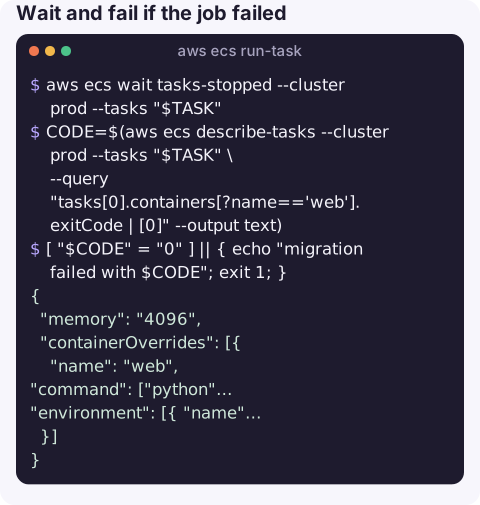
Wait and fail if the job failed:
aws ecs wait tasks-stopped --cluster prod --tasks "$TASK"
CODE=$(aws ecs describe-tasks --cluster prod --tasks "$TASK" \
  --query "tasks[0].containers[?name=='web'].exitCode | [0]" --output text)
[ "$CODE" = "0" ] || { echo "migration failed with $CODE"; exit 1; }
Pass extra environment variables and more memory through an overrides file:
{
  "memory": "4096",
  "containerOverrides": [{
    "name": "web",
    "command": ["python", "scripts/backfill.py"],
    "environment": [{ "name": "BACKFILL_FROM", "value": "2026-11-01" }]
  }]
}
Task-level CPU and memory overrides must still be a valid Fargate combination.
A debugging shell you can exec into:
aws ecs run-task --cluster prod --task-definition toolbox --launch-type FARGATE \
  --enable-execute-command \
  --network-configuration "awsvpcConfiguration={subnets=[subnet-0aa0123456789abcd],securityGroups=[sg-0123456789abcdef0]}"
Failures and fixes
| Symptom | Cause |
|---|---|
failures[].reason = RESOURCE:MEMORY or RESOURCE:CPU | EC2 launch type: no instance with enough free capacity. |
InvalidParameterException: Network Configuration must be provided | Fargate and awsvpc tasks need --network-configuration. |
Task stops with CannotPullContainerError | Private subnet without NAT or VPC endpoints, or public subnet with assignPublicIp=DISABLED. |
AccessDeniedException on iam:PassRole | Your identity needs permission to pass the task and execution roles. |
Gotchas
- Container names in overrides must match the task definition exactly, or the override is rejected.
- Overrides replace, not append. A
commandoverride replaces the whole command array;environmententries add to or replace variables by name. - Waiter limits.
tasks-stoppedgives up after about ten minutes; long jobs need a polling loop onlastStatus. - Scheduled tasks not running? EventBridge rules and Scheduler schedules call this same API; check the target's role permissions and network configuration, and the rule's failed invocation metrics.
- Label your tasks. A meaningful
--started-byvalue, such as the job name and a timestamp, lets you find the task later withlist-tasks --started-byand makes CloudTrail and task events easier to read.
Questions
How do I override the command in aws ecs run-task?
Use --overrides with containerOverrides, naming the container and giving a command array, for example {"containerOverrides":[{"name":"web","command":["npm","run","migrate"]}]}.
Why is my ECS scheduled task not running?
Check the EventBridge target's role can call ecs:RunTask and pass the task roles, that the network configuration is valid for Fargate, and the rule's FailedInvocations metric.
How do I get the exit code of a task started with run-task?
Wait with aws ecs wait tasks-stopped, then read tasks[0].containers[].exitCode from describe-tasks.
One-off jobs such as migrations are often run during incidents, sometimes under pressure. CloudConsole, a phone app for AWS, is built with production guardrails and to show task outcomes and logs on a phone.
About the app → · Download on the App Store