 CloudConsole
aws iam create-access-key
aws iam create-access-key --user-name my-user creates a new long-term access key ID and secret for an IAM user. The secret is shown only in this response, each user can have at most two keys, and for people (as opposed to legacy automation) temporary credentials from IAM Identity Center or roles are the better choice.
What the command does
It generates a key pair for the named IAM user and returns it once:
{
  "AccessKey": {
    "UserName": "ci-deploy",
    "AccessKeyId": "AKIAIOSFODNN7EXAMPLE",
    "Status": "Active",
    "SecretAccessKey": "wJalrXUtnFEMI/K7MDENG/bPxRfiCYEXAMPLEKEY",
    "CreateDate": "2026-11-16T09:30:00+00:00"
  }
}
If you omit --user-name, the key is created for the IAM user making the call. The new key is active immediately, though as with other IAM changes it can take a few seconds before every AWS endpoint accepts it.
Syntax
aws iam create-access-key [--user-name <user>]Worked examples
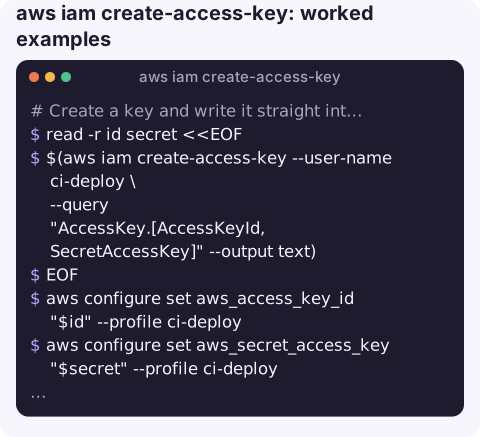
Create a key and write it straight into a CLI profile, without printing the secret to the terminal:
read -r id secret <<EOF
$(aws iam create-access-key --user-name ci-deploy \
  --query "AccessKey.[AccessKeyId,SecretAccessKey]" --output text)
EOF
aws configure set aws_access_key_id "$id" --profile ci-deploy
aws configure set aws_secret_access_key "$secret" --profile ci-deploy
unset secret
Store it in Secrets Manager for an application to read instead:
aws iam create-access-key --user-name legacy-ftp-sync --output json > /tmp/key.json
aws secretsmanager create-secret --name legacy-ftp-sync/aws-key \
  --secret-string file:///tmp/key.json
shred -u /tmp/key.json
Check the user is below the two-key limit first:
aws iam list-access-keys --user-name ci-deploy \
  --query "AccessKeyMetadata[].[AccessKeyId,Status,CreateDate]" --output text
Rotation pattern: create the new key, deploy it, confirm the old key is no longer used, deactivate, then delete. See rotating IAM access keys and update-access-key.
Letting users manage their own keys
If some IAM users must keep keys, let them rotate their own rather than routing every rotation through an administrator. An identity-based policy that allows iam:CreateAccessKey, iam:UpdateAccessKey, iam:DeleteAccessKey and iam:ListAccessKeys on arn:aws:iam::123456789012:user/${aws:username} limits each user to their own keys. Pair it with an MFA condition for anything sensitive.
When not to create an access key
| You are… | Use instead |
|---|---|
| A person using the CLI | IAM Identity Center and aws sso login, which gives short-lived credentials |
| Code on EC2, ECS, Lambda | The instance profile, task role or execution role |
| CI in GitHub Actions or similar | OIDC federation to an IAM role |
| Another AWS account | A cross-account role and sts assume-role |
| Root user | Never. Delete root keys if any exist |
Gotchas
- The secret cannot be retrieved later. Lose it and the only fix is a new key.
LimitExceededmeans the user already has two keys, active or inactive. Delete an unused one first.- Keys leak through history and logs. Do not paste the JSON into chat or tickets, and avoid echoing it in CI output.
- "Identity Center create access key" is a different thing. Identity Center users cannot have long-term IAM keys. The access portal shows short-lived credentials per account and role, and the CLI fetches the same via SSO.
- Least privilege still applies. A key is only as dangerous as the user's policies. Review them with simulate-principal-policy.
Questions
How do I create access keys for IAM Identity Center users?
You do not; Identity Center issues temporary credentials. Configure a profile with aws configure sso and run aws sso login, or copy the short-term keys from the access portal.
How many access keys can an IAM user have?
Two at a time. That allows rotation: create a second key, move to it, then delete the first.
How do I create an access key for myself?
Run aws iam create-access-key without --user-name while authenticated as that IAM user. You need iam:CreateAccessKey on your own user.
Key rotation is the kind of chore that slips until an audit finding forces it. CloudConsole is built with production guardrails in mind and to show the state of your AWS resources on a phone.
About the app → · Download on the App Store