 CloudConsole
aws sts assume-role
aws sts assume-role --role-arn arn:aws:iam::123456789012:role/Admin --role-session-name jane returns temporary credentials (access key, secret key and session token) for that role, valid for an hour by default. For everyday CLI use, a profile with role_arn and source_profile does the same thing automatically and refreshes it for you.
What the command does
assume-role exchanges your current credentials for short-lived credentials of another role, in the same or another account. Two things must both allow it: the role's trust policy must name your principal (or account), and your own identity must be allowed sts:AssumeRole on that role ARN.
Syntax
aws sts assume-role \
  --role-arn arn:aws:iam::123456789012:role/Admin \
  --role-session-name jane-debug \
  [--duration-seconds 3600] \
  [--external-id abc123] \
  [--serial-number arn:aws:iam::111122223333:mfa/jane --token-code 123456]
Response (trimmed):
{
  "Credentials": {
    "AccessKeyId": "ASIA...",
    "SecretAccessKey": "...",
    "SessionToken": "...",
    "Expiration": "2026-11-16T11:02:00+00:00"
  },
  "AssumedRoleUser": { "Arn": "arn:aws:sts::123456789012:assumed-role/Admin/jane-debug" }
}
Worked examples
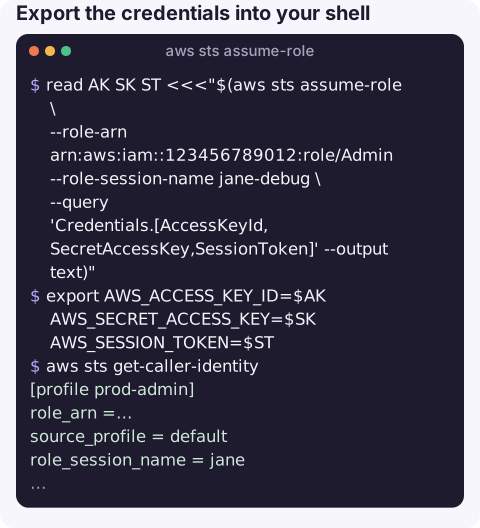
Export the credentials into your shell:
read AK SK ST <<<"$(aws sts assume-role \
  --role-arn arn:aws:iam::123456789012:role/Admin --role-session-name jane-debug \
  --query 'Credentials.[AccessKeyId,SecretAccessKey,SessionToken]' --output text)"
export AWS_ACCESS_KEY_ID=$AK AWS_SECRET_ACCESS_KEY=$SK AWS_SESSION_TOKEN=$ST
aws sts get-caller-identity
Undo it with unset AWS_ACCESS_KEY_ID AWS_SECRET_ACCESS_KEY AWS_SESSION_TOKEN.
Better for daily use: a role profile in ~/.aws/config, which the CLI assumes and refreshes on demand:
[profile prod-admin]
role_arn = arn:aws:iam::123456789012:role/Admin
source_profile = default
role_session_name = jane
mfa_serial = arn:aws:iam::111122223333:mfa/jane
duration_seconds = 3600
aws s3 ls --profile prod-adminThird-party access with an external ID:
aws sts assume-role --role-arn arn:aws:iam::123456789012:role/VendorAudit \
  --role-session-name vendor --external-id 7f3c2b9e
Assume a role with a web identity token (for example from a CI provider's OIDC token), which needs no AWS credentials beforehand:
aws sts assume-role-with-web-identity \
  --role-arn arn:aws:iam::123456789012:role/GitHubDeploy \
  --role-session-name ci-4821 \
  --web-identity-token "$OIDC_TOKEN"
Duration rules
| Situation | Maximum session |
|---|---|
| Default | 1 hour |
With --duration-seconds | Up to the role's maximum session duration, which can be set up to 12 hours |
| Role chaining (assuming a role from a role session) | 1 hour, regardless of settings |
Gotchas
AccessDenied ... is not authorized to perform: sts:AssumeRolemeans either the trust policy or your IAM policy is missing; see not authorized to perform sts:AssumeRole. An SCP or a missing external ID or MFA condition gives the same message.- Stale variables. Assuming a role while old
AWS_SESSION_TOKENvalues are exported leads toInvalidClientTokenId. Unset them first. - Session names show up in CloudTrail. Use something that identifies the person or job, not a constant like
session. - Do not paste credentials into tickets or chat. They are live until they expire.
- Trace people through shared roles. Values passed with
--source-identityand session tags with--tagsare recorded in CloudTrail and can be used in policy conditions, which helps when many people use the same role.
Questions
How do I assume a role from the AWS CLI?
Either run aws sts assume-role and export the returned credentials, or define a profile with role_arn and source_profile and use --profile, which is simpler and refreshes automatically.
Why does assume-role say the security token included in the request is invalid?
The credentials used to call assume-role are bad: a deleted key, or an expired session token still set in your environment.
How do I assume a role with web identity from the CLI?
Use aws sts assume-role-with-web-identity with --role-arn, --role-session-name and --web-identity-token; no existing AWS credentials are needed.
Switching into a production role is a deliberate step, and it should feel like one on any device. CloudConsole, a phone app for AWS, is built with production guardrails and a clear view of which account and role you are using.
About the app → · Download on the App Store