 CloudConsole
AccessDenied: User is not authorized to perform: sts:AssumeRole
Assuming a role needs two things to line up: the role's trust policy must name your principal (or your account), and, unless the trust policy names you directly in the same account, your own identity policy must allow sts:AssumeRole on that role's ARN. Most failures are a trust policy that doesn't list the caller, a typo in the role ARN, or a missing ExternalId or MFA value that a trust policy condition requires.
Reading the message
An error occurred (AccessDenied) when calling the AssumeRole operation:
User: arn:aws:iam::111122223333:user/alice is not authorized to perform:
sts:AssumeRole on resource: arn:aws:iam::123456789012:role/Admin
The User: part is the identity that made the call; check it is who you think. A role's session looks like arn:aws:sts::111122223333:assumed-role/CI/session, which matters because trust policies that name a user won't match a role session. The resource is the role ARN as you typed it. AWS returns this same error when the role doesn't exist, so a misspelt role name looks identical to a policy problem.
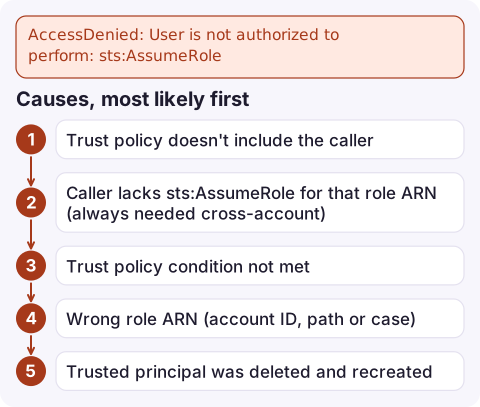
Causes, most likely first
| Cause | Where to look |
|---|---|
| Trust policy doesn't include the caller | Role's Trust relationships tab: Principal must list your user, role or account |
Caller lacks sts:AssumeRole for that role ARN (always needed cross-account) | Identity policies on the calling user or role |
| Trust policy condition not met | sts:ExternalId, aws:MultiFactorAuthPresent, aws:SourceIp or aws:PrincipalOrgID conditions |
| Wrong role ARN (account ID, path or case) | Compare with Arn from aws iam get-role in the target account |
| Trusted principal was deleted and recreated | Trust policy shows an ID like AROA… instead of an ARN; re-save it with the ARN |
| Session tags or source identity passed without permission | Trust policy also needs sts:TagSession or sts:SetSourceIdentity |
Fix both sides
Target account (the role): a trust policy that lets a specific role in another account assume it, requiring an external ID:
{
  "Version": "2012-10-17",
  "Statement": [{
    "Effect": "Allow",
    "Principal": { "AWS": "arn:aws:iam::111122223333:role/CI" },
    "Action": "sts:AssumeRole",
    "Condition": { "StringEquals": { "sts:ExternalId": "build-7f3a" } }
  }]
}
Source account (the caller): an identity policy statement allowing the call:
{ "Effect": "Allow", "Action": "sts:AssumeRole",
  "Resource": "arn:aws:iam::123456789012:role/Admin" }
Then confirm from the caller's side:
aws sts get-caller-identity
aws sts assume-role \
  --role-arn arn:aws:iam::123456789012:role/Admin \
  --role-session-name alice-debug \
  --external-id build-7f3a
If the trust policy requires MFA, add --serial-number and --token-code, or put mfa_serial in the CLI profile.
Use the assumed role
To run a few commands as the role and export its credentials into the shell:
read -r AK SK ST <<<"$(aws sts assume-role \
  --role-arn arn:aws:iam::123456789012:role/Admin \
  --role-session-name alice-debug \
  --query 'Credentials.[AccessKeyId,SecretAccessKey,SessionToken]' \
  --output text)"
export AWS_ACCESS_KEY_ID=$AK AWS_SECRET_ACCESS_KEY=$SK AWS_SESSION_TOKEN=$ST
aws sts get-caller-identity
For daily use, a profile with role_arn and source_profile is better, because the CLI renews the credentials for you; see switching roles in the CLI.
Still denied?
- A service control policy or permissions boundary on the caller can deny
sts:AssumeRole; the message then says "explicit deny" (see SCP deny). - CloudTrail in the target account records failed
AssumeRolecalls with the caller's ARN, which helps when you can't see the source account. - Exported credentials from an earlier role are still in your shell, so you're calling as the wrong identity. Unset them first.
Questions
How do I assume a role in another account with the AWS CLI?
The role's trust policy must trust your account or principal, and your identity needs sts:AssumeRole on the role ARN. Then run aws sts assume-role with --role-arn and --role-session-name, or define a profile with role_arn and source_profile.
How do I assume a role and export the credentials?
Query Credentials.[AccessKeyId,SecretAccessKey,SessionToken] as text from aws sts assume-role and export them as AWS_ACCESS_KEY_ID, AWS_SECRET_ACCESS_KEY and AWS_SESSION_TOKEN.
Does a missing role give a different error?
No. A role ARN that doesn't exist returns the same AccessDenied for sts:AssumeRole, so check the ARN before rewriting policies.

Role assumption problems often hit during an incident, when someone needs break-glass access to another account quickly. CloudConsole, a phone app for AWS, is built with production guardrails in mind, so read-only views of alarms and logs are within reach on your phone while access is sorted out.
Did it start after a deploy? What changed? on the app’s alarm screen lists the deploys and configuration changes from the hour before the alarm fired.
About the app → · Download on the App Store