 CloudConsole
aws lambda update-event-source-mapping
aws lambda update-event-source-mapping --uuid <mapping UUID> --no-enabled pauses a Lambda trigger such as an SQS queue or Kinesis stream without deleting it; --enabled resumes it. The same command changes batch size, batching window, maximum concurrency, filters and retry settings. Find the UUID with list-event-source-mappings.
What the command does
Event source mappings are identified by a UUID, not by name. This command changes the settings of an existing mapping in place. While the change applies, the mapping's State shows Updating, then returns to Enabled or Disabled. Some settings, such as the starting position of a stream, cannot be changed at all; for those you delete and recreate the mapping.
Syntax
aws lambda list-event-source-mappings --function-name my-function \
  --query "EventSourceMappings[].[UUID,EventSourceArn,State]" --output table

aws lambda update-event-source-mapping --uuid 14e0db71-0000-4eb5-b481-1945cf9d10c2 \
  [--enabled] [--no-enabled] [--batch-size 50] \
  [--maximum-batching-window-in-seconds 10] \
  [--scaling-config MaximumConcurrency=5] \
  [--filter-criteria ...] [--function-name my-function:live]
Worked examples
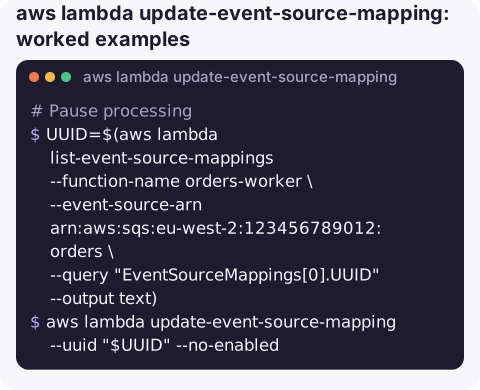
Pause processing during an incident, for example while a downstream API is failing:
UUID=$(aws lambda list-event-source-mappings --function-name orders-worker \
  --event-source-arn arn:aws:sqs:eu-west-2:123456789012:orders \
  --query "EventSourceMappings[0].UUID" --output text)
aws lambda update-event-source-mapping --uuid "$UUID" --no-enabled
For SQS, messages simply accumulate in the queue. Watch the retention period: messages older than it are deleted by SQS.
Resume:
aws lambda update-event-source-mapping --uuid "$UUID" --enabledSlow it down instead of stopping, protecting a database while still draining the queue:
aws lambda update-event-source-mapping --uuid "$UUID" --scaling-config MaximumConcurrency=2Increase throughput with bigger batches and a short batching window:
aws lambda update-event-source-mapping --uuid "$UUID" \
  --batch-size 100 --maximum-batching-window-in-seconds 5
For SQS, batch sizes above 10 require a batching window greater than zero.
Point the trigger at an alias so releases go through alias moves:
aws lambda update-event-source-mapping --uuid "$UUID" --function-name orders-worker:liveStop a poison batch blocking a Kinesis shard by limiting retries and adding a destination:
aws lambda update-event-source-mapping --uuid "$UUID" \
  --maximum-retry-attempts 2 --bisect-batch-on-function-error \
  --destination-config '{"OnFailure":{"Destination":"arn:aws:sqs:eu-west-2:123456789012:clicks-dlq"}}'
Pause options compared
| Method | Effect |
|---|---|
--no-enabled on the mapping | Polling stops; messages and records stay in the source. |
| Reserved concurrency 0 on the function | Polling may continue while invocations are throttled; SQS messages can move to the DLQ after repeated receives. |
MaximumConcurrency=2 | Keeps draining slowly; SQS only. |
delete-event-source-mapping | Removes the trigger; stream position is lost. |
Gotchas
- Changes are not instant. In-flight batches finish, and a disabled mapping can take a short while to stop polling.
ResourceInUseExceptionmeans a previous update is still being applied; wait untilStateis no longerUpdating.- Stream iterator age grows while paused. If records age beyond the stream's retention, they are lost.
- Infrastructure as code drift. A paused mapping will be re-enabled by the next CloudFormation or Terraform deploy if the template says enabled.
- Find mappings from the source side.
aws lambda list-event-source-mappings --event-source-arnwith a queue or stream ARN lists every function consuming it, which helps when you know the queue but not the function.
Questions
How do I disable a Lambda SQS trigger temporarily?
Run update-event-source-mapping --uuid <id> --no-enabled. Messages stay in the queue until you re-enable it with --enabled.
How do I find the UUID of an event source mapping?
aws lambda list-event-source-mappings --function-name my-function --query "EventSourceMappings[].[UUID,EventSourceArn]" --output table.
Can I change the starting position of a Kinesis trigger?
No. Delete the mapping and create a new one with the starting position you need.
Pausing a trigger is a common incident lever when something downstream is failing. CloudConsole, a phone app for AWS, is built to show queue depth, errors and logs on a phone, with guardrails around changes like this.
About the app → · Download on the App Store