 CloudConsole
aws lambda put-function-concurrency
aws lambda put-function-concurrency --function-name my-function --reserved-concurrent-executions 50 caps the function at 50 simultaneous executions and reserves that much of the account's concurrency for it. Setting it to 0 stops all invocations, which is the quickest way to halt a runaway function; remove the setting with delete-function-concurrency.
What the command does
Reserved concurrency does two things at once: it is a ceiling (the function can never run more copies than this) and a guarantee (that capacity is carved out of the regional account pool, so other functions cannot starve it). Invocations beyond the ceiling are throttled.
It is not the same as provisioned concurrency, which keeps pre-initialised environments warm to cut cold starts and is billed while configured. Reserved concurrency has no charge.
Syntax
aws lambda put-function-concurrency --function-name my-function --reserved-concurrent-executions 50

aws lambda get-function-concurrency --function-name my-function
aws lambda delete-function-concurrency --function-name my-function
Reserved concurrency applies to the function as a whole, across all its versions and aliases.
Worked examples
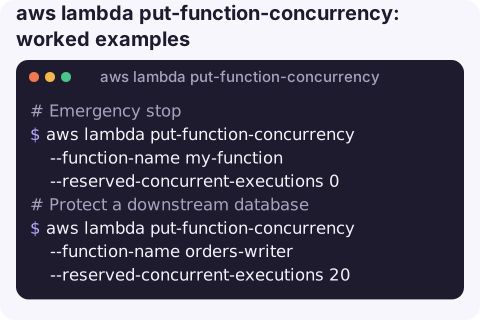
Emergency stop: a function is in a loop, flooding a database or racking up cost:
aws lambda put-function-concurrency --function-name my-function --reserved-concurrent-executions 0New invocations are throttled immediately. Synchronous callers get 429 TooManyRequestsException; asynchronous events are retried by Lambda for a period and then sent to any failure destination; SQS messages stay in the queue.
Protect a downstream database from more connections than it can handle:
aws lambda put-function-concurrency --function-name orders-writer --reserved-concurrent-executions 20See how much of the account pool is left:
aws lambda get-account-settings \
  --query "AccountLimit.[ConcurrentExecutions,UnreservedConcurrentExecutions]" --output text
Find every function with a reservation:
for f in $(aws lambda list-functions --query "Functions[].FunctionName" --output text); do
  c=$(aws lambda get-function-concurrency --function-name "$f" \
      --query ReservedConcurrentExecutions --output text)
  [ "$c" != "None" ] && echo "$f $c"
done
Undo the emergency stop:
aws lambda delete-function-concurrency --function-name my-functionReserved vs provisioned vs SQS maximum concurrency
| Setting | Purpose | Cost |
|---|---|---|
Reserved (put-function-concurrency) | Cap and guarantee concurrent executions for the whole function | None |
Provisioned (put-provisioned-concurrency-config) | Pre-warmed environments for a version or alias | Charged while configured |
SQS mapping MaximumConcurrency | Limit how many concurrent invocations one queue drives, without throttling other callers | None |
Gotchas
- The account must keep a buffer. Lambda requires a minimum amount of unreserved concurrency (100 at the time of writing). A reservation that would go below it fails with
InvalidParameterValueException. - Reserving takes capacity from everyone else. Large reservations on quiet functions can cause throttling elsewhere. Alarm on the account's
ClaimedAccountConcurrencyand onThrottles. - Throttling SQS triggers with reserved concurrency can push messages to the dead-letter queue because receives continue while invocations are throttled. For SQS, prefer the mapping's maximum concurrency setting.
- Zero is not the same as disabling a trigger. Event sources keep trying; disable the event source mapping if you want them to stop polling.
- Watch throttles after setting a cap. A reservation that is too low shows up as a rising
Throttlesmetric at peak times; synchronous callers see 429 errors and asynchronous events are delayed by retries.
Questions
How do I stop a Lambda function from running?
Set reserved concurrency to 0 with put-function-concurrency. Every new invocation is throttled until you delete the setting.
What is the difference between reserved and provisioned concurrency?
Reserved concurrency caps and guarantees capacity at no cost. Provisioned concurrency keeps environments initialised to avoid cold starts and is billed.
How do I remove reserved concurrency?
Run aws lambda delete-function-concurrency --function-name my-function. The function then draws from the unreserved pool again.
A runaway function is the kind of problem you want to contain in seconds, wherever you are. CloudConsole, a phone app for AWS, is built to show throttles, errors and costs on a phone, with production guardrails around changes.
About the app → · Download on the App Store